
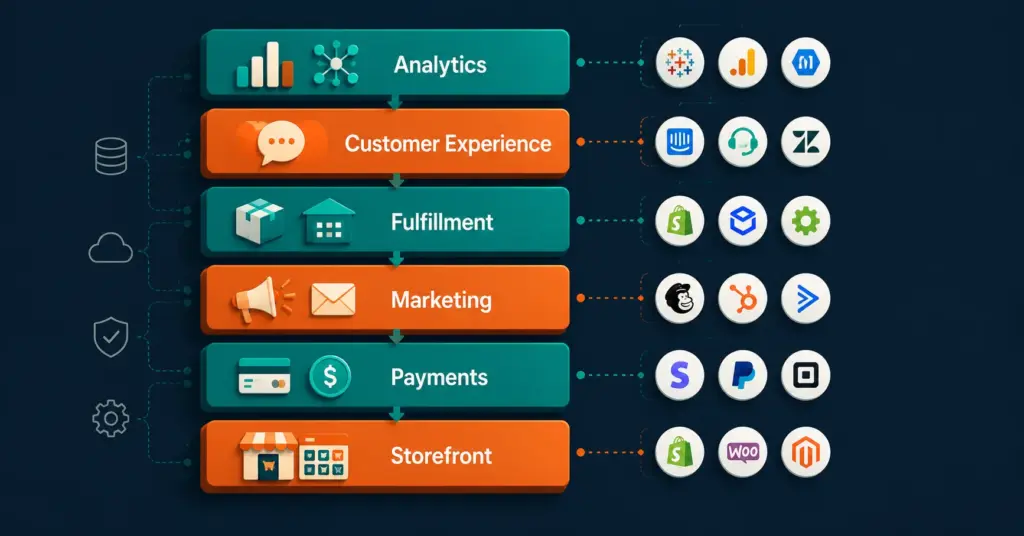
- An ecommerce tools tech stack is every software layer your store runs on, from the storefront platform to analytics, email, payments, and fulfillment.
- The right stack depends on your business stage: starter, growth, and mid-market brands each need a different set of tools and budget allocation.
- SaaS sprawl is the silent margin killer. Auditing for overlap every six months can cut tool costs by 20 to 40 percent.
- AI-native tools are now viable at every budget tier. Knowing where to add them, and where not to, separates efficient stacks from expensive ones.
An ecommerce tools tech stack is the full collection of software your online store depends on to operate, from the platform hosting your product pages to the tools that handle payments, email, fulfillment, analytics, and customer support. Most stores run on six to twelve tools simultaneously, and how well those tools work together determines your margins, your speed, and your sanity.
Choosing the wrong combination is expensive. Overlapping tools waste budget. Gaps between systems create order errors, broken automations, and lost revenue. This guide walks through every layer of a modern ecommerce stack, what tools belong in each layer, how to evaluate them without vendor bias, and what a realistic budget looks like at each stage of growth. If you are just starting out, it also helps to read our overview of ecommerce business models before committing to any tools, because your model shapes every layer of the stack.
What Is an Ecommerce Tech Stack and What Does It Include?
A tech stack, in plain terms, is every piece of software that touches your business. For ecommerce, that breaks down into six distinct layers, each serving a different function. Understanding these layers is the first step to building a stack that does not collapse under its own weight.
Layer 1: Storefront and platform. This is the foundation. It controls how your store looks, how products are displayed, and how customers navigate. Options range from hosted platforms like Shopify to open-source solutions like WooCommerce. The platform you choose will constrain or enable almost every tool in every other layer, so it deserves the most scrutiny. Our comparison of Shopify vs WooCommerce covers this decision in depth, and our guide to choosing the best ecommerce platform adds a broader view across all major options.
Layer 2: Payments and checkout. This layer includes your payment gateway, any buy-now-pay-later integrations, fraud detection, and tax calculation software. Stripe, Shopify Payments, and PayPal are common gateway choices. Klarna and Afterpay handle installment payments. Avalara or TaxJar handles tax compliance. Gaps here translate directly to lost revenue and compliance risk.
Layer 3: Marketing and acquisition. This is typically the largest layer by tool count. It includes your SEO tools, paid ads management, email and SMS platform, social media scheduling, and influencer or affiliate tracking. This layer is also the most prone to redundancy. Many brands end up with two email tools, two analytics dashboards, and two SEO platforms running simultaneously because teams added tools at different times without auditing what already existed.
Layer 4: Operations and fulfillment. Inventory management, order management, warehouse systems, shipping carriers, and returns processing all live here. For brands selling on multiple channels, an inventory sync tool becomes critical. Our guide to inventory sync tools explains how to prevent overselling across platforms.
Layer 5: Customer experience and retention. This layer covers your helpdesk or live chat software, loyalty program platform, review collection tool, and post-purchase experience. These tools directly affect repeat purchase rate, which is the most controllable lever for improving margins over time. Our piece on ecommerce customer retention outlines which tools move the needle most.
Layer 6: Analytics and intelligence. This is the layer most brands underinvest in early, and then over-correct for later. It includes your web analytics platform (GA4 being the standard), revenue attribution tools, and increasingly, AI-powered insight tools. Our GA4 ecommerce setup guide covers the foundation, and our overview of AI tools for ecommerce covers what belongs on top of it.
What Are the Essential Tools Every Ecommerce Tech Stack Needs?
Not every business needs the same tools. But there is a minimum viable stack that every store needs before generating its first sale, and a growth stack that becomes necessary once volume creates operational complexity. Here is how that progression works.
Minimum viable stack (pre-revenue to first 50 orders per month): At this stage, you need a storefront platform, a payment gateway, a basic email marketing tool, and either Google Analytics or a native platform analytics dashboard. That is four tools. Adding more at this stage usually slows you down rather than helping. Focus on your ecommerce startup costs and keep the stack lean until you have consistent order volume.
Growth stack (50 to 500 orders per month): At this stage, you add an email and SMS platform with automation capability, a helpdesk tool, a dedicated SEO tool, and a basic review platform. You also likely need to formalize your inventory management, especially if you are selling across more than one channel. Check our resource on multi-channel ecommerce for guidance on managing that complexity.
Mid-market stack (500 or more orders per month): This is where a composable commerce approach becomes worth evaluating. You start separating best-in-class tools for each function rather than relying on bundled platform features. You add a proper analytics and attribution layer, a post-purchase experience tool, an affiliate or influencer platform, and possibly a headless or API-connected storefront layer. Stack costs can range from $2,000 to $10,000 per month at this tier, so ROI tracking per tool becomes non-negotiable.
How Do I Choose the Right Tools for My Business Size and Model?
The most common mistake brands make is choosing tools based on what larger competitors use, or what was trending on Twitter when they were building their stack. The right framework is to score tools against your specific constraints and goals, not against an abstract ideal.
Here is a practical four-factor scoring rubric you can apply to any tool you are evaluating.
Factor 1: Native integrations with your existing stack. A tool that requires a custom API build or a Zapier chain to connect to your platform adds hidden cost and creates a single point of failure. Score each tool on how many of your existing tools it connects to natively, out of the box, without developer work.
Factor 2: Total cost at your current volume, not at projected volume. Many SaaS pricing pages show attractive entry-level prices that jump sharply once you cross certain email subscriber, order, or contact thresholds. Map out exactly what the tool costs at your current metrics and at 2x your current metrics before signing any annual contract.
Factor 3: Migration cost if you leave. Lock-in is real. Some tools make it very easy to export your data and move. Others make it deliberately painful. Ask specifically about data portability before signing up, not after. This is especially important for email platforms (subscriber history, automation flows) and review platforms (review content, customer data).
Factor 4: Support quality at your tier. A tool with excellent documentation and fast chat support is worth more than a tool with slightly better features and unreliable support. Check review platforms for support experience at your price tier specifically, since enterprise-tier customers often get a completely different level of service than small business customers on the same platform.
For dropshipping businesses, the platform choice has additional nuance because supplier integrations become part of the stack. Our guide to the best ecommerce platform for dropshipping covers which platforms have the best native supplier connection tools.
What Does a Composable Commerce Tech Stack Look Like in Practice?
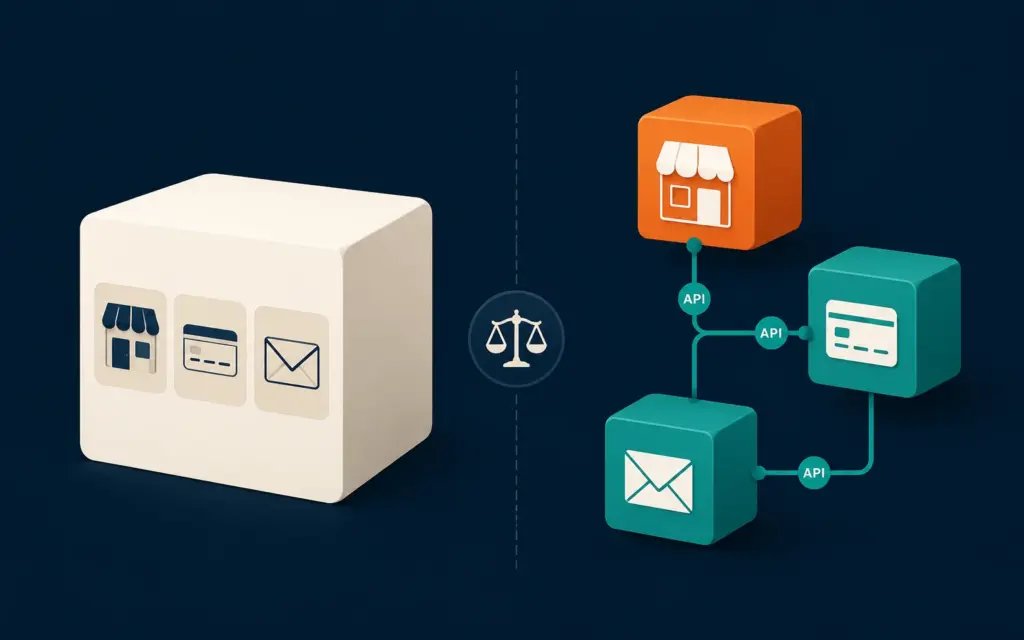
Composable commerce is a term that gets used loosely, but the core idea is straightforward: instead of buying one platform that handles everything (storefront, checkout, CMS, cart, OMS) from a single vendor, you connect best-in-class tools for each function via APIs. The result is a stack that is more flexible and more powerful, but also more expensive to maintain and more dependent on developer resources.
A typical composable stack for a mid-market brand might look like this: a headless storefront built on a framework like Next.js, a content management system like Contentful or Sanity, a commerce engine like Elastic Path or Commerce.js handling catalog and cart logic, Stripe for payments, Klaviyo for email and SMS, Gorgias for helpdesk, and a data warehouse like BigQuery or Snowflake feeding a BI tool. Each component is independently upgradeable. If you want a better CMS, you swap it out without touching checkout. If a better payments API launches, you integrate it without migrating your entire store.
The tradeoff is real: composable stacks typically require at least one developer on staff or a reliable agency relationship, and the monthly tool costs add up faster than a monolithic platform. For most brands under $1 million in annual revenue, a monolithic platform with well-chosen app-layer additions outperforms a composable stack on both cost and operational simplicity. For brands above $5 million with specific customization needs or high SKU complexity, composable starts to pay for itself.
Our comparison of Shopify vs WooCommerce touches on this tradeoff from a platform perspective, and our guide to AI store builders covers a newer category of tools that sit between fully composable and fully managed.
How Do I Integrate All My Ecommerce Tools So They Work Together?
Integration is where stacks succeed or fail. A collection of excellent individual tools that do not share data cleanly is worse than a smaller collection of adequate tools that do. Here is how to approach integration at each maturity level.
Native platform integrations first. Before adding any middleware, check whether the tools you need integrate directly with your platform. Shopify’s app ecosystem, for example, handles a large percentage of common integrations natively. Our overview of Shopify apps covers the most useful categories. WooCommerce handles most integrations via plugins. Using native integrations means fewer failure points and faster setup.
iPaaS tools for the gaps. When native integrations do not exist, integration platform as a service tools like Zapier, Make (formerly Integromat), or dedicated ecommerce middleware like Alloy Automation fill the gaps. These tools let you build automated workflows between apps without writing code. The limitation is that they add a layer of abstraction that can break silently, so any workflow you build in these tools needs monitoring.
Data warehouse as the single source of truth. At the mid-market level and above, the right long-term approach is to send all tool data into a central data warehouse. This means your Shopify orders, your Klaviyo email events, your Google Ads spend, and your helpdesk tickets all land in one place where you can actually connect them and answer questions like “what is the lifetime value of customers who came through TikTok vs email?” Our guide to ecommerce automation covers how this architecture connects to operational workflows.
Order management as the operational hub. For brands with complex fulfillment (multiple warehouses, 3PLs, marketplace orders) a dedicated order management system becomes the connective tissue that keeps inventory, shipping, and customer data synchronized. Without it, multi-channel operations become a manual reconciliation job that consumes hours every week.
Where Do AI Tools Fit in a Modern Ecommerce Stack?
AI-native tools are no longer a future consideration. They are available at every budget tier and are already changing what a lean team can accomplish. The question is not whether to add AI tools but where they deliver genuine ROI versus where they add cost and complexity without measurable return.
The highest-ROI AI integrations for most ecommerce brands currently fall into three categories: product description and content generation, customer service automation, and predictive inventory management.
Product content generation is the most accessible entry point. Tools that generate SEO-optimized product descriptions, category page copy, and email subject lines at scale reduce a significant content workload. The key is treating AI-generated content as a first draft that gets edited and fact-checked, not as finished output. Our guide to ecommerce SEO services covers how to keep AI-assisted content compliant with current search quality standards.
Customer service automation via AI chatbots has improved dramatically. Modern implementations can handle order status queries, return initiation, and FAQ responses without human involvement, deflecting 30 to 50 percent of tickets according to Gorgias benchmark data from brands running AI-assisted support. The critical implementation detail is building clear escalation paths to human agents when the AI encounters edge cases.
Predictive inventory management uses historical sales data, seasonality patterns, and external signals to recommend reorder points and quantities. For brands that have struggled with either stockouts or overstock situations, this is often the highest-margin AI investment available. Our overview of AI automation for ecommerce covers the specific tool categories and what to look for in each.
How Much Does Building an Ecommerce Tech Stack Cost?
Stack costs vary enormously, but here is a realistic breakdown by business stage that avoids the optimistic low-end estimates most SaaS vendors advertise.
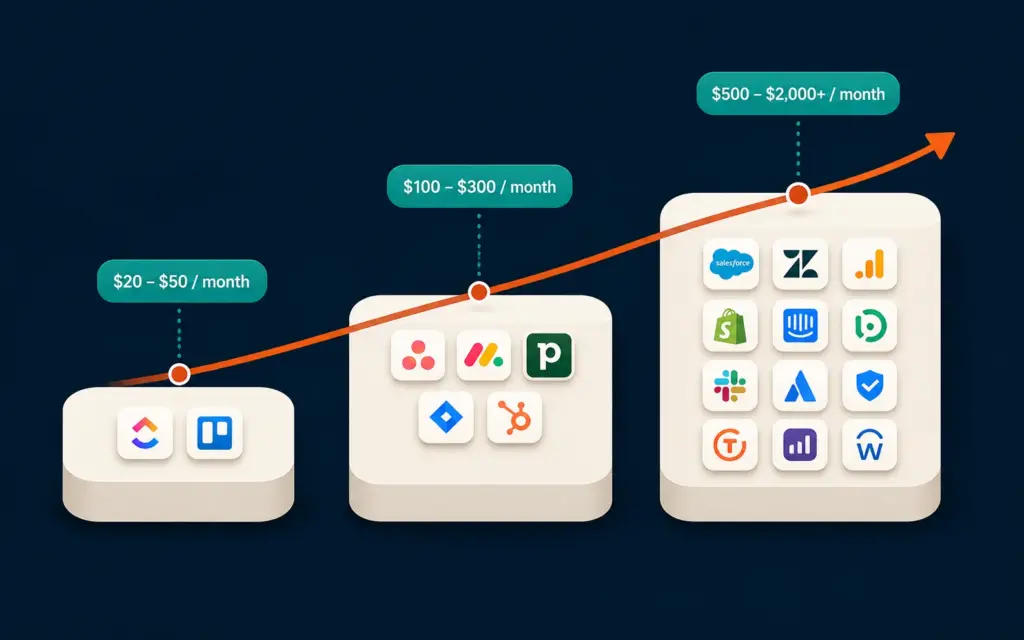
Starter stage (under $10k monthly revenue): Expect to spend $100 to $400 per month on tools. A Shopify Basic plan, a free or entry-level email tool like Klaviyo’s free tier or Mailchimp, Google Analytics (free), and a basic payment gateway processing fee structure covers most needs. The trap at this stage is adding tools to solve problems that are actually caused by low traffic volume, not tool gaps.
Growth stage ($10k to $100k monthly revenue): Budget $500 to $2,000 per month. This covers a mid-tier platform plan, a paid email and SMS tool, a helpdesk platform, a review tool, a basic SEO tool, and inventory management. At this stage, calculating your ecommerce profit margins per tool category becomes important because stack costs can quietly consume 3 to 8 percent of revenue if not audited regularly.
Mid-market stage ($100k-plus monthly revenue): Budget $2,000 to $10,000 or more per month. This tier adds a full attribution platform, a loyalty program, advanced A/B testing and CRO tools, a proper data warehouse setup, and potentially agency or developer costs for integrations. According to Gartner’s technology spending research, mid-market ecommerce businesses typically allocate 4 to 9 percent of revenue to technology, including both platform costs and internal engineering time.
The single most effective cost-reduction move at any stage is a bi-annual stack audit. Pull every active subscription, map what each tool actually does in practice (not what it was purchased to do), and identify overlaps. Most brands that do this exercise for the first time find two to four redundant tools they can cancel immediately.
What Are Real Ecommerce Tech Stack Examples by Business Type?
Abstract frameworks only go so far. Here are three concrete stack examples based on common ecommerce business configurations.
Example 1: Solo-operated print on demand brand, $8k monthly revenue. Shopify Basic + Printful integration, Klaviyo (paid starter tier), Google Analytics 4, Tidio (live chat with free tier), Loox (reviews). Total monthly tool cost: roughly $180. This stack handles the full customer journey without developer involvement. Our print on demand guide covers which platforms and suppliers integrate most cleanly into this type of stack.
Example 2: Multi-channel seller on Shopify and Amazon, $60k monthly revenue. Shopify Advanced, Linnworks or Skubana for inventory sync, Klaviyo (growth tier), Gorgias (helpdesk), Yotpo (reviews and loyalty), Northbeam or Triple Whale (attribution), TaxJar (tax compliance). Total monthly tool cost: roughly $1,400 to $1,800 depending on order volume tiers. Our Amazon FBA guide and multi-channel ecommerce guide cover the operational complexity this stack is designed to manage.
Example 3: DTC brand with wholesale component, $400k monthly revenue. Shopify Plus, Klaviyo Enterprise, Gorgias, Yotpo (full suite), Attentive (SMS), Northbeam (attribution), Netsuite or Brightpearl (ERP/OMS), Snowflake data warehouse, Looker or Power BI (BI layer), and a headless CMS for content-heavy landing pages. Total monthly tool cost: $6,000 to $12,000 before developer time. At this tier, the stack is the business infrastructure, and decisions about adding or replacing tools carry significant migration cost.
How Do I Avoid SaaS Sprawl and Stack Bloat?
SaaS sprawl is what happens when tools accumulate faster than they are audited. It is one of the most common and least discussed margin problems in ecommerce. Here is a repeatable process to prevent it.
First, maintain a live stack inventory. This does not need to be sophisticated: a spreadsheet with columns for tool name, monthly cost, primary function, which team member owns it, and the last date someone confirmed it is actively used. The ownership column is important because tools often outlive the person who added them.
Second, run a quarterly ROI review on any tool costing more than $200 per month. For marketing tools, this means connecting the tool to actual revenue outcomes, not just activity metrics. An email platform that sends 100,000 emails per month but is not connected to a proper attribution model may be producing $0 in measurable return while costing $800 per month.
Third, before adding any new tool, require a consolidation check. Ask whether an existing tool in your stack already handles this function, even partially. Many helpdesk platforms now include live chat. Many email platforms now include SMS. Many analytics dashboards now include basic attribution. The bundled version may be slightly less powerful than the best-in-class standalone option, but the integration cost savings often outweigh the feature gap.
For brands exploring platform migrations as part of a stack consolidation effort, our guides to selling on Shopify and the ecommerce web design process cover what to evaluate before committing to a platform change.
Frequently Asked Questions
Your ecommerce platform (Shopify, WooCommerce, BigCommerce, etc.) is one layer of your tech stack. The full stack includes every tool your business runs on: payments, email, helpdesk, analytics, fulfillment, reviews, and more. The platform is the foundation, but the stack is everything built on top of and alongside it.
Most ecommerce stores actively use between 6 and 15 tools depending on business stage and complexity. Stores under $50k monthly revenue typically run 6 to 9 tools well. Stores above $200k monthly revenue often use 12 to 20 tools, though the optimal number is usually lower than the actual number, because tools accumulate faster than they are audited.
Composable commerce is most cost-effective for brands above $3 to $5 million in annual revenue that have specific customization requirements or very high SKU complexity. Below that threshold, the developer costs required to build and maintain API connections between components typically exceed the value of the added flexibility. Most small and mid-size brands are better served by a monolithic platform with well-chosen app integrations.
The platform choice matters most because it determines which tools can connect to your store natively, how much developer work integrations require, and how expensive a future migration will be. Getting the platform wrong creates compounding costs. Every other layer of the stack is easier to swap than the foundation, so treat the platform decision as a multi-year commitment and evaluate it accordingly.
The clearest signal is when the cost of workarounds exceeds the cost of migration. If your team is spending more than four to six hours per week compensating for a tool’s limitations, manually reconciling data it should sync automatically, or rebuilding broken automations, the hidden cost of staying likely exceeds the one-time cost of switching. Calculate both numbers before deciding.
It depends entirely on where you add them. AI tools for customer service ticket deflection and product content generation typically show measurable ROI within 60 to 90 days for stores with sufficient volume. AI tools added for trend forecasting or advanced personalization at low revenue levels often cost more than the incremental revenue they generate. Start with the highest-volume, most repetitive tasks in your operation and apply AI there first.
Related Reads
- Best Ecommerce Platform: How to Choose the Right Foundation
- Shopify vs WooCommerce: Full Comparison for 2026
- Ecommerce Automation: What to Automate and When
- AI Tools for Ecommerce: What Actually Works
- Ecommerce Profit Margins: How to Calculate and Improve Them
- Multi-Channel Ecommerce: Managing Complexity Without Chaos
- GA4 Ecommerce Setup: Step-by-Step Guide
- Ecommerce Customer Retention: Strategies That Actually Work
Enjoying this? Get more like it every week.
One email per week with ecommerce strategies, tool picks, and seller insights. No spam.