

- Both Wix and Squarespace are website builders that can run ecommerce stores, but they suit different priorities. Wix offers more design flexibility and a larger app ecosystem with a drag-anywhere editor. Squarespace offers more polished templates and a more curated, design-consistent experience. For pure ecommerce depth, both trail Shopify, but both work well for small to mid-size stores prioritizing design and simplicity.
- Wix's strength is flexibility: drag-and-drop anywhere on the page, 900+ templates, an extensive app market, and more granular control. Its weakness is that flexibility can produce inconsistent, cluttered designs, and switching templates later is difficult. Best for stores wanting maximum customization control.
- Squarespace's strength is design quality: award-winning templates that look professional out of the box, consistent design system, and superior built-in features for content-rich brands. Its weakness is less flexibility and a smaller app ecosystem. Best for design-focused brands, creatives, and stores where aesthetics drive sales.
- For serious ecommerce (large catalogs, complex shipping, heavy sales volume), both are outgrown eventually and Shopify or WooCommerce become the better fit. Choose Wix or Squarespace when design and ease matter more than ecommerce depth, and your catalog is modest (under a few hundred products).
Choosing between Wix vs Squarespace for an ecommerce store comes down to what you value most: flexibility or polish. Both are website builders that include ecommerce functionality, both let you launch a professional-looking store without code, and both handle the basics of selling products online. But they make different trade-offs, and the right choice depends on your catalog size, design priorities, and how much you want to customize versus how much you want done for you.
Neither is a pure ecommerce platform the way Shopify is. They’re website builders that added ecommerce, which means they excel at design-forward, content-rich stores with modest catalogs and trail dedicated platforms on deep ecommerce features. For many small to mid-size stores, especially those where brand aesthetics drive sales, that trade-off is worth it. This comparison covers pricing, ease of use, design, ecommerce features, and SEO so you can match the builder to your store. The Shopify vs WooCommerce comparison covers the dedicated-platform alternatives if your ecommerce needs are heavier.
Pricing: What Each Builder Costs for Ecommerce
Both use tiered pricing where ecommerce features require higher plans. Wix’s ecommerce plans start lower but climb with added features. Squarespace’s commerce plans are more straightforward but start slightly higher. Both are dramatically cheaper than building custom, and both include hosting, SSL certificates, and a library of templates bundled into the price. This all-in-one bundling is a genuine advantage for beginners: you don’t have to separately source hosting, install security certificates, or configure a server the way a self-hosted platform like WooCommerce requires.
The key pricing consideration for ecommerce: transaction fees. Squarespace charges no additional transaction fees on its Commerce plans (you still pay payment processor fees). Wix similarly waives transaction fees on business/ecommerce plans. Factor in that both require annual commitment for the best rates, and both add costs through premium apps and templates. According to Website Builder Expert’s comparison, Squarespace tends to deliver better value for design-focused stores while Wix offers more feature flexibility per dollar for stores needing specific functionality. The ecommerce startup costs guide covers total cost of ownership across platforms, which includes these builder fees plus apps, payment processing, and marketing.
Ease of Use: Drag-Anywhere vs Structured Design
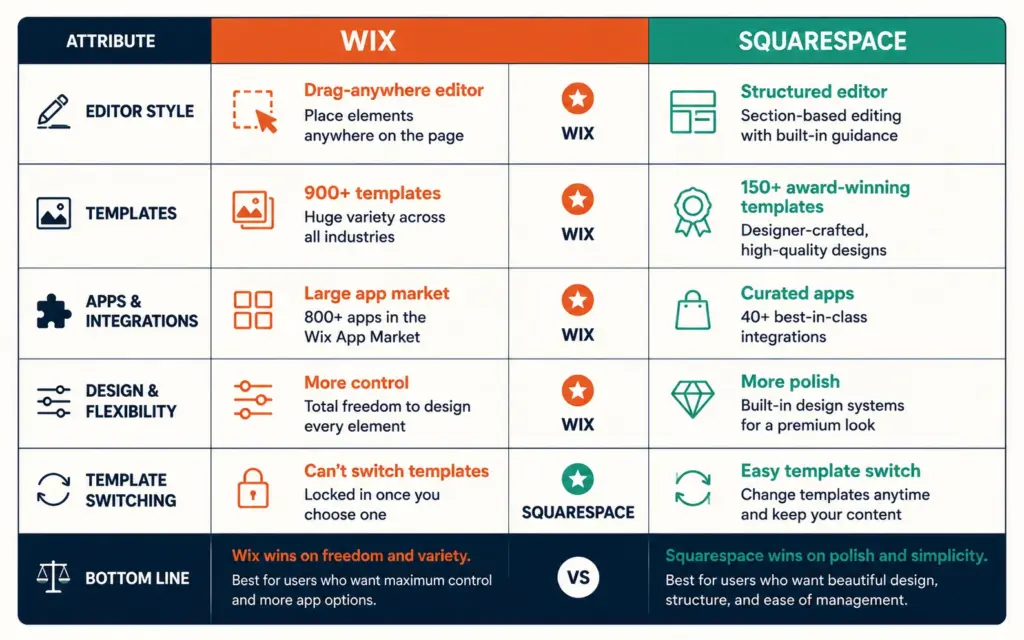
Wix uses a true drag-and-drop editor: you can place any element anywhere on the page. This offers maximum control but also maximum opportunity to create cluttered, inconsistent layouts. Beginners sometimes over-customize and end up with designs that look busy. The freedom is powerful in experienced hands and occasionally counterproductive in inexperienced ones. The tradeoff is real: more control means more decisions, and more decisions mean more opportunities to make a design mistake that a more constrained system would have prevented.
Squarespace uses a more structured, section-based editor. You have less freedom to place elements arbitrarily, but the constraint produces more consistent, professional-looking results. It’s harder to make a Squarespace site look bad because the design system guides you toward good choices. The trade-off is less granular control.
There’s no universally correct answer here, only a fit question: how much control do you want, and how much design confidence do you have? Someone redesigning their third store wants Wix’s control. Someone launching their first wants Squarespace’s guardrails. For a beginner prioritizing a polished result with less effort, Squarespace’s guardrails help. For someone who wants precise control and is willing to invest time learning, Wix’s flexibility rewards the effort. The ecommerce web design principles apply to both: whichever you choose, prioritize clarity, mobile responsiveness, and fast load times over decorative complexity.
Design and Templates: Flexibility vs Polish
Wix offers 900+ templates across every industry, plus the freedom to modify them extensively or start from scratch. The catch: once you choose a Wix template, you can’t switch to a different one without rebuilding. Choose carefully upfront.
Squarespace offers fewer templates (around 150+) but each is award-winning in design quality. Squarespace templates are known for looking professional and modern out of the box, which is why they’re popular with photographers, designers, restaurants, and creative brands where visual presentation is central. You can switch templates on Squarespace more easily than on Wix. This matters more than it sounds: as your brand evolves over the first year or two, the ability to refresh your design without rebuilding your entire store saves significant time and cost.
For design-forward brands where aesthetics directly drive sales (fashion, art, premium products, handmade goods), Squarespace’s template quality is a genuine advantage. For stores needing specific custom layouts or industry-specific functionality, Wix’s flexibility and larger template library provide more options. Your product page design quality matters more than raw template count, so evaluate how each builder’s product pages actually convert, not just how the homepage looks.
Ecommerce Features: Where Both Show Their Limits
Both handle ecommerce fundamentals: product listings, cart, checkout, payment processing, basic inventory, discount codes, and order management. The differences show at the edges.
Wix has a larger app market (Wix App Market) for extending ecommerce functionality: reviews, subscriptions, advanced shipping, marketplaces. More apps means more ways to add features, though app quality varies, so read reviews carefully before relying on a third-party app for critical ecommerce functionality like shipping or tax.
Squarespace has a smaller but more curated set of ecommerce extensions. It handles content-commerce well (blogs, galleries, content alongside products) and includes solid built-in features, but has fewer third-party extensions for specialized needs.
Both trail Shopify significantly on ecommerce depth: multi-channel selling, advanced inventory, extensive app ecosystems, and scalability for large catalogs. If you’re selling a few dozen to a few hundred products with straightforward shipping, both work fine. If you’re managing thousands of SKUs, complex variants, or high order volume, you’ll outgrow both. The best ecommerce platform guide covers when to choose a builder versus a dedicated platform. The inventory management needs of your catalog are a good deciding factor: simple inventory suits builders, complex inventory suits dedicated platforms.
SEO Capabilities for Both Builders
Both have improved their SEO substantially and both can rank well for small to mid-size stores. Squarespace has historically had cleaner code and strong built-in SEO features (automatic sitemaps, clean URLs, meta tag control). Wix, once criticized for SEO limitations, has closed the gap considerably with better technical SEO controls and faster load times than in earlier years.
For product page SEO specifically, both let you control title tags, meta descriptions, URL slugs, and alt text. Both support the structured data that helps products appear in rich results. The product page SEO tactics apply to both builders: unique descriptions, complete schema, fast load times, and internal linking. Neither builder’s SEO is a dealbreaker for a modest catalog. The ecommerce technical SEO audit works on both platforms. According to Forbes Advisor’s builder comparison, both platforms now offer sufficient SEO capability for small to mid-size stores, with the practical difference lying more in your content quality, product data completeness, and overall site speed than in the builders’ native SEO features. Whichever you choose, your product page optimization and page speed will determine rankings far more than the builder brand.
Which Builder Should You Choose?
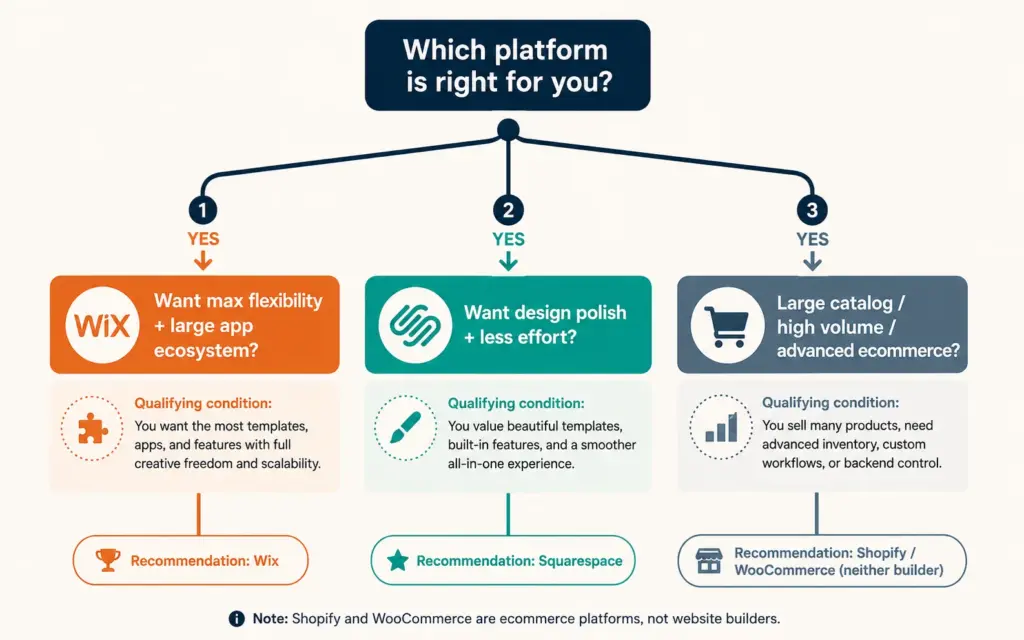
Choose Wix if: you want maximum design flexibility and control, you need a large app ecosystem for specific functionality, you’re comfortable investing time to customize, or you want a wide template selection. Wix suits stores wanting to customize extensively and add varied third-party features.
Choose Squarespace if: design quality and polish matter most, you’re a creative or design-focused brand, you want professional results with less effort, or you’re building a content-rich store (blog plus products). Squarespace suits aesthetics-driven brands where visual presentation sells, which is why photographers, designers, restaurants, and premium product brands gravitate toward it.
Choose neither (go Shopify or WooCommerce) if: you have a large catalog (thousands of products), need advanced ecommerce features, plan to sell across multiple channels, or expect high order volume. Both builders are outgrown by serious ecommerce operations. The best ecommerce platform decision should weigh your growth trajectory: if you’ll outgrow a builder within a year, starting on a dedicated platform avoids a costly migration.
Frequently Asked Questions
It depends on your priorities. Wix is better for flexibility, customization control, and a large app ecosystem. Squarespace is better for design quality, polish, and content-rich brands where aesthetics drive sales. For pure ecommerce depth, both trail Shopify. Choose Wix if you want to customize extensively; choose Squarespace if you want professional design with less effort. For large catalogs or high volume, consider Shopify or WooCommerce instead.
Wix’s ecommerce plans typically start slightly lower, but pricing climbs with added features and premium apps. Squarespace’s commerce plans start a bit higher but are more straightforward with fewer add-on costs. Both waive additional transaction fees on their ecommerce/commerce plans (you still pay payment processor fees), both require annual commitment for best rates, and both include hosting and SSL. Total cost depends on which apps and premium features you add.
Squarespace allows template switching relatively easily. Wix does not: once you choose a Wix template, switching to a different one requires rebuilding your site from scratch. This makes your initial Wix template choice critical. If you value the ability to redesign later without a rebuild, Squarespace has the advantage. On Wix, invest extra time choosing the right template upfront.
Both can rank well for small to mid-size stores. Squarespace has historically had cleaner code and strong built-in SEO features. Wix has closed the gap considerably, improving technical SEO controls and load speeds. Both let you control title tags, meta descriptions, URL slugs, alt text, and structured data. Neither builder’s SEO is a dealbreaker for a modest catalog. Your content quality, page speed, and product page optimization matter more than the builder choice.
Choose Shopify when you have a large catalog (thousands of products), need advanced ecommerce features (complex variants, multi-channel selling, sophisticated inventory), expect high order volume, or plan to scale significantly. Wix and Squarespace are website builders with ecommerce added; Shopify is a dedicated ecommerce platform. For design-forward stores with modest catalogs, the builders work well. For serious, scaling ecommerce operations, a dedicated platform prevents outgrowing your tools.
Squarespace is generally easier for beginners to achieve a polished result because its structured, section-based editor guides you toward professional-looking designs. Wix’s drag-anywhere freedom offers more control but also more opportunity to create cluttered layouts. If you want a professional result with minimal design experience, Squarespace’s guardrails help. If you enjoy customizing and want precise control, Wix rewards the extra learning investment.
Related Reads
- Shopify vs WooCommerce
- Best Ecommerce Platform
- Ecommerce Web Design
- Product Page Design
- Product Page SEO
- Ecommerce Startup Costs
Enjoying this? Get more like it every week.
One email per week with ecommerce strategies, tool picks, and seller insights. No spam.