
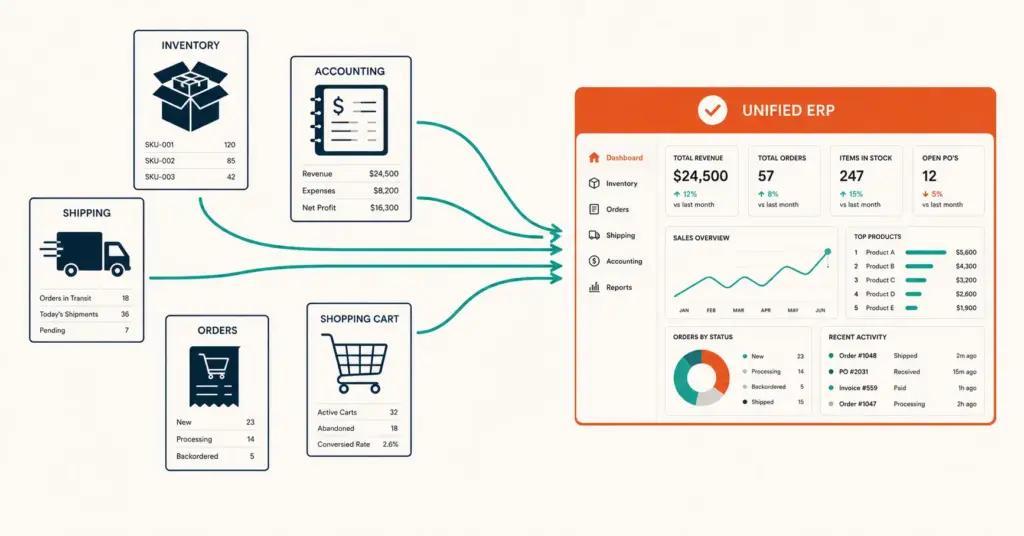
- An ERP (Enterprise Resource Planning) system unifies inventory, orders, finance, purchasing, and fulfillment data into one platform, replacing the disconnected spreadsheets and individual tools that most growing ecommerce businesses cobble together. Most stores need an ERP between $50k and $200k monthly revenue when manual reconciliation exceeds 8 to 10 hours per week.
- The 3 ERP tiers for ecommerce: lightweight (Dear Inventory, Cin7, $200 to $500/month for under $2M annual revenue), mid-market (Brightpearl, Linnworks, $500 to $2,000/month for $2M to $20M), and enterprise (NetSuite, SAP Business One, $2,000 to $10,000+/month for $20M+).
- ERP implementation takes 2 to 6 months and costs 1 to 3x the annual software cost in setup, data migration, and training. The hidden cost isn't the software license; it's the disruption to operations during transition and the integration work connecting the ERP to your ecommerce platform, marketplace channels, and shipping tools.
- The most common ERP mistake is implementing too early. A $300/month ERP on a $15k/month store adds complexity without solving real problems. Wait until manual processes actually bottleneck growth before investing.
ERP for ecommerce (Enterprise Resource Planning) is a centralized software system that connects inventory management, order processing, financial accounting, purchasing, and fulfillment into one unified platform. Instead of tracking inventory in Shopify, orders in a spreadsheet, finances in QuickBooks, purchasing in email, and fulfillment in ShipStation separately, an ERP synchronizes everything so a single order update flows automatically through inventory counts, financial records, and shipping workflows. According to NetSuite’s ERP research data, businesses implementing ERP systems report 20 to 30% reduction in operational costs and 95% fewer inventory discrepancies within the first year.
The challenge is that ERP systems are expensive, complex to implement, and disruptive to adopt. Most ecommerce businesses under $50k monthly revenue don’t need one. They need better use of existing tools and cleaner processes. The ERP becomes valuable when the manual work of keeping disconnected systems synchronized exceeds 8 to 10 hours per week and produces errors that cost real money (overselling, accounting discrepancies, fulfillment delays). For foundational tool stack decisions that precede ERP, see our ecommerce tech stack guide.
This guide covers when an ERP actually makes sense for ecommerce, the three tiers of ERP systems by business size, the evaluation and selection process, implementation planning, and the mistakes that make ERP projects fail.
When Does an Ecommerce Business Actually Need an ERP?
An ERP is justified when the cost of manual data reconciliation and operational errors exceeds the cost of the ERP system. The specific signals:
| Signal | What’s Happening | Threshold |
|---|---|---|
| Manual reconciliation hours | Syncing inventory, orders, and finances between tools | 8+ hours/week |
| Inventory discrepancies | Stock counts don’t match across platforms | 5+ errors/week |
| Multi-channel overselling | Selling items already sold on another channel | Any recurring frequency |
| Financial close time | Monthly books take too long to reconcile | 3+ days to close month |
| Team coordination failures | 3+ people managing operations in separate tools | Daily miscommunication |
| Revenue threshold | Complexity justifies cost | $50k to $200k/month |
When NOT to implement an ERP
- Under $50k/month revenue: Individual tools (Shopify + QuickBooks + ShipStation) handle this volume without integration complexity. Focus resources on growth, not infrastructure.
- Single sales channel: If you only sell on Shopify or only on Amazon, the platform’s built-in tools plus QuickBooks handle operations. Multi-channel selling is the primary ERP trigger.
- Under 200 SKUs: Manual inventory management with spreadsheet reconciliation works for small catalogs. ERP overhead doesn’t justify the cost below this threshold.
- Before process maturity: An ERP automates processes. If your processes are undefined, the ERP automates chaos. Define workflows first, then automate them. For automation strategy, see our ecommerce automation guide.
What Are the ERP Options for Ecommerce?
Tier 1: Lightweight ERP ($200 to $500/month)
| System | Best For | Starting Price | Key Strengths |
|---|---|---|---|
| Dear Inventory (Cin7 Core) | Product-based businesses under $2M | $249/month | Inventory-first design, Shopify/WooCommerce integration |
| Cin7 Omni | Multi-channel sellers with 3+ channels | $349/month | EDI connections, B2B + DTC combined |
| Katana MRP | Makers and manufacturers selling DTC | $179/month | Manufacturing workflows, BOM management |
Lightweight ERPs connect inventory, orders, and basic financial reporting. They don’t replace QuickBooks or Xero for full accounting but sync data to reduce double entry. Implementation time: 2 to 6 weeks. Best for stores at $50k to $200k/month revenue with 200 to 2,000 SKUs across 2 to 4 sales channels.
Tier 2: Mid-market ERP ($500 to $2,000/month)
| System | Best For | Starting Price | Key Strengths |
|---|---|---|---|
| Brightpearl (Sage) | Ecommerce-native mid-market brands | $750/month | Built for ecommerce, POS + DTC + wholesale |
| Linnworks | Multi-channel marketplace sellers | $449/month | Amazon, eBay, Etsy integration depth |
| Acumatica | Growing ecommerce with complex operations | Custom pricing | Flexible, cloud-native, unlimited users |
Mid-market ERPs add full accounting, advanced reporting, demand forecasting, and warehouse management. They replace both inventory tools and accounting software with one system. Implementation time: 1 to 3 months. Best for stores at $200k to $2M/month with 2,000+ SKUs, 3+ team members in operations, and multi-channel selling including wholesale. For marketplace-specific operations, see our Walmart marketplace guide.
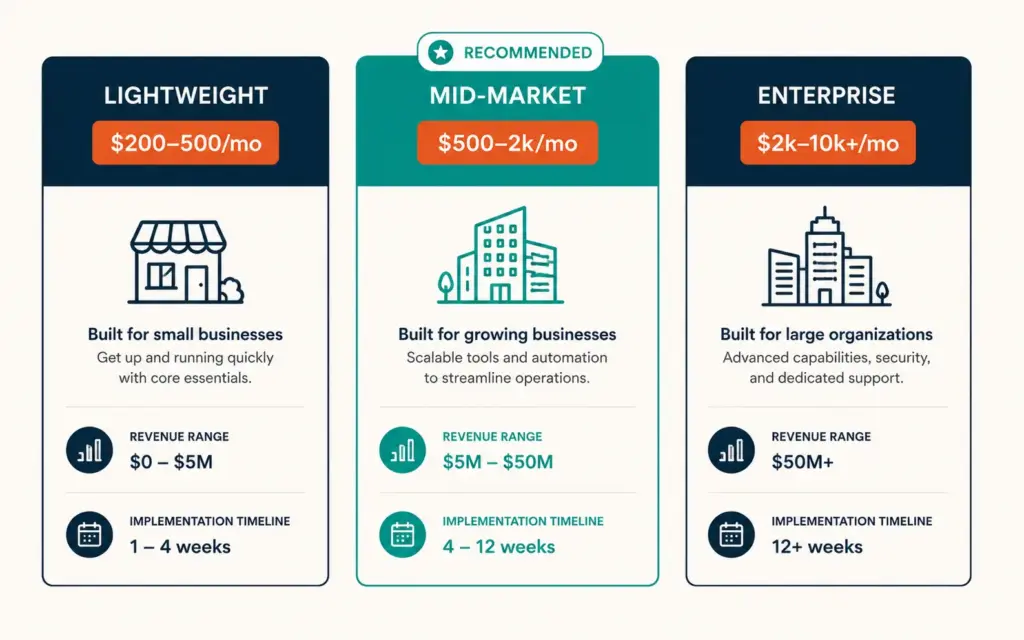
Tier 3: Enterprise ERP ($2,000 to $10,000+/month)
| System | Best For | Starting Price | Key Strengths |
|---|---|---|---|
| NetSuite (Oracle) | Scaling DTC brands, $20M+ | $2,000/month | Full financials, global multi-currency, CRM built-in |
| SAP Business One | International operations, manufacturing | $3,000/month | Multi-country compliance, deep manufacturing |
| Microsoft Dynamics 365 | Enterprise with Microsoft ecosystem | $2,500/month | Power BI, Office integration, Azure cloud |
Enterprise ERPs handle multi-country operations, complex manufacturing, advanced financial consolidation, and teams of 20+ users. Implementation cost: $50,000 to $200,000+ including consulting, customization, and data migration. Implementation time: 3 to 9 months. Most ecommerce brands never need this tier unless scaling to $20M+ annual revenue with international operations.
How Do I Evaluate ERP Systems for My Store?
The 5-criteria ERP evaluation
- Ecommerce platform integration: Native Shopify, WooCommerce, or BigCommerce connector that syncs orders, inventory, and product data in real-time. API-only integrations require custom development ($5,000 to $25,000) and ongoing maintenance. For platform details, see our Shopify vs WooCommerce comparison.
- Marketplace connectors: Pre-built connections to Amazon, Walmart, Etsy, and your selling channels. Multi-channel inventory sync must be real-time (not batch) to prevent overselling.
- Accounting integration or replacement: Does the ERP replace QuickBooks/Xero, or does it sync to them? Replacement simplifies architecture. Sync maintains flexibility but adds an integration point. According to Brightpearl’s ecommerce ERP guide, 65% of mid-market ecommerce brands prefer ERP systems with built-in accounting to eliminate data sync issues.
- Implementation complexity: How long to go live? How much consulting is required? Lightweight ERPs: 2 to 6 weeks self-serve. Mid-market: 1 to 3 months with partner support. Enterprise: 3 to 9 months with dedicated implementation team.
- Total cost of ownership: Software license + implementation cost + annual maintenance + integration maintenance + training. Year-one total is typically 2 to 3x the annual software cost. Model the 3-year total cost, not just the monthly fee.
The ERP evaluation process
- Week 1 to 2: Document current workflows, pain points, and system inventory. List every tool, every manual process, and every recurring error.
- Week 3 to 4: Research 3 to 5 ERP options within your tier. Request demos. Provide identical business scenarios to each vendor.
- Week 5 to 6: Get pricing quotes including implementation, training, and year-one total cost. Check references from ecommerce businesses similar to yours (same revenue, same channel mix).
- Week 7 to 8: Trial the top 2 options with a small subset of real data. Test critical workflows: order sync, inventory update, financial posting.
- Week 9: Decision and implementation planning.
How Does ERP Implementation Work?
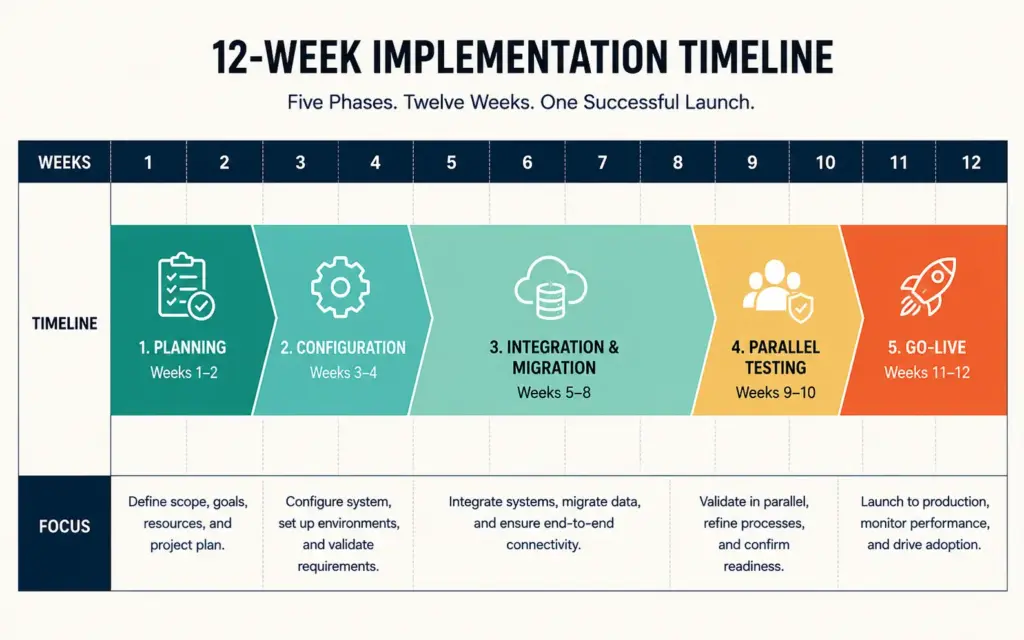
The implementation timeline
- Phase 1 (Week 1 to 2): Planning and data mapping. Map current data structures (products, customers, orders, inventory) to the ERP’s data model. Identify what migrates, what transforms, and what starts fresh.
- Phase 2 (Week 3 to 4): System configuration. Set up the ERP: chart of accounts, tax rules, warehouse locations, shipping methods, user permissions, and workflow automations.
- Phase 3 (Week 5 to 8): Integration and data migration. Connect ecommerce platform, marketplace channels, and shipping tools. Migrate historical data (products, customers, open orders). Test data accuracy.
- Phase 4 (Week 9 to 10): Parallel testing. Run both old and new systems simultaneously for 1 to 2 weeks. Compare outputs. Identify discrepancies. Fix before cutover.
- Phase 5 (Week 11 to 12): Go-live and stabilization. Cut over to the ERP as the primary system. Monitor daily for 2 to 4 weeks. Address issues immediately.
Critical implementation risks
- Data quality: Migrating dirty data (duplicate products, incorrect costs, orphaned records) into a new system amplifies existing problems. Clean data before migration, not after.
- Team adoption: The ERP only works if the team uses it. Invest in training (8 to 16 hours per user) and designate one internal “super user” who becomes the go-to resource. Resistance to new systems is the #1 implementation failure cause.
- Timing: Never implement during peak season (Q4 for most ecommerce). Begin implementation in January to March for a stabilized system before holiday volume. For seasonal planning, see our inventory management guide.
Common ERP Mistakes for Ecommerce
Implementing too early
A $300/month ERP plus $5,000 implementation on a $15k/month store adds complexity without solving real problems. At this stage, spreadsheets plus Shopify plus QuickBooks handles operations. ERP investment should follow operational bottlenecks, not precede them. Wait until manual reconciliation costs more in time and errors than the ERP costs in money.
Choosing enterprise software for mid-market needs
NetSuite at $2,000+/month with $100,000 implementation for a $500k/year business is over-engineering. Dear Inventory or Brightpearl at $250 to $750/month with $2,000 to $10,000 implementation solves the same problems at 80% lower cost. Match ERP tier to current revenue, not aspirational revenue. You can upgrade later.
Underestimating implementation time and cost
Vendors quote optimistic timelines. Add 50% buffer to every estimate. If the vendor says 6 weeks, plan for 9. If they quote $10,000 implementation, budget $15,000. The gap between estimated and actual implementation cost is the most consistent ERP complaint across all tiers.
Not cleaning data before migration
Duplicate SKUs, incorrect product costs, orphaned customer records, and inconsistent categorization in your current system become amplified problems in the new system. Spend 1 to 2 weeks cleaning data before migration begins. This prevents 4 to 8 weeks of post-migration cleanup. For broader financial hygiene, see our financial planning guide.
Customizing instead of adapting workflows
Customizing the ERP to match your existing (potentially broken) workflows costs $10,000 to $100,000. Adapting your workflows to match the ERP’s built-in best practices costs nothing and often improves operations. Only customize when the ERP genuinely can’t support a critical business requirement, not just because “we’ve always done it this way.” For margin impact of operational decisions, see our ecommerce profit margins guide.
Frequently Asked Questions
An ERP (Enterprise Resource Planning) system unifies inventory management, order processing, financial accounting, purchasing, and fulfillment into one centralized platform. Instead of managing separate tools for each function, an ERP synchronizes data so a single order update automatically flows through inventory counts, financial records, and shipping workflows. For ecommerce, this eliminates manual reconciliation between platforms like Shopify, Amazon, QuickBooks, and shipping tools.
Evaluate an ERP when manual data reconciliation exceeds 8 to 10 hours per week, inventory discrepancies occur 5+ times weekly, multi-channel overselling becomes recurring, monthly financial close takes 3+ days, or 3+ team members struggle to coordinate in separate tools. Revenue threshold is typically $50k to $200k monthly. Under $50k/month, individual tools (Shopify + QuickBooks + ShipStation) handle operations without ERP complexity.
Lightweight ERPs (Dear Inventory, Cin7): $200 to $500/month software, $2,000 to $10,000 implementation. Mid-market (Brightpearl, Linnworks): $500 to $2,000/month, $10,000 to $50,000 implementation. Enterprise (NetSuite, SAP): $2,000 to $10,000+/month, $50,000 to $200,000+ implementation. Year-one total cost is typically 2 to 3x the annual software license. Always model 3-year total cost of ownership.
Dear Inventory (Cin7 Core) at $249/month is the best starting point for small ecommerce businesses. It offers inventory-first design, native Shopify and WooCommerce integrations, and basic financial reporting without the complexity of mid-market systems. Cin7 Omni ($349/month) is better for multi-channel sellers needing EDI connections. Both can be self-implemented in 2 to 6 weeks without consulting costs.
Lightweight ERPs: 2 to 6 weeks with self-serve setup. Mid-market ERPs: 1 to 3 months with partner support. Enterprise ERPs: 3 to 9 months with dedicated implementation team. Add 50% buffer to vendor-quoted timelines. Implementation includes planning, configuration, integration, data migration, parallel testing, and go-live stabilization. Never implement during peak season; start in January to March for Q4 readiness.
Probably not until you exceed $200k/month revenue with 2,000+ SKUs and 3+ operations team members. Single-channel Shopify sellers can manage with Shopify’s built-in inventory, QuickBooks for accounting, and ShipStation for shipping. ERP becomes necessary when you add channels (Amazon, wholesale, retail) because multi-channel inventory sync is the primary problem ERPs solve. Single-channel stores benefit more from optimizing existing tools than adding ERP complexity.
Related Reads
- Ecommerce Tech Stack Guide
- Shopify vs WooCommerce
- Ecommerce Automation
- Inventory Management Guide
- Ecommerce Profit Margins
- Financial Planning for Scaling
Enjoying this? Get more like it every week.
One email per week with ecommerce strategies, tool picks, and seller insights. No spam.