
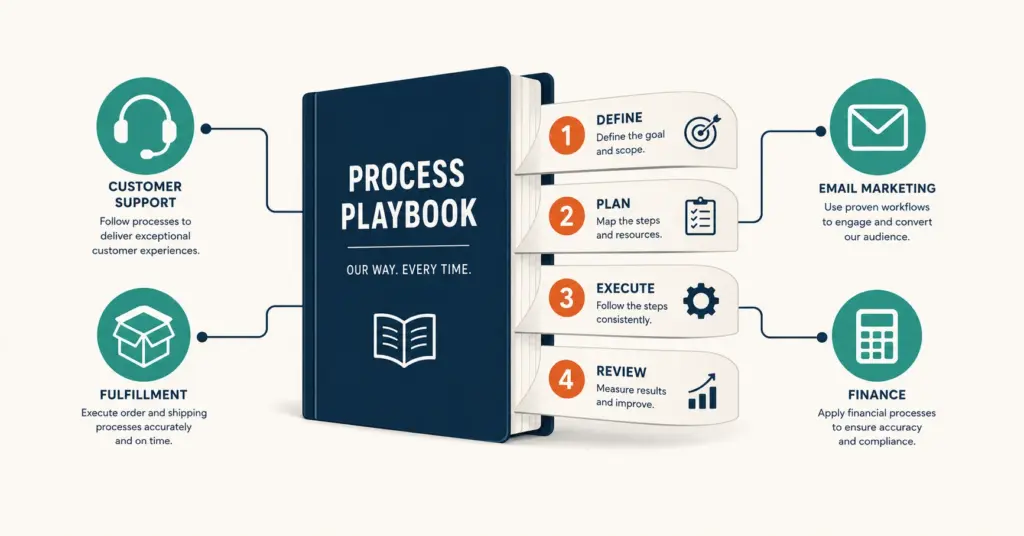
- Standard operating procedures (SOPs) are documented, step-by-step instructions for performing repeatable tasks in your ecommerce business. SOPs transform tribal knowledge (information that exists only in the founder's head) into scalable systems that any trained team member can execute consistently.
- The 10 processes to document first: order fulfillment, customer service responses, product listing creation, inventory replenishment, return and refund processing, social media posting, email campaign setup, financial reconciliation, new product onboarding, and supplier communication.
- The fastest SOP creation method: record yourself performing the task using Loom (screen recording), narrate each step, then have the new hire convert the video into a written document with screenshots during their first week. This takes 15 minutes versus 1 to 2 hours writing from scratch.
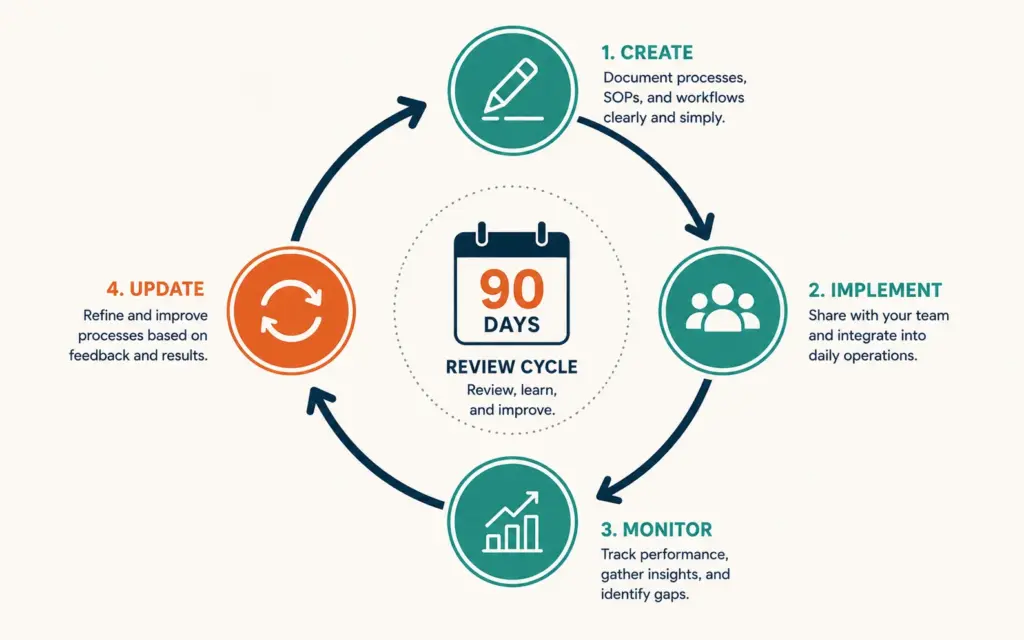
- SOPs should be living documents updated every 90 days or when processes change. Outdated SOPs are worse than no SOPs because they teach the wrong process and create false confidence in standardization.
Standard operating procedures (SOPs) are documented, step-by-step instructions that ensure repeatable tasks in your ecommerce business are performed consistently regardless of who performs them. Every process that happens more than once per week and involves more than 3 steps needs an SOP: how orders are fulfilled, how customer complaints are handled, how products are listed, how inventory is reordered, and how returns are processed. According to Process Street’s operations research, businesses with documented processes are 3x more likely to scale successfully because they can delegate without quality degradation and onboard new team members in days instead of months.
Most ecommerce stores operate on tribal knowledge: the founder knows how everything works, and team members learn through observation and asking questions. This works with 1 to 3 people. It breaks at 4+ because information gets lost, tasks get done inconsistently, and the founder becomes a bottleneck for every operational question. SOPs remove the founder as the single point of failure. For the delegation framework that SOPs enable, see our outsourcing guide.
Which Ecommerce Processes Need SOPs First?
The priority 10
| Priority | Process | Why First | Frequency |
|---|---|---|---|
| 1 | Order fulfillment | Highest volume, most error-prone | Daily |
| 2 | Customer service responses | Consistency affects brand perception | Daily |
| 3 | Return and refund processing | Policy compliance, financial impact | Daily to weekly |
| 4 | Product listing creation | SEO quality, content consistency | Weekly |
| 5 | Inventory replenishment | Stockout prevention, cash management | Weekly |
| 6 | Social media posting | Brand voice consistency, scheduling | Daily |
| 7 | Email campaign setup | Quality control, compliance | Weekly |
| 8 | Financial reconciliation | Accuracy, audit trail | Weekly to monthly |
| 9 | New product onboarding | Consistent launch process | Monthly |
| 10 | Supplier communication | Relationship consistency, order accuracy | Weekly |
Document these 10 before any others. They cover 80% of daily operations in most ecommerce businesses. Each remaining process gets documented as it’s delegated. For fulfillment-specific SOPs, see our order fulfillment process guide. For inventory planning, see our inventory management guide.
How Do I Write an Effective SOP?
The SOP template
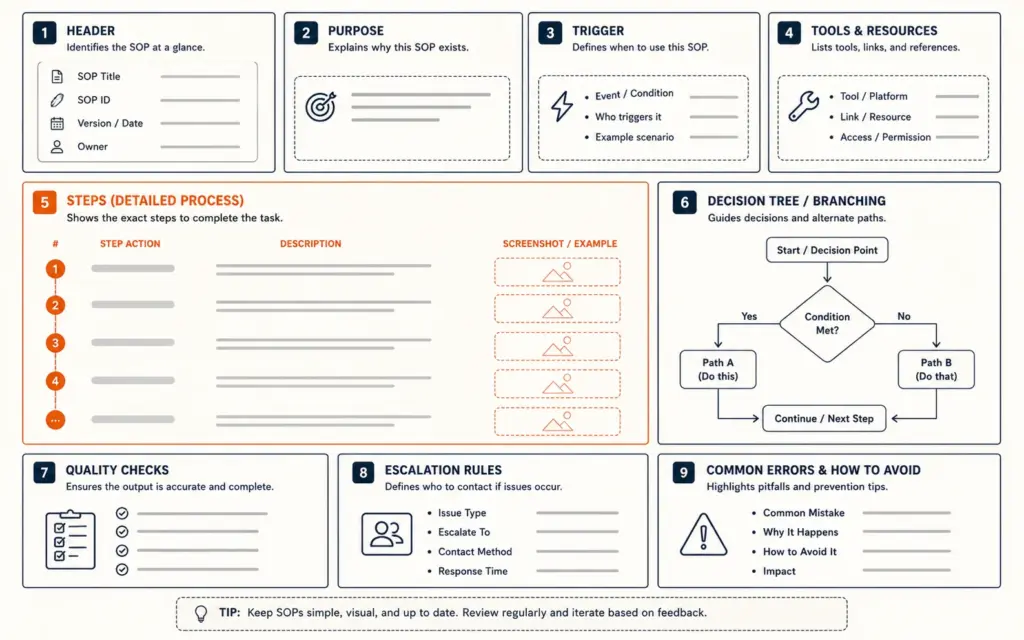
- Header: SOP title, version number, last updated date, owner (who maintains this SOP)
- Purpose: One sentence explaining why this process exists and what outcome it produces
- Trigger: What initiates this process (new order received, customer emails support, inventory hits reorder point)
- Tools required: Software, accounts, and access permissions needed
- Step-by-step instructions: Numbered steps with screenshots showing exactly what to click, type, or select. Each step = one action. If a step has sub-steps, break it into 2 to 3 separate numbered items
- Decision points: If/then logic. “If order total exceeds $200, flag for fraud review. If under $200, proceed to step 7.”
- Quality checks: What to verify before considering the process complete
- Escalation rules: When and how to escalate issues beyond the SOP scope. Who to contact and through what channel.
- Common errors and fixes: The 3 to 5 most frequent mistakes and how to correct them
The Loom shortcut method
The fastest way to create SOPs:
- Open Loom (free screen recording tool)
- Perform the task exactly as you’d do it normally
- Narrate each step as you perform it: “Now I click on Orders, then filter by Unfulfilled, then select the order…”
- Save and share the Loom recording as the initial SOP
- Have the new hire convert the video into a written document with screenshots during onboarding
This method takes 10 to 20 minutes per process versus 1 to 3 hours writing from scratch. The new hire learns the process by documenting it, which is more effective than reading someone else’s documentation. For automation that reduces the need for some SOPs, see our ecommerce automation guide.
What Does a Good Ecommerce SOP Look Like?
Example: Customer refund processing SOP
Purpose: Process customer refund requests within 24 hours while maintaining return policy compliance and accurate financial records.
Trigger: Customer requests refund through email, chat, or returns portal.
Steps:
- Open the customer’s order in Shopify Admin > Orders > search by order number or email
- Verify the order falls within the 30-day return window (check order date vs today’s date)
- Check the refund reason against approved reasons list (defective, wrong item, doesn’t fit, changed mind)
- If “defective” or “wrong item”: process full refund including shipping. No return shipment required for orders under $30
- If “doesn’t fit” or “changed mind”: process product refund minus original shipping cost. Send prepaid return label via email template #4
- Click “Refund” in Shopify > enter refund amount > select “Refund to original payment method” > add internal note explaining reason
- Send confirmation email using template #7 (Refund Processed)
- Tag the order “Refunded” in Shopify and update the returns tracking spreadsheet
Decision point: If refund amount exceeds $100, notify [manager name] via Slack before processing.
Quality check: Verify refund amount matches the original charge minus any applicable deductions. Confirm customer received email confirmation.
This level of specificity eliminates ambiguity. Any team member following these steps produces the same outcome. For customer service strategy, see our customer retention guide.
How Do I Organize and Store SOPs?
Storage tools
| Tool | Best For | Cost |
|---|---|---|
| Google Docs (shared folder) | Small teams (1 to 5 people) | Free |
| Notion | Mid-size teams, visual organization | Free to $10/user/month |
| Trainual | Teams with frequent onboarding | $99/month+ |
| Process Street | Checklist-based SOPs with tracking | $25/user/month |
| SweetProcess | Procedure documentation specialists | $99/month for 20 users |
Start with Google Docs or Notion. Don’t buy SOP software until you have 20+ documented procedures and 5+ team members using them. The tool doesn’t matter; the documentation habit matters. For broader tool decisions, see our ecommerce tech stack guide.
Organization structure
- By department: Operations, Customer Service, Marketing, Finance, Product
- By frequency: Daily, Weekly, Monthly, As-needed
- By role: Each team member’s role has a folder with all SOPs relevant to their responsibilities
Use consistent naming: “SOP-[Department]-[Process Name]-v[Version].” Example: “SOP-Operations-Order-Fulfillment-v3.” Include version numbers to prevent confusion about which SOP is current.
How Often Should I Update SOPs?
The 90-day review cycle
Review every SOP at least once per quarter. Assign an owner to each SOP who is responsible for keeping it current. The review process:
- Is the process still performed this way? If tools changed, steps changed, or the process was automated, update the SOP.
- Are the screenshots current? Tool interfaces change frequently. Outdated screenshots confuse new team members.
- Has the decision logic changed? If refund thresholds, approval workflows, or escalation rules changed, update immediately.
- Are the common errors section accurate? Add new errors discovered since last review. Remove errors that no longer occur.
An outdated SOP is worse than no SOP because it teaches the wrong process while creating false confidence that the team is following standardized procedures. For financial process documentation, see our financial planning guide.
How Do SOPs Enable Scaling?
Onboarding acceleration
Without SOPs, onboarding a new customer service agent takes 2 to 4 weeks of shadowing, asking questions, and learning through mistakes. With SOPs, the same onboarding takes 3 to 5 days: read the SOPs, practice with test scenarios, and handle real cases with spot-check review. The difference compounds: hiring 3 agents per year saves 9 to 15 weeks of training time with documented procedures. According to SHRM’s onboarding research, organizations with standardized onboarding processes achieve 50% higher new-hire retention.
Quality consistency at scale
One person handling 50 orders per day maintains consistency through personal memory. Five people handling 250 orders per day need shared documentation to maintain the same quality. SOPs ensure order #1 and order #250 receive identical processing quality regardless of who handles them.
Founder liberation
Every SOP you create is a task you no longer need to perform, explain, or supervise closely. The goal: the founder should be able to take a 2-week vacation without any operational process breaking. SOPs make this possible by removing the founder as the knowledge bottleneck. For delegation depth, see our outsourcing guide.
Common SOP Mistakes
Writing SOPs too abstractly
“Process the customer’s refund according to company policy” is not an SOP step. “Click Refund in Shopify > enter $XX.XX > select Original Payment Method > click Submit” is. SOPs must be specific enough that someone with zero prior context can follow them successfully on their first attempt.
Creating SOPs nobody uses
Documentation that sits in a folder unread is wasted effort. SOPs must be part of onboarding, referenced in daily work, and enforced through quality checks. If team members consistently don’t follow the SOP, either the SOP is wrong (update it to match reality) or the team needs retraining. For performance measurement, see our ecommerce KPIs guide.
Writing SOPs for processes that should be automated
If a process is purely rule-based with zero judgment required, automate it instead of documenting it. Order confirmation emails, inventory alerts, shipping label generation, and review requests should be automated, not manually performed from an SOP. SOPs are for processes that require human judgment, creativity, or complex decision-making. For automation context, see our ecommerce automation guide.
Not including decision logic
SOPs without if/then decision points leave team members stuck whenever a non-standard situation arises. Every SOP needs escalation rules: “If [unusual situation], do [this] or contact [person] via [channel].” Anticipate the 3 to 5 most common edge cases and document how to handle each one. For customer-facing decisions, see our checkout optimization guide for policy implementation context.
Frequently Asked Questions
SOPs (Standard Operating Procedures) are documented, step-by-step instructions for performing repeatable tasks in your ecommerce business. They cover processes like order fulfillment, customer service responses, product listing creation, inventory replenishment, and return processing. SOPs transform tribal knowledge (information only in the founder’s head) into scalable systems that any trained team member can execute consistently.
Document the 10 highest-frequency processes first: order fulfillment, customer service responses, return/refund processing, product listing creation, inventory replenishment, social media posting, email campaign setup, financial reconciliation, new product onboarding, and supplier communication. These cover 80% of daily operations and are the processes most likely to be delegated first.
Record yourself performing the task using Loom (free screen recording) while narrating each step. This takes 10 to 20 minutes versus 1 to 3 hours writing from scratch. Share the recording as the initial SOP. Have the new hire convert the video into a written document with screenshots during their onboarding week. They learn the process by documenting it, which is more effective than reading existing documentation.
Review every SOP at least quarterly (every 90 days). Assign an owner to each SOP responsible for keeping it current. Update immediately when tools change, processes change, or decision logic changes. Outdated SOPs are worse than no SOPs because they teach the wrong process. Check that screenshots match current tool interfaces and that common errors sections reflect actual issues.
Start with Google Docs or Notion (free). Both support text, screenshots, and shared access. Don’t buy dedicated SOP software until you have 20+ documented procedures and 5+ team members. Trainual ($99/month) and Process Street ($25/user/month) add onboarding flows and completion tracking. The documentation habit matters more than the tool choice.
SOPs reduce onboarding from 2 to 4 weeks to 3 to 5 days by providing step-by-step instructions new hires follow immediately. They enable delegation because tasks are no longer dependent on the founder’s presence or memory. SOPs allow quality control through spot-checking against documented standards. Organizations with standardized procedures achieve 50% higher new-hire retention because expectations are clear from day one.
Related Reads
- Outsourcing Guide
- Ecommerce Automation
- Order Fulfillment Process
- Inventory Management Guide
- Ecommerce Tech Stack
- Ecommerce KPIs Guide
Enjoying this? Get more like it every week.
One email per week with ecommerce strategies, tool picks, and seller insights. No spam.