
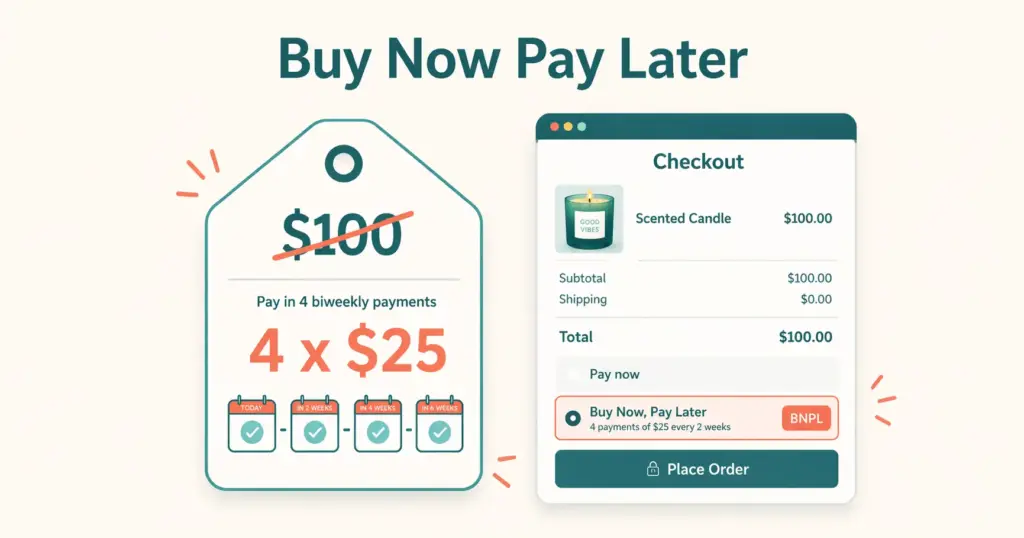
- Buy now pay later (BNPL) lets customers split purchases into 4 interest-free installments while you get paid in full upfront. A $100 product becomes "4 payments of $25" in the customer's mind, reducing the psychological barrier to purchase and increasing conversion rates by 20-30% on average.
- BNPL increases both conversion rate AND average order value. Customers spend 30-50% more per order when BNPL is available because the per-installment cost feels manageable at higher cart totals. A $200 cart that feels expensive as a lump sum feels affordable at $50/payment.
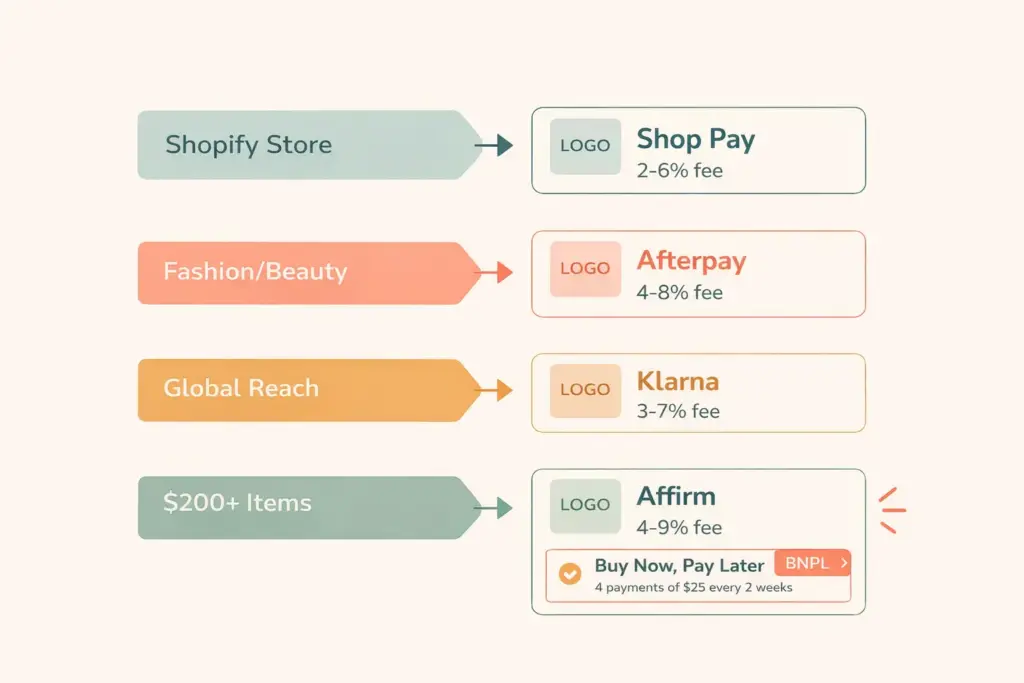
- Top BNPL providers for ecommerce: Shop Pay Installments (Shopify-native, lowest friction), Klarna (global reach, strongest brand recognition), Afterpay (strong in fashion and beauty), and Affirm (best for higher-ticket items $200+). Each charges merchants 2-8% per transaction.
- The merchant cost (2-8% fee per BNPL transaction) is offset by the conversion and AOV lift. If BNPL increases your conversion rate by 20% and AOV by 30%, the incremental revenue far exceeds the fee. The math works for most stores selling products above $50.
Buy now pay later ecommerce refers to integrating installment payment options into your online store checkout that allow customers to split their purchase into multiple interest-free payments (typically 4 payments over 6-8 weeks) while you, the merchant, receive the full payment upfront from the BNPL provider. The provider assumes the credit risk and collection responsibility. You get your money immediately.
BNPL has shifted from a niche payment option to an expected checkout feature. Over 45% of US consumers have used a BNPL service, and that number skews even higher for shoppers aged 18-40. For stores selling products above $50, not offering BNPL means losing sales to competitors who do, because a meaningful percentage of your potential customers now evaluate whether installment payments are available before committing to purchase.
This guide covers how BNPL works for merchants, which provider fits your store, integration steps, and the real cost-benefit math. For the broader checkout experience, our product page design guide covers the full conversion optimization framework. For payment processing basics, our payment gateway guide covers the foundation BNPL builds on.
How BNPL Works for Merchants
The transaction flow is straightforward:
- Customer adds items to cart and proceeds to checkout
- At payment, they select a BNPL option (Klarna, Afterpay, etc.) instead of paying full price
- The BNPL provider runs an instant soft credit check (no impact on customer’s credit score)
- If approved, the customer pays the first installment (typically 25% of the total)
- You receive the full payment amount (minus the BNPL provider’s fee) within 1-3 business days
- The BNPL provider collects the remaining installments from the customer over the next 6-8 weeks
The critical point: you get paid in full upfront. The installment risk sits with the BNPL provider, not you. If a customer misses payments, that’s between them and the BNPL company. Your cash flow is unaffected.
BNPL Providers Compared
| Provider | Merchant Fee | Customer Plan | Best For | Platform Integration |
|---|---|---|---|---|
| Shop Pay Installments | ~5.9% + $0.30 | 4 biweekly payments | Shopify stores | Shopify only (native) |
| Klarna | 3.29-5.99% + $0.30 | 4 payments or pay in 30 days | Global reach, fashion, lifestyle | Shopify, WooCommerce, BigCommerce, Magento |
| Afterpay | 4-6% + $0.30 | 4 biweekly payments | Fashion, beauty, younger demographics | Shopify, WooCommerce, BigCommerce |
| Affirm | 2-8% | 4 payments or 3-36 month financing | Higher-ticket items ($200+) | Shopify, WooCommerce, BigCommerce |
| Sezzle | ~6% + $0.30 | 4 biweekly payments | Smaller stores, higher approval rates | Shopify, WooCommerce, BigCommerce |
| PayPal Pay Later | Standard PayPal rates | 4 payments or monthly financing | Stores already using PayPal | Any platform with PayPal |
Choosing the Right Provider
Shop Pay Installments: Best for Shopify Stores
If you’re on Shopify, Shop Pay Installments is the lowest-friction BNPL option. It’s built directly into Shopify’s checkout, requires zero third-party setup, and over 100 million consumers already have Shop Pay accounts. The approval rate is high because Affirm (which powers Shop Pay Installments) has extensive consumer data.
Activation: Settings > Payments > Shop Pay Installments > Enable. That’s it. No separate application, no integration code, no additional app installation.
Klarna: Best for Global and Multi-Platform
Klarna has the strongest global brand recognition among BNPL providers with 150 million active users across 45 countries. For stores selling internationally or on non-Shopify platforms, Klarna provides the widest consumer awareness and trust.
Klarna offers three customer options: Pay in 4 (interest-free installments), Pay in 30 (try before you buy), and monthly financing (6-36 months for larger purchases). This flexibility covers products from $50 to $5,000+.
Afterpay: Best for Fashion and Beauty
Afterpay (owned by Block/Square) dominates in fashion, beauty, and lifestyle categories. Their in-app marketplace drives discovery traffic to participating merchants, essentially acting as a free advertising channel. Afterpay’s customer base skews younger (Gen Z and Millennial) and fashion-oriented.
If your store sells clothing, cosmetics, accessories, or home decor targeting 18-35 year olds, Afterpay’s customer demographic aligns perfectly.
Affirm: Best for Higher-Ticket Items
Affirm offers longer financing terms (up to 36 months) for expensive products. While other providers cap at 4 payments on items under $1,000-2,000, Affirm finances purchases up to $17,500. Electronics, furniture, fitness equipment, and luxury goods benefit from Affirm’s extended payment terms.
Affirm also powers Shop Pay Installments, so Shopify sellers using Shop Pay get Affirm’s underwriting without a separate integration.
The Real Cost-Benefit Math
BNPL merchant fees (2-8%) sound expensive compared to standard card processing (2.9% + $0.30). But the calculation isn’t fee versus fee. It’s fee versus incremental revenue.
Scenario: Store with $50,000/month revenue, 2% conversion rate, $75 AOV
| Metric | Without BNPL | With BNPL (conservative estimates) |
|---|---|---|
| Monthly visitors | 33,333 | 33,333 |
| Conversion rate | 2.0% | 2.4% (+20%) |
| Orders/month | 667 | 800 |
| Average order value | $75 | $90 (+20%) |
| Monthly revenue | $50,000 | $72,000 |
| BNPL fee (on ~30% of orders at 5%) | $0 | -$1,080 |
| Net revenue | $50,000 | $70,920 |
The $1,080/month BNPL cost generates $20,920 in incremental revenue. Even with conservative estimates (20% conversion lift, 20% AOV increase, 30% BNPL adoption), the ROI is overwhelming. The math gets even stronger for stores selling products above $100 where BNPL adoption rates are higher.
Where BNPL math doesn’t work: products under $30 (installment amounts feel trivially small, fee percentage is too high relative to margin), very high-margin luxury where every customer will pay full price anyway, and stores with already near-perfect conversion rates. For most mid-priced ecommerce, BNPL pays for itself many times over. Apply these insights alongside your pricing strategy for maximum impact.
Integration and Implementation
Shopify
Shop Pay Installments: enable in Settings > Payments. For Klarna, Afterpay, or Affirm: install from the Shopify App Store, connect your merchant account, and the BNPL option appears at checkout automatically.
WooCommerce
Install the provider’s official plugin (Klarna Checkout, Afterpay Gateway, or Affirm for WooCommerce). Configure your merchant credentials and payment thresholds (minimum/maximum order amounts for BNPL eligibility). Test with a sandbox transaction before going live.
BigCommerce
BigCommerce supports Klarna, Afterpay, and PayPal Pay Later through its payment settings panel. Enable the provider, enter merchant credentials, and configure display options.
Displaying BNPL Messaging
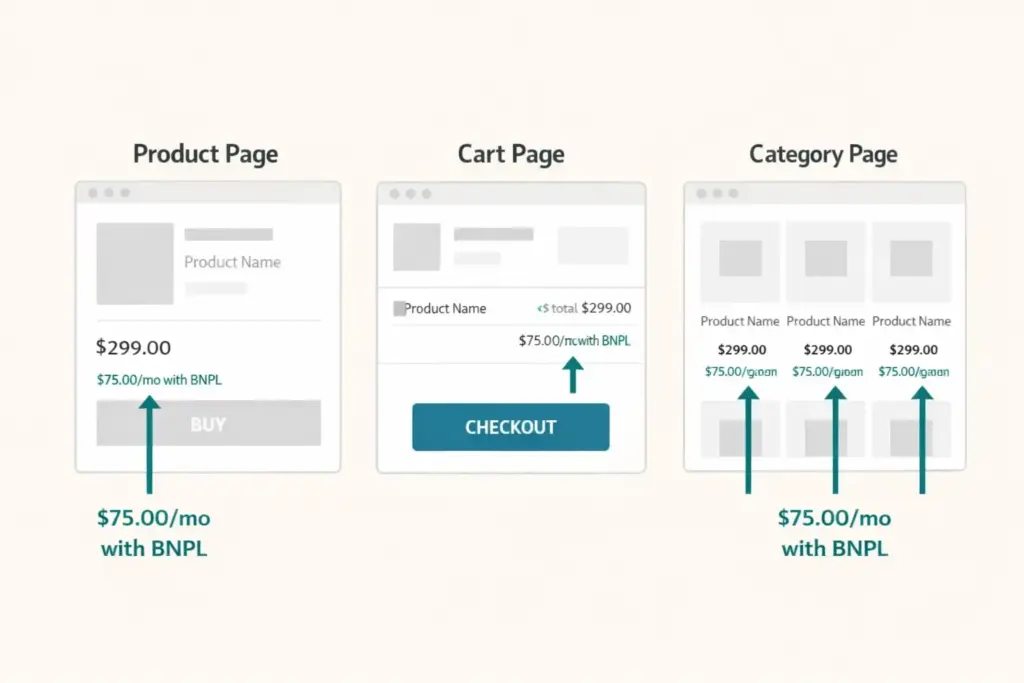
Adding BNPL to checkout isn’t enough. Customers need to see installment pricing BEFORE they reach checkout to influence their purchasing decision. Display BNPL messaging on:
- Product pages: “Or 4 interest-free payments of $18.75 with Klarna” below the price
- Cart page: “Pay in 4 installments of $XX.XX” next to the cart total
- Category/collection pages: Installment price below each product price
- Homepage banner or badge: “Buy now, pay later available” builds awareness site-wide
Most BNPL providers offer on-site messaging widgets that automatically calculate and display installment amounts based on product price. Install these alongside the payment integration.
BNPL Best Practices
Offer multiple BNPL options. Customers have provider preferences. Someone who always uses Afterpay won’t switch to Klarna for your store. Offering 2-3 BNPL options captures the widest audience. At minimum, offer one short-term (4 payments) and one longer-term (monthly financing) option for different cart values.
Set minimum order thresholds. BNPL on a $15 order creates a $3.75 installment, which feels unnecessary and costs you a disproportionate fee. Set minimum eligible order amounts ($35-50) so BNPL activates only where it meaningfully changes the purchase psychology.
Promote BNPL in marketing. Mention installment pricing in ad copy, email subject lines, and social posts. “Starting at $12/month” or “4 payments of $25” in your Facebook ads reduces perceived price and can improve ad click-through rates.
Monitor BNPL metrics separately. Track BNPL adoption rate, BNPL vs non-BNPL AOV, BNPL conversion rate versus standard payment conversion, and provider-specific performance. Most BNPL dashboards provide this data. Use it to optimize thresholds, messaging, and provider selection. Connect this data to your GA4 setup for full funnel visibility.
Account for BNPL fees in pricing. If BNPL adds 3-5% cost on 30% of orders, your blended payment processing cost rises by about 1-1.5%. Factor this into your margin calculations when setting product prices. The conversion and AOV lift should more than compensate, but track it.
Common BNPL Mistakes
Only adding BNPL at checkout. If customers don’t know installment payments are available until the final payment step, you’ve missed the influence window. BNPL messaging on product pages changes the purchase decision at the consideration stage, not just the payment stage.
Not A/B testing BNPL impact. Enable BNPL for a month, compare conversion rate and AOV against the prior month (controlling for seasonality). If the numbers don’t show improvement for your specific product category and price point, reevaluate which provider or messaging approach to use.
Ignoring return rate impact. BNPL can increase return rates by 5-10% because lower upfront commitment makes purchasing feel less consequential. Monitor your return rate before and after BNPL implementation. If returns spike, tighten your product descriptions and size guides to set better expectations. Your retention strategy should account for this.
Frequently Asked Questions
The customer selects BNPL at checkout and pays the first installment (typically 25%). The BNPL provider pays you the full order amount (minus their fee of 2-8%) within 1-3 business days. The provider then collects the remaining installments from the customer over 6-8 weeks. You receive full payment upfront with zero credit risk.
Shopify stores: Shop Pay Installments (zero-friction native integration). Fashion and beauty: Afterpay (aligned demographics and discovery marketplace). Global stores: Klarna (150M users across 45 countries). High-ticket items over $200: Affirm (up to 36-month financing). Budget-conscious choice: PayPal Pay Later (no additional merchant fees beyond standard PayPal rates).
BNPL merchant fees range from 2-8% per transaction depending on the provider and your negotiated rate. Klarna charges 3.29-5.99% + $0.30. Afterpay charges 4-6% + $0.30. Affirm charges 2-8%. These fees are higher than standard card processing (2.9%) but are offset by 20-30% conversion rate lift and 20-50% AOV increase that BNPL typically generates.
Yes. Industry data consistently shows BNPL increases conversion rates by 20-30% and average order value by 30-50%. The psychological shift from “$100 today” to “4 payments of $25” reduces purchase resistance. The impact is strongest for products priced $50-500 and for demographics aged 18-40 where BNPL adoption is highest.
Yes. Klarna, Afterpay, and Affirm all offer official plugins for WooCommerce and native integrations with BigCommerce. Install the provider’s plugin, enter your merchant credentials, configure minimum order thresholds, and enable on-site messaging widgets. Setup takes 30-60 minutes per provider. PayPal Pay Later works on any platform that already accepts PayPal.
Set BNPL minimum at $35-50. Below $30, installment amounts feel trivially small ($7.50 per payment on a $30 item) and the 2-8% merchant fee is disproportionately high relative to your margin. BNPL delivers the strongest ROI on orders above $75 where the installment breakdown meaningfully changes purchase psychology and the higher cart value absorbs the fee.
Related Reads
- Product Page Design Guide
- Payment Gateway Setup
- Ecommerce Pricing Strategy
- GA4 Ecommerce Setup
- Customer Retention Strategies
- How to Sell on Shopify
Enjoying this? Get more like it every week.
One email per week with ecommerce strategies, tool picks, and seller insights. No spam.