
- Ecommerce automation replaces repetitive manual tasks with software-driven workflows that execute automatically based on triggers you set. Order comes in → shipping label prints → tracking email sends → inventory updates → review request schedules. All without you touching anything.
- The six automation categories by impact: order processing and fulfillment, email marketing flows, inventory management, customer service, pricing and repricing, and marketing and advertising. Most stores can automate 60-70% of their operational workload.
- Solo operators should automate first, hire second. A $50/month automation tool that saves 10 hours per week is cheaper than a $15/hour employee doing the same tasks. Automation scales without additional cost per transaction.
- Start with the workflow that consumes the most manual time. For most stores that's order processing (shipping labels, tracking updates, confirmation emails). Automate that completely, then move to the next bottleneck.
Ecommerce automation is the use of software tools and configured workflows to execute repetitive business tasks automatically based on predefined triggers and rules, eliminating the manual labor of order processing, email sending, inventory updating, price adjusting, and customer communication that would otherwise consume 15-20 hours per week for a typical store owner.
Every hour you spend manually printing shipping labels, sending order confirmations, updating stock counts, and answering “where’s my order?” emails is an hour you’re not spending on product development, marketing strategy, or business growth. Automation doesn’t eliminate your job. It eliminates the parts of your job that a computer does better, faster, and without errors.
This guide covers the six automation categories that matter most, with specific tool recommendations and implementation priority. If you’re specifically interested in AI-powered automation, our AI automation guide covers that layer. This guide covers the broader ecommerce workflow automation landscape including non-AI tools.
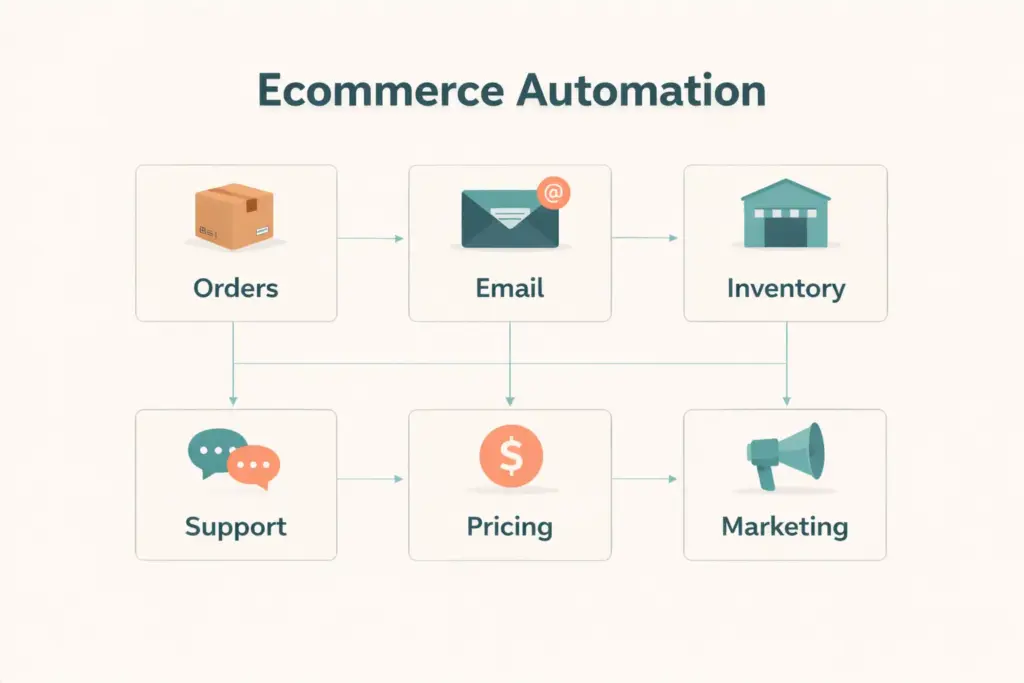
The 6 Automation Categories by Impact
| Category | Manual Time Replaced | Automation Tool | Cost |
|---|---|---|---|
| Order processing | 5-10 hrs/week | ShipStation, Shopify Shipping, Pirate Ship | $0-99/mo |
| Email marketing flows | 5-8 hrs/week | Klaviyo, Shopify Email, Omnisend | $0-100/mo |
| Inventory management | 3-5 hrs/week | Cin7, Ordoro, Sellbrite | $29-349/mo |
| Customer service | 5-10 hrs/week | Tidio, Gorgias, Zendesk | $0-300/mo |
| Pricing and repricing | 2-4 hrs/week | Prisync, RepricerExpress | $59-299/mo |
| Marketing and ads | 3-5 hrs/week | Buffer, Hootsuite, Google Performance Max | $0-100/mo |
1. Order Processing Automation
This is the first workflow every store should automate because it runs on every single order and the manual version involves the most repetitive steps.
The manual process: Customer orders → you check inventory → open carrier website → enter shipping details → print label → copy tracking number → paste into order → send customer tracking email → update inventory count. That’s 8-15 minutes per order. At 20 orders per day, you’re spending 3-5 hours just processing shipments.
The automated process: Customer orders → system auto-generates optimized shipping label → tracking auto-uploads to order → confirmation email auto-sends with tracking → inventory auto-decrements → review request auto-schedules for 7 days post-delivery. Total manual time: zero per order after initial setup.
Tools: Shopify’s built-in shipping handles this natively for Shopify stores. ShipStation ($9.99/mo+) works across all platforms and adds batch printing, multi-carrier rate shopping, and automation rules. Pirate Ship (free) offers the cheapest USPS rates with simple batch processing.
If you’re dropshipping, order forwarding to suppliers is the equivalent automation. Apps like DSers auto-forward orders to AliExpress suppliers, and CJdropshipping auto-processes fulfillment without manual order placement.
2. Email Marketing Automation
Email flows are the most profitable automation because they generate revenue directly without ongoing manual effort. Set them up once, they sell for you forever.
Five essential automated email flows:
- Welcome series (trigger: email signup): 3 emails over 5 days introducing your brand, best sellers, and a first-purchase incentive. Converts subscribers to buyers at 5-15% rate.
- Abandoned cart (trigger: cart created, no purchase within 1-4 hours): 3 emails over 72 hours reminding the shopper what they left behind. Recovers 5-15% of abandoned carts.
- Post-purchase (trigger: order completed): Thank you, shipping update, usage tips, review request, and related product suggestion over 30 days. Drives repeat purchases and reviews.
- Win-back (trigger: no purchase in 60-90 days): Re-engagement email with incentive for lapsed customers. Recovers 3-8% of churned buyers.
- Browse abandonment (trigger: viewed product but didn’t add to cart): Reminds the shopper about products they browsed. Lower conversion than cart abandonment but captures earlier-stage intent.
Klaviyo (free to 250 contacts) is the industry standard for ecommerce email automation with pre-built flows for each of these. Shopify Email (free for 10,000 emails/month) covers basic automation for stores not ready for Klaviyo’s feature set. Our retention guide covers the strategy behind these flows in detail.
3. Inventory Automation
Manual inventory tracking breaks at scale. When you sell on multiple channels (own store + Amazon + eBay), manual stock updates guarantee overselling.
What to automate:
- Stock sync across channels: Sale on Amazon reduces available stock on Shopify and eBay within minutes
- Low stock alerts: Automatic notification when any product hits its reorder point
- Purchase order generation: Auto-create supplier POs when stock drops below threshold
- Receiving: Scan incoming inventory to update stock counts and verify quantities against POs
Our inventory management guide covers the systems and formulas. The automation layer connects those systems so they execute without manual data entry. Cin7, Ordoro, and Sellbrite handle multi-channel sync that prevents the overselling nightmare.
4. Customer Service Automation
80% of customer inquiries fall into 5-10 repeating categories: order status, shipping time, return process, product sizing, and payment issues. Automating responses to these frees you for the 20% that require human judgment.
Tools and tactics:
- AI chatbots (Tidio, Gorgias): Answer routine questions instantly using your store’s FAQ and order data. Handle 60-80% of inquiries without human touch.
- Auto-responders: Acknowledge every support email immediately with expected response time. Sets expectations and reduces “did you get my email?” follow-ups.
- Macro templates: Pre-written responses for common scenarios (return instructions, sizing help, shipping delays) that agents can send with one click instead of typing from scratch.
- Order tracking page: A self-service tracking page on your store (apps like AfterShip or ParcelPanel) lets customers check status themselves, eliminating 30-40% of “where’s my order?” emails.
5. Pricing Automation
For stores selling on competitive marketplaces (Amazon, eBay) or competing against multiple retailers for the same products, manual price monitoring is unsustainable beyond 50 products.
What to automate: Competitor price monitoring (track prices across Amazon, eBay, Google Shopping), rule-based repricing (match lowest competitor minus $0.50, or maintain 30% margin minimum), and dynamic adjustments based on demand (raise price when stock is low, lower when velocity drops).
Prisync ($59/mo+) handles competitor monitoring and rule-based repricing for your own store. RepricerExpress focuses on Amazon repricing. Both replace hours of manual price checking with real-time automated adjustments. Our pricing strategy guide covers the strategic framework these tools execute.
6. Marketing Automation
Beyond email (covered above), automate these marketing workflows:
Social media scheduling: Buffer or Hootsuite schedule posts across Instagram, Facebook, TikTok, and Pinterest. Batch-create a week’s content in one session, schedule it, and the tool posts at optimal times automatically.
Google Shopping feed: Your product catalog syncs to Google Merchant Center automatically through Shopify’s Google channel or WooCommerce’s Google Listings plugin. New products appear in Google Shopping without manual submission.
Ad bidding: Google Performance Max and Meta Advantage+ use machine learning to optimize bids, audiences, and creative combinations. You set the budget and conversion goal. The algorithm handles the thousands of micro-decisions that determine ad performance.
Review requests: Judge.me, Loox, and similar apps automatically email customers 7-14 days after delivery requesting a product review. No manual follow-up needed. Reviews build social proof for your product pages on autopilot.
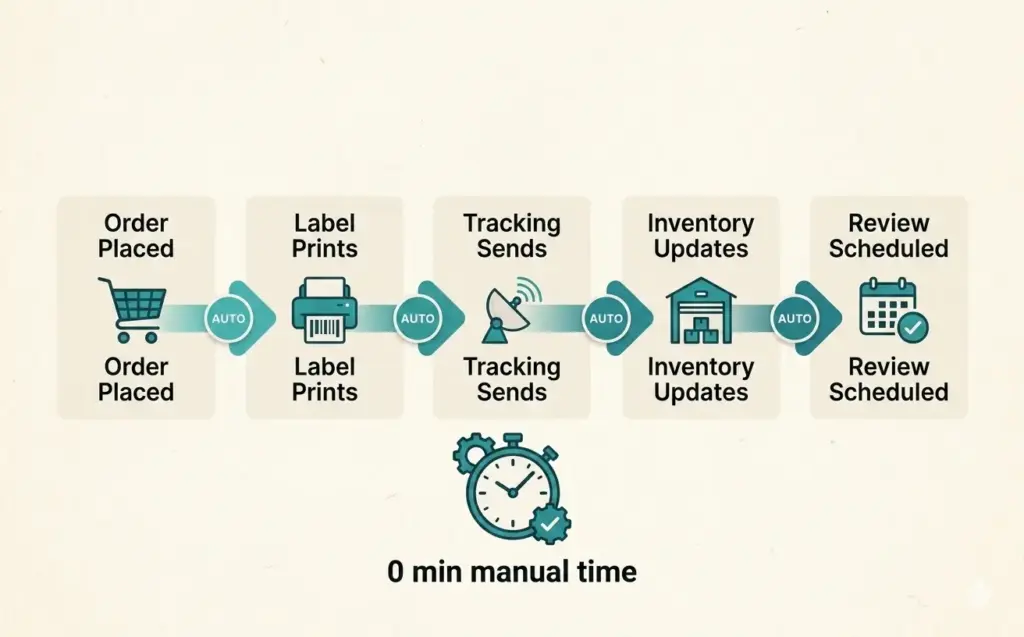
Implementation Priority: What to Automate First
Don’t automate everything simultaneously. Follow this sequence based on time saved per implementation effort:
- Week 1: Order processing. Highest daily time savings. Configure shipping automation through your platform or ShipStation. Impact: 5-10 hours/week saved immediately.
- Week 2-3: Email flows. Set up the five core automated flows. Each flow generates revenue passively once configured. Impact: 5-8 hours/week saved plus incremental revenue.
- Week 4: Customer service. Install a chatbot, create a self-service tracking page, and build macro templates. Impact: 5-10 hours/week saved on repetitive inquiries.
- Month 2: Inventory sync. Critical if selling on 2+ channels. Connect your inventory system across all platforms. Impact: prevents overselling disasters and saves 3-5 hours/week of manual updates.
- Month 3: Marketing and pricing. Add social scheduling, review automation, and pricing tools as order volume justifies the subscription costs.
Each automation should be running smoothly before you add the next. Rushing implementation creates more problems than it solves. Choose the right ecommerce platform and apps that support the automations you need.
When to Automate vs When to Hire
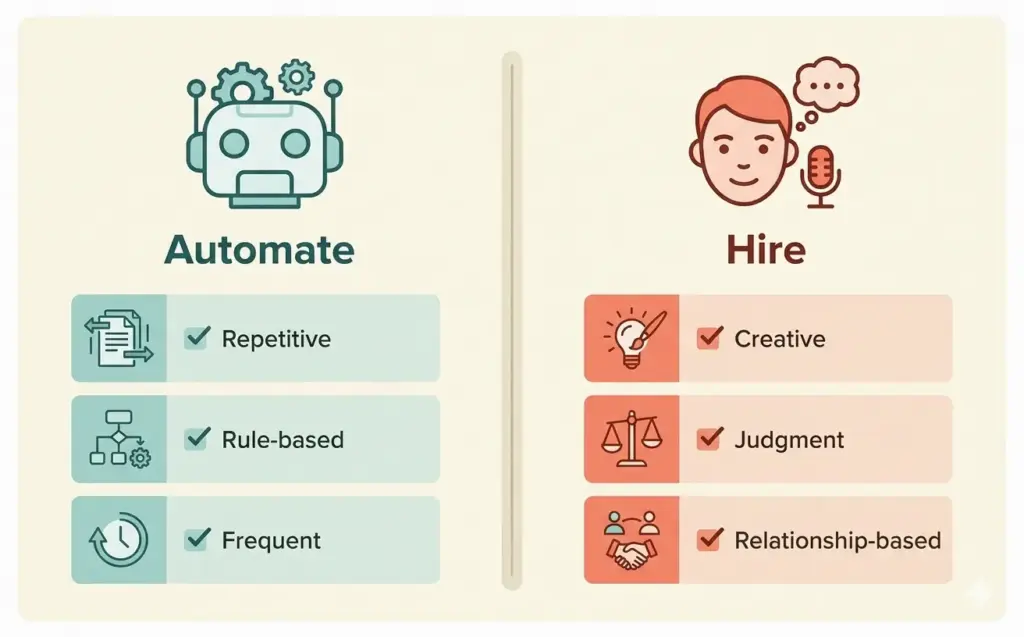
Automate when: The task is repetitive with clear rules (if X happens, do Y). The task happens frequently (daily or with every order). The task doesn’t require judgment, creativity, or emotional intelligence. Most order processing, inventory updates, and routine emails fall here.
Hire when: The task requires creative decisions (product photography, brand strategy, content creation). The task involves complex human interaction (VIP customer relationships, supplier negotiations). The task has too many exceptions for rules-based automation. Our startup costs guide helps budget for both automation tools and eventual team members.
The ideal progression: automate everything automatable first, then hire humans for the work that requires human capabilities. A solo operator with good automation can manage a store doing $20,000-50,000/month. Beyond that, the work that can’t be automated (strategy, relationships, creative) justifies hiring.
Frequently Asked Questions
Start with order processing automation (shipping labels, tracking updates, confirmation emails). It saves the most time per day because it runs on every single order. Second priority is email marketing flows (abandoned cart, welcome series, post-purchase) because they generate revenue automatically. Third is customer service chatbots for routine inquiries.
Basic automation (shipping + email + chatbot) costs $30-150/month using free tiers and affordable tools. Mid-level automation adding inventory sync and pricing costs $200-500/month. Full automation stack costs $500-1,500/month. Most solo operators get 80% of the value from the basic tier. The tools pay for themselves by saving 15-20 hours per week of manual work.
Ecommerce automation follows rules you set (if order placed, print label and send email). AI automation makes decisions based on data patterns (generate product description, predict demand, personalize recommendations). Traditional automation handles predictable workflows. AI handles tasks requiring judgment or content generation. Most stores need both, starting with traditional automation first.
Yes. A solo operator with proper automation can manage a store doing $20,000-50,000 per month. Automate order processing, email flows, customer service (chatbot), and inventory tracking. These four automations eliminate 15-20 hours per week of manual work, freeing you for product sourcing, marketing strategy, and growth activities that require human judgment.
By function: ShipStation for order processing ($9.99/mo+), Klaviyo for email automation (free to 250 contacts), Tidio for customer service chatbots (free tier), Cin7 or Ordoro for inventory sync ($59-349/mo), Prisync for competitive pricing ($59/mo+), and Buffer for social media scheduling (free tier). Choose based on your biggest time drain, not the longest feature list.
Most ecommerce automation tools are designed for non-technical users. Shopify’s built-in shipping automation requires zero coding. Klaviyo’s email flows use drag-and-drop builders. Tidio’s chatbot trains through a visual interface. The tools handle the technical complexity. You configure the rules and triggers through user-friendly dashboards.
Related Reads
- AI Automation for Ecommerce
- Inventory Management Guide
- Customer Retention Strategies
- Ecommerce Tools and Tech Stack
- Best Shopify Apps
- Ecommerce Startup Costs
Enjoying this? Get more like it every week.
One email per week with ecommerce strategies, tool picks, and seller insights. No spam.