
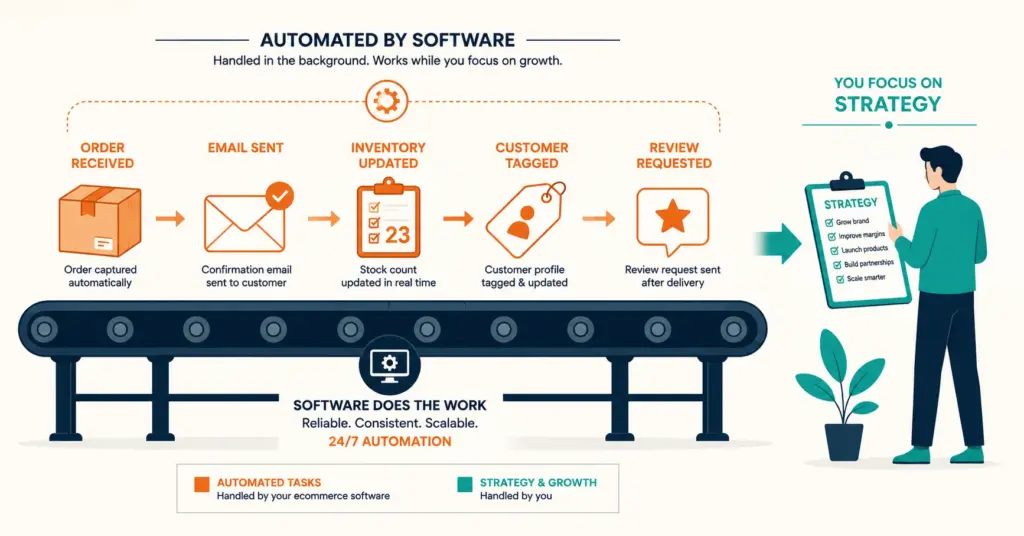
- Ecommerce stores lose 30 to 40% of operational time to repetitive tasks: updating inventory counts, sending order notifications, tagging customers, generating reports, syncing data between apps. Workflow automation tools handle these tasks without human involvement, freeing that time for decisions that actually need a person.
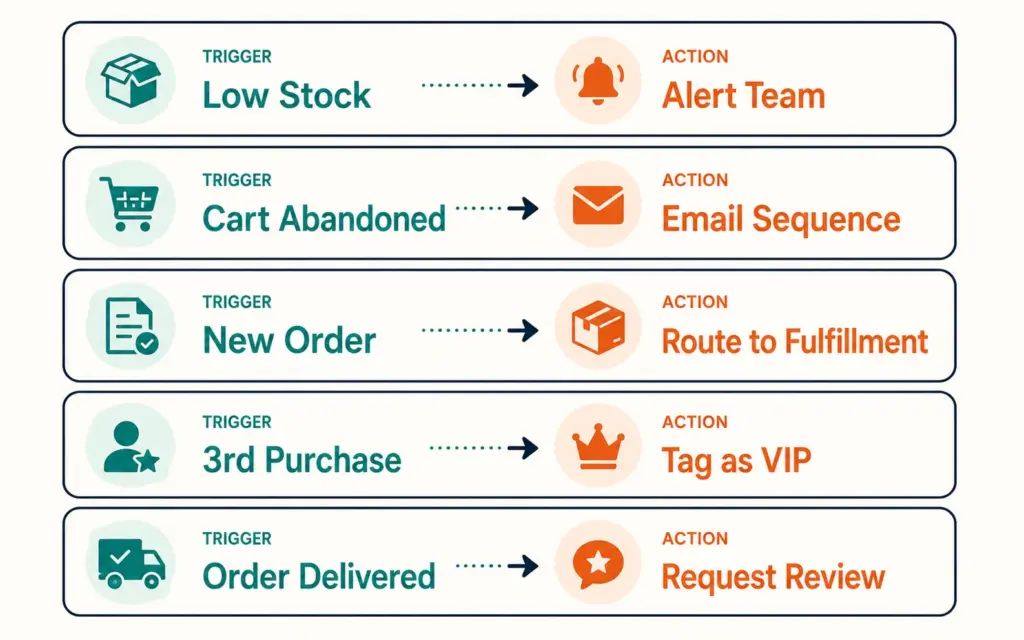
- The five automations worth setting up first: low-stock alerts before stockouts happen, abandoned cart email sequences, order-to-fulfillment routing, customer tagging based on purchase behavior, and review request emails timed to delivery. These five alone save most stores 10 to 15 hours per week and prevent revenue losses from missed reorders and unrecovered carts.
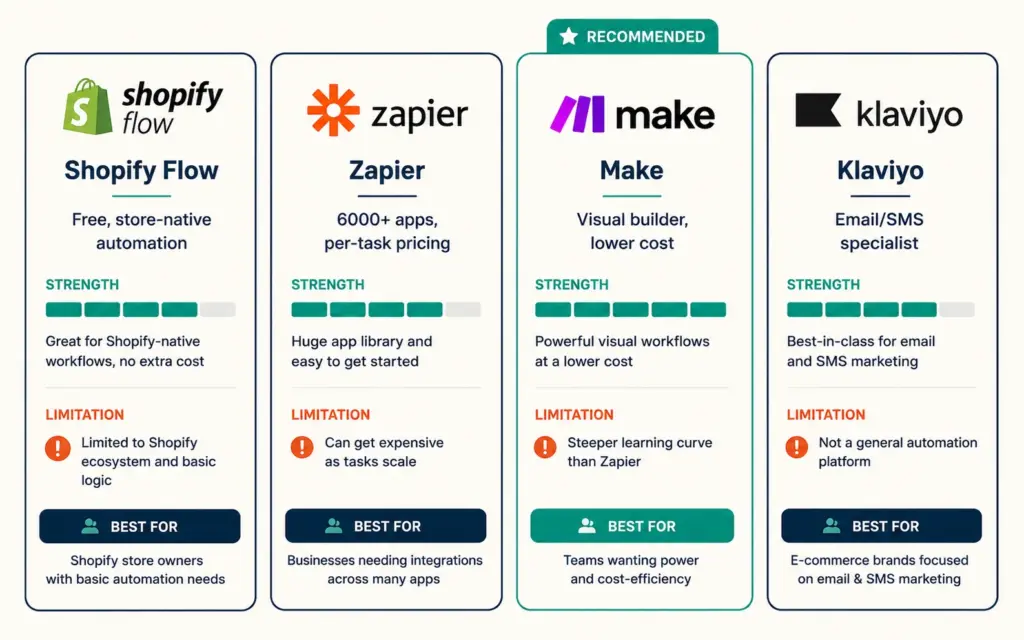
- Tool selection depends on your platform and complexity. Shopify Flow handles most Shopify-native automations for free. Zapier connects any app to any app but gets expensive at high volumes. Klaviyo automates the email and SMS side. Make (formerly Integromat) handles complex multi-step workflows at lower cost than Zapier. Most stores need 2 of these, not all 4.
- The biggest automation mistake is starting with complex workflows. Start with one automation that solves a specific pain point you deal with daily. Get it running reliably. Then add the next one. Stores that try to automate everything at once end up with broken workflows nobody trusts, and the team goes back to doing things manually.
Workflow automation tools for ecommerce replace the repetitive manual tasks that eat up your day with software that runs them without you. Updating a spreadsheet when an order comes in. Sending a restock alert when inventory drops below 10 units. Tagging a customer as “VIP” after their third purchase. Posting a Slack notification when a refund is issued. None of these tasks require human judgment. All of them consume human time.
The pitch for automation is always about saving time, and that’s real. But the bigger value is reliability. A person forgets to check inventory levels on a busy Friday and you sell out over the weekend without reordering. An automation never forgets. According to TheAutomators’ analysis of ecommerce operations, stores using automated workflows report up to 65% reduction in stockouts and 50% faster order processing compared to manual methods. Those aren’t efficiency gains. Those are revenue protection.
The 5 Automations to Set Up First
Not every task needs automation. Some tasks happen once a week and take 5 minutes. Automate the tasks that happen daily, are time-sensitive, or cause problems when missed.
1. Low-stock inventory alerts
Trigger: inventory count drops below your reorder threshold. Action: send a Slack message, email, or push notification to whoever handles purchasing.
This is the single most valuable automation for product-based stores because a stockout doesn’t just lose today’s sale. On Amazon, it tanks your listing ranking. On your own store, it sends the customer to a competitor. On Etsy, it kills the listing quality score you spent months building. A $0/month automation that sends an alert at 15 units prevents a $5,000 revenue loss from a week-long stockout. The demand forecasting model tells you what threshold to set. The automation executes when that threshold is hit.
2. Abandoned cart recovery sequence
Trigger: customer adds to cart but doesn’t complete checkout within 1 hour. Action: send a 3-email recovery sequence at 1 hour, 24 hours, and 72 hours.
This is the highest-ROI email automation in ecommerce. It recovers 10 to 15% of abandoned carts with zero ongoing effort after initial setup. Klaviyo and Omnisend have pre-built flows for this. The abandoned cart emails guide covers the exact sequence, subject lines, and discount timing.
3. Order routing to fulfillment
Trigger: new order placed. Action: route to the correct fulfillment channel based on rules (product type, shipping method, warehouse location).
If you sell across multiple channels or use a mix of self-fulfillment and 3PL guide, manual order routing is a bottleneck. Shopify Flow can tag orders by type and send fulfillment instructions automatically. Stores with split fulfillment (some products ship from your garage, others from a 3PL warehouse) save 30 minutes to 2 hours daily by automating this routing.
4. Customer tagging by purchase behavior
Trigger: customer completes their 2nd purchase, or spends over $200 lifetime. Action: add a “Repeat Buyer” or “VIP” tag in your CRM or email platform.
Tags power everything downstream: which email segments see which campaigns, who gets VIP discounts, who receives early access to new products. But manually reviewing customer purchase history and applying tags is tedious and falls behind within weeks. Automate it and your segmentation stays accurate without anyone maintaining it.
5. Post-delivery review request
Trigger: order marked as delivered (or X days after shipment). Action: send an email asking for a review, with a direct link to the review form.
Timing matters. Ask too early and the customer hasn’t received the product. Ask too late and they’ve moved on. 7 to 14 days after delivery is the sweet spot. Automate the timing and every customer gets the ask at the right moment. Manual review requests are inconsistent and the inconsistency costs you reviews. The reviews and social proof strategy depends on systematically asking, which means automating the ask.
Tool Comparison: What Does What
Shopify Flow (free with Shopify)
If you’re on Shopify, this is where to start. It’s free, it’s native, and it handles the most common operational automations without connecting external tools. You build workflows using a visual trigger-condition-action interface. No code required.
What it does well: inventory management triggers (tag products as low stock, hide out-of-stock items, notify your team), order management (tag high-value orders for priority fulfillment, flag potential fraud), customer management (tag customers by purchase count or spend level, auto-segment for marketing). It runs inside Shopify’s ecosystem so there’s no data syncing delay. Changes happen in real-time.
Where it falls short: it only works within Shopify. You can’t use it to connect Shopify to Google Sheets, Slack, your accounting software, or your warehouse management system. For cross-app workflows, you need Zapier or Make. The best Shopify apps guide covers which apps integrate natively with Flow for extended functionality.
Zapier ($0 to $69+/month)
Zapier connects over 6,000 apps using simple trigger-action workflows called “Zaps.” New Shopify order → create row in Google Sheets. New customer in Klaviyo → add to Slack channel. Refund processed → send notification to finance team. If two apps exist, Zapier probably connects them.
What it does well: breadth of integrations. Almost any tool in your stack has a Zapier connector. Setup is fast for simple workflows. It’s accessible to non-technical team members.
Where it falls short: pricing. Zapier charges per task (each action in a workflow counts as a task). A store processing 500 orders/day with 3 tasks per order burns through 45,000 tasks/month, pushing costs to $69+/month or higher. Multi-step workflows with complex branching get messy in Zapier’s interface. For high-volume stores, Make or n8n are more cost-effective.
Make (formerly Integromat, $0 to $16+/month)
Make does what Zapier does but with a visual workflow builder that handles complexity better and costs less at scale. The interface shows data flowing between steps, making it easier to debug when something breaks. Operations teams and agencies tend to prefer Make over Zapier for anything beyond simple two-step connections.
What it does well: complex multi-step workflows with branching logic, data transformation, and error handling. Better value than Zapier at moderate to high volumes. More granular control over how data moves between apps.
Where it falls short: steeper learning curve. Non-technical users find Zapier easier to set up for simple automations. Fewer pre-built templates than Zapier. If your workflow is “when X happens, do Y,” Zapier is simpler. If your workflow is “when X happens, check condition A, if true do Y, if false do Z, then update W,” Make handles it better.
Klaviyo (email/SMS automation, $0 to $45+/month)
Klaviyo isn’t a general-purpose automation tool. It automates email and SMS marketing specifically, and it does that better than any general tool can. Pre-built flows for abandoned carts, welcome series, post-purchase sequences, win-back campaigns, and browse abandonment. Predictive analytics for churn risk and next-order timing. Deep Shopify integration that syncs customer data in real-time.
The email marketing strategy for most ecommerce stores runs on Klaviyo. It handles the marketing automation side while Shopify Flow or Zapier handles the operational automation side. You need both types, but they’re different tools for different jobs.
What to Automate (and What Not To)
Automate: repetitive, rule-based, time-sensitive
- Inventory level alerts and automatic reorder notifications
- Order tagging based on product type, value, or shipping method
- Customer segmentation by purchase frequency, AOV, or product category
- Email/SMS flows triggered by specific customer actions
- Data syncing between your store, accounting software, and spreadsheets
- Social media posting schedules and product feed updates
- Return processing notifications and refund confirmations
Don’t automate: judgment calls, relationship moments, complex decisions
- Responding to upset customers (automate the routing, not the response)
- Product selection and sourcing decisions
- Brand partnerships and influencer negotiations
- Pricing strategy changes (automate the execution after you decide, not the decision itself)
- Creative work: ad copy, product photography, brand storytelling
The standard operating procedures you’ve documented are the best candidates for automation. If a task has a written SOP with clear “if X then do Y” logic, software can follow that logic faster and more consistently than a person.
Building Your Automation Stack
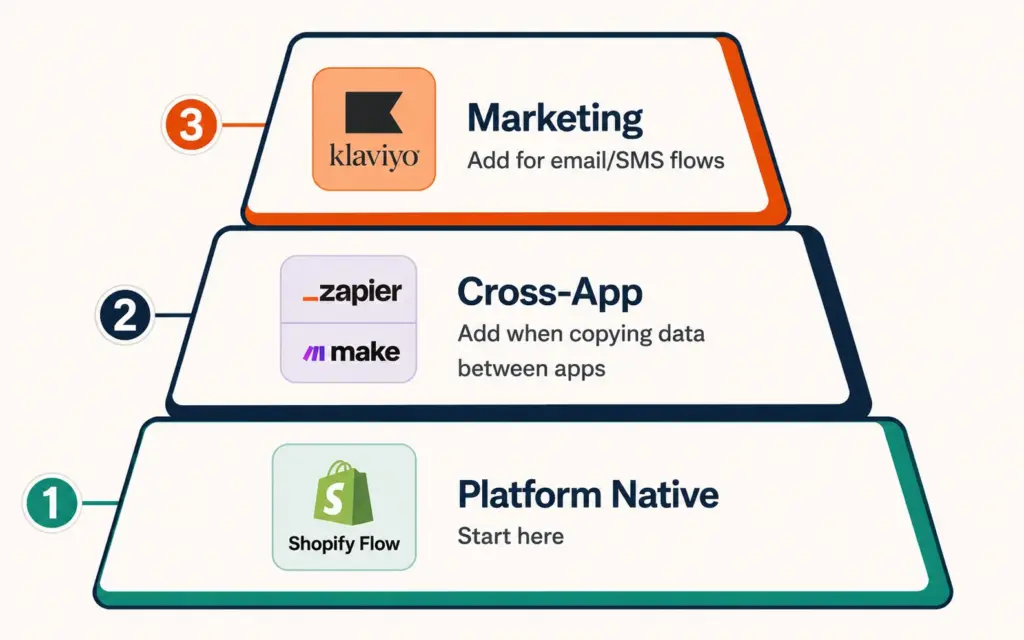
Most ecommerce stores need two automation layers:
Layer 1: Platform-native automation. Shopify Flow, WooCommerce Automations, or BigCommerce Workflows. These handle store-specific tasks (inventory, orders, customer tags) within your platform. Free or included with your plan. Start here.
Layer 2: Cross-app automation. Zapier or Make. These connect your store to external tools (accounting, project management, communication, analytics). Add this layer when you find yourself manually copying data between apps more than 3 to 5 times per week.
Layer 3 (optional): Marketing automation. Klaviyo, Omnisend, or ActiveCampaign. Dedicated email/SMS automation with ecommerce-specific triggers and flows. Add when your email marketing strategy outgrows basic platform emails.
That’s it. Three layers cover 95% of ecommerce automation needs. You don’t need an enterprise automation suite. You don’t need custom-built integrations. You need Shopify Flow + Zapier/Make + Klaviyo, configured to handle the specific tasks that eat your time. The ecommerce tools and tech stack approach should evaluate automation tools by the hours they save per month divided by their monthly cost. Anything above $50/hour saved per $1 spent is a strong investment. According to DigitalApplied’s ecommerce automation research, retailers see average payback on automation investments within 9 months, with AI-enabled workflows reducing manual operations by 40 to 60% in the first four weeks.
Common Automation Mistakes
Automating everything at once. You read this guide, get excited, and try to build 15 automations in a weekend. Three of them conflict with each other, two break within a week, and your team stops trusting any of them. Start with one. Make it reliable. Then add the next. The ERP for ecommerce implementation principle applies here: phased rollout beats big-bang deployment every time.
No error monitoring. An automation that fails silently is worse than no automation. A broken Zap that was supposed to alert you about low stock means you think you’re protected when you’re not. Every automation should include a failure notification: if the workflow errors, someone gets a Slack message or email immediately. Check your automation logs weekly for the first month after setup.
Automating broken processes. If your order fulfillment process is chaotic and inconsistent, automating it just makes the chaos faster. Fix the process first. Write the SOP. Walk through it manually a few times. Then automate the working version. Automation amplifies whatever you feed it: good processes get faster, broken processes get louder.
Not testing with real data. An automation that works in test mode with sample data might break with real orders that have special characters in customer names, international addresses, or unusual product variants. Test every automation with 5 to 10 real transactions before trusting it to run unsupervised. The order fulfillment process automations especially need real-data testing because edge cases (split shipments, backorders, address corrections) only surface with actual order volume.
Frequently Asked Questions
Shopify Flow for store-native automations (inventory, orders, customer tagging). It’s free, built into Shopify, and handles the most common operational workflows without external tools. Add Zapier or Make when you need to connect Shopify to external apps like Google Sheets, Slack, or your accounting software. Add Klaviyo for email and SMS automation. Most Shopify stores run well on these three without anything else.
10 to 20 hours per week for a store doing 50+ orders per day, based on automating the five core workflows: inventory alerts, cart recovery emails, order routing, customer tagging, and review requests. Smaller stores (10 to 30 orders/day) save 5 to 10 hours weekly. The time savings compound as order volume grows because manual tasks scale linearly with orders while automated tasks don’t scale at all.
Zapier is easier for simple workflows and has more app integrations (6,000+). Make is better for complex multi-step workflows with branching logic and is more cost-effective at higher volumes because it charges per operation rather than per task. If your automations are mostly “when X, do Y,” Zapier is simpler. If you need conditional logic, data transformation, or process 10,000+ actions monthly, Make saves money and handles complexity better.
No. Shopify Flow, Zapier, Make, and Klaviyo are all no-code tools with visual builders. You select triggers, set conditions, and choose actions using dropdown menus and toggle switches. Technical knowledge helps for complex workflows (API connections, data formatting), but the five core ecommerce automations covered in this guide are all buildable without writing a line of code.
Low-stock inventory alerts. It takes 5 minutes to set up in Shopify Flow, costs nothing, and prevents the most expensive operational failure (stockouts that lose sales and damage marketplace rankings). After that: abandoned cart emails (highest revenue recovery per effort), customer tagging (powers all downstream segmentation), order routing (daily time savings), and review requests (systematic review collection).
Partially. Automation handles the repetitive execution tasks that would otherwise require a part-time operations assistant: data entry, order processing, inventory monitoring, and email sending. It doesn’t replace the judgment tasks: customer service conversations, vendor negotiations, marketing strategy, or product decisions. Most growing stores find that automation delays the first operations hire by 3 to 6 months and reduces the scope of that role when it’s eventually filled.
Related Reads
- Standard Operating Procedures
- Order Fulfillment Process
- Demand Forecasting
- Abandoned Cart Emails
- Email Marketing Strategy
- Ecommerce Tools and Tech Stack
Enjoying this? Get more like it every week.
One email per week with ecommerce strategies, tool picks, and seller insights. No spam.