
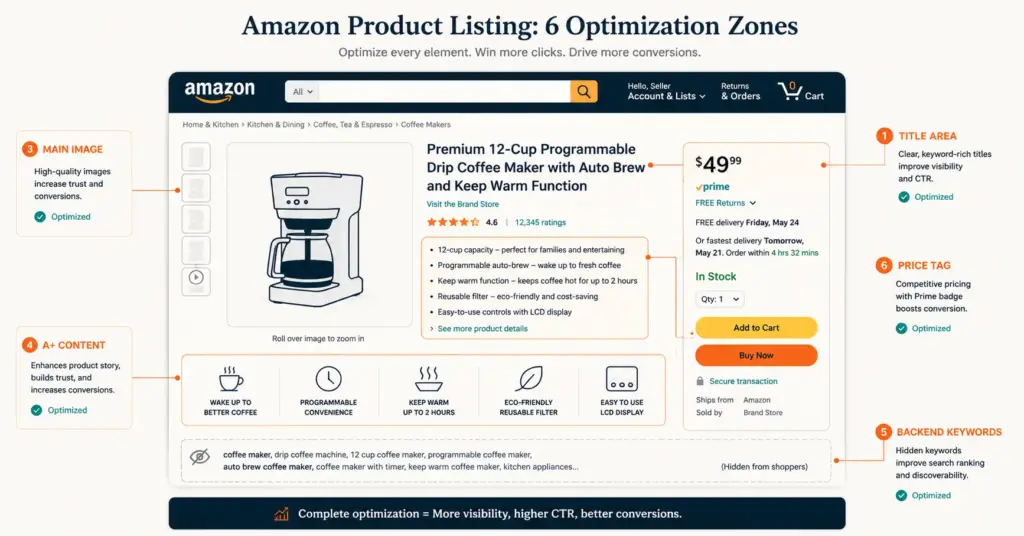
- Amazon listing optimization is the process of improving your product title, bullet points, description, images, A+ Content, and backend keywords to increase organic search visibility and conversion rate on Amazon. Optimized listings rank higher in Amazon search results and convert 15 to 40% better than unoptimized competitors.
- The 6 elements that determine Amazon listing performance: title (most weight for search ranking), bullet points (conversion driver), main image (click-through rate), A+ Content (conversion lift 3 to 10%), backend keywords (hidden search terms), and pricing (Buy Box eligibility).
- Amazon's A9/A10 search algorithm ranks products based on relevance (keyword match), performance (conversion rate, sales velocity), and customer satisfaction (reviews, return rate). Optimization must address all three factors, not just keywords.
- The most common listing optimization mistake is keyword stuffing titles at the expense of readability. Amazon's algorithm now penalizes unreadable titles, and human buyers skip listings with titles that read like keyword dumps.
Amazon listing optimization is the process of improving every element of a product listing, from title and images to bullet points and backend keywords, to increase organic search visibility and conversion rate on Amazon’s marketplace. Amazon processes over 12 million product searches per hour, and the difference between appearing on page 1 and page 3 is typically the difference between 200+ daily sales and 2. According to Amazon Seller Central’s optimization resources, listings with complete, optimized content generate 3 to 5x more impressions and 15 to 40% higher conversion rates than incomplete or generic listings.
The optimization process isn’t guesswork. Amazon’s search algorithm (A9/A10) weighs specific ranking factors in a predictable order: keyword relevance, conversion rate, sales velocity, and customer satisfaction metrics. Each element of the listing maps to one or more of these factors. Optimizing systematically, element by element, compounds the ranking signal across all factors simultaneously. For the full Amazon selling framework, see our Amazon FBA guide.
This guide covers the 6 listing elements that determine performance, the optimization process for each element, the keyword research approach specific to Amazon, and the measurement framework that validates whether changes actually improved results.
What Factors Does Amazon’s Algorithm Use to Rank Listings?
Amazon’s search algorithm evaluates listings across three categories:
| Factor Category | Specific Signals | Your Control Level |
|---|---|---|
| Relevance | Title keywords, bullet keywords, backend keywords, category placement | Full control |
| Performance | Conversion rate, sales velocity, click-through rate, session count | Indirect control (via listing quality) |
| Customer Satisfaction | Review rating, review count, return rate, seller feedback | Partial control (product quality + service) |
Most sellers focus only on relevance (keywords) and ignore performance and satisfaction signals. A listing stuffed with keywords but converting at 5% will be outranked by a listing with fewer keywords converting at 15%. Amazon wants to show products that sell because Amazon earns commission on every sale. Your goal and Amazon’s goal are aligned: help buyers find and buy the right product.
How Do I Optimize My Amazon Product Title?
The title carries the most weight for Amazon search ranking. It’s also the first text buyers see in search results, making it the primary click-through rate driver.
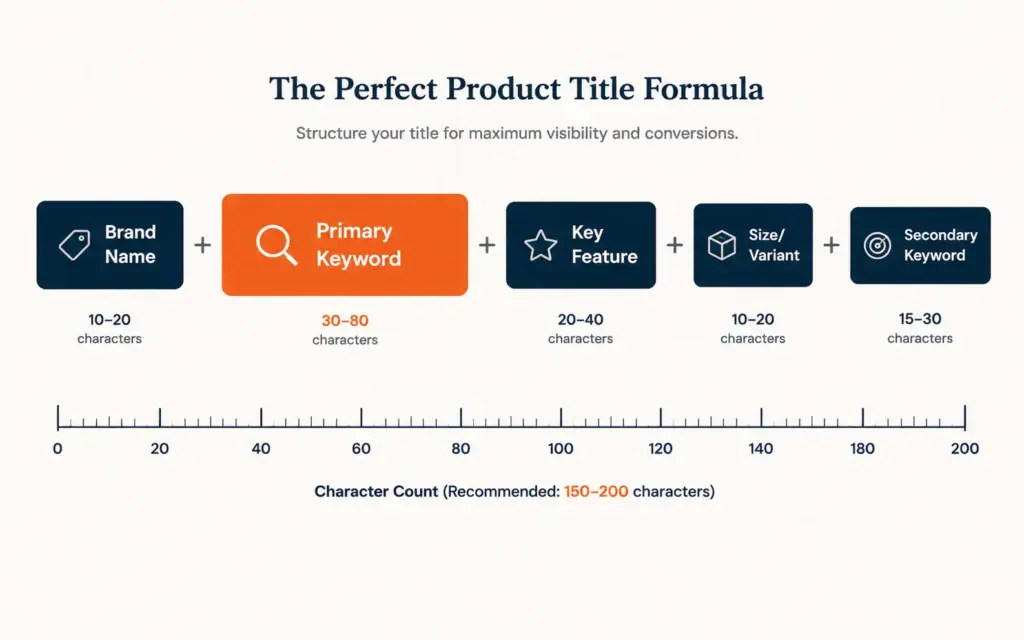
Title formula
Brand Name + Primary Keyword + Key Feature/Benefit + Size/Variant + Secondary Keyword
Example: “ChefPro Bamboo Cutting Board with Juice Groove, Large 18×12 Inch, Non-Slip Kitchen Chopping Board for Meat and Vegetables”
Title optimization rules
- Character limit: 200 characters maximum (Amazon truncates beyond this). Aim for 150 to 180 characters to include core keywords while remaining readable.
- Primary keyword first: Place the most important search term within the first 80 characters. Amazon gives extra weight to early-position keywords, and mobile search results truncate after approximately 80 characters.
- Readability matters: Titles that read like keyword dumps (“Cutting Board Bamboo Wood Kitchen Board Chopping Large Board Meat Board”) get penalized by Amazon’s title quality score and skipped by human buyers. Natural language with strategic keyword placement outperforms stuffed titles.
- Include key product differentiator: Size, color, material, or primary benefit. “18×12 Inch” and “Non-Slip” immediately answer buyer questions and reduce comparison shopping.
- Capitalize correctly: Title case (capitalize first letter of each major word). All-caps triggers suppression in some categories.
Amazon keyword research for titles
Amazon keyword research differs from Google keyword research because Amazon searchers have purchase intent, not informational intent. Tools: Helium 10 (Cerebro, Magnet), Jungle Scout (Keyword Scout), or free alternatives like Amazon’s own search autocomplete and Brand Analytics (available to Brand Registered sellers).
Process: search your product category in Amazon’s search bar and note autocomplete suggestions. These are real, high-volume search terms. Cross-reference with Helium 10 or Jungle Scout for exact search volume. Prioritize keywords with 1,000+ monthly Amazon searches that accurately describe your product. For broader product research methods, see our best selling products research guide.
How Do I Write Converting Bullet Points?
Amazon allows 5 bullet points (Key Product Features) of up to 500 characters each. Bullet points are the primary conversion driver because they answer buyer questions and overcome purchase objections.
Bullet point structure
Each bullet follows: BENEFIT IN CAPS + supporting detail with features and specifications.
- Bullet 1: Primary benefit. The main reason someone buys this product. “CUTS MEAL PREP TIME IN HALF: 7 interchangeable blade attachments handle dicing, slicing, and julienne cuts in seconds, replacing 4 separate kitchen tools.”
- Bullet 2: Quality/material. What it’s made of and why that matters. “PREMIUM BAMBOO THAT LASTS: Organic moso bamboo is 16% harder than maple, resists knife scarring, and won’t dull your blades like glass or ceramic boards.”
- Bullet 3: Key differentiator. What sets you apart from competitors. “NON-SLIP GRIP ON ANY SURFACE: Silicone corner feet keep the board stable on wet countertops, tile, and granite, eliminating the cutting board slide that causes kitchen accidents.”
- Bullet 4: Use case or compatibility. Who this product is for and how it’s used. “SIZED FOR REAL COOKING: 18×12 inch surface fits a whole chicken, large vegetables, and multi-ingredient meal prep without crowding, while still fitting in standard dishwashers.”
- Bullet 5: Risk reversal. Warranty, guarantee, or included extras. “WORRY-FREE PURCHASE: Backed by our 2-year satisfaction guarantee. If the board cracks, warps, or stains within 24 months, we replace it free, no questions asked.”
Include secondary keywords naturally within bullets. Don’t repeat keywords already in the title. For copywriting principles that apply to bullet writing, see our product descriptions guide.
How Do I Optimize Amazon Product Images?
Amazon allows 7 to 9 images per listing. The main image determines click-through rate in search results. Supporting images drive conversion on the product detail page.
Image optimization by slot
| Image Slot | Content | Purpose |
|---|---|---|
| Main image | Product on pure white background, filling 85%+ of frame | Click-through rate in search results |
| Image 2 | Product in use (lifestyle/context) | Help buyer visualize ownership |
| Image 3 | Key features with callout text overlays | Communicate benefits visually |
| Image 4 | Size/scale reference (next to common object) | Answer “how big is it?” question |
| Image 5 | Comparison infographic (vs competitor approach) | Differentiation and value |
| Image 6 | What’s included (all components laid out) | Set expectations, reduce returns |
| Image 7 | Social proof (review quotes, awards, certifications) | Build trust at decision point |
Technical requirements: minimum 1,000px on longest side (2,000px recommended for zoom), JPEG or PNG, pure white background (#FFFFFF) for main image, RGB color mode. Listings with 6+ high-quality images convert 20 to 30% better than those with 3 or fewer. For ad creative that drives traffic to listings, see our ad creative tips guide.
What is A+ Content and How Do I Use It?
A+ Content (formerly Enhanced Brand Content) is the rich media section below the standard product description. Available to Brand Registered sellers, A+ Content allows formatted text, comparison charts, brand story modules, and high-resolution images that standard descriptions cannot include.
A+ Content impact
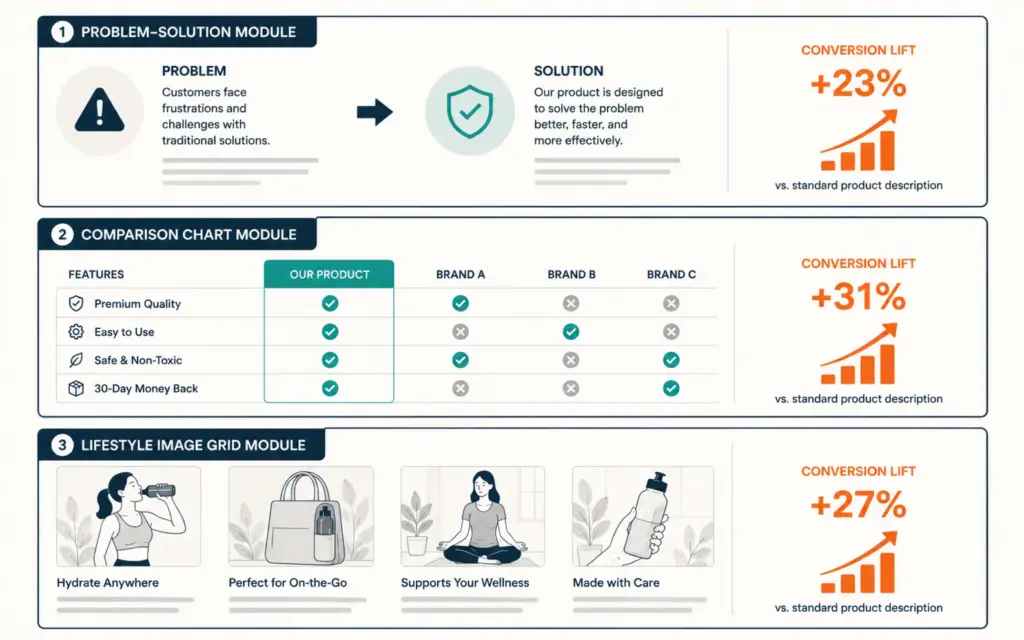
Amazon reports that A+ Content lifts conversion 3 to 10% on average. According to Amazon’s A+ Content guide, listings with A+ Content also see reduced return rates because better product information sets accurate expectations. The combination of higher conversion and lower returns makes A+ Content one of the highest-ROI listing optimizations.
A+ Content best practices
- Lead with the problem your product solves: The first module should address the buyer’s pain point, not your brand history
- Use comparison charts: Compare your product variations or compare your approach to the “traditional way.” Comparison modules are the highest-converting A+ module type
- Include lifestyle imagery: Show the product in aspirational use contexts. Lifestyle A+ images convert better than additional white-background product shots
- Cross-sell related products: Use the brand story module or comparison chart to showcase complementary products from your catalog
- Keep text concise: A+ Content is visual-first. Short paragraphs (2 to 3 sentences) with strong headers outperform text-heavy modules
How Do Backend Keywords Work?
Backend keywords (Search Terms) are hidden keywords in Seller Central that influence search ranking without appearing on the visible listing. Amazon provides 250 bytes for backend keywords.
Backend keyword rules
- Don’t repeat title or bullet keywords: Amazon already indexes visible content. Backend keywords are for additional terms not in your visible listing.
- Include misspellings and alternate spellings: “cutiing board,” “chopping bord,” “cutting bored.” Buyers misspell; backend keywords capture those searches.
- Include Spanish or other language terms: If your product appeals to multilingual audiences, include translations of key search terms.
- Use single words, not phrases: “bamboo wood kitchen large” works the same as “large bamboo wood kitchen cutting board” but uses fewer bytes.
- No commas needed: Spaces separate terms. Commas waste bytes.
- No competitor brand names: Amazon prohibits competitor brand names in backend keywords. Violations risk listing suppression.
How Do I Optimize Amazon Pricing for Ranking?
Price directly impacts Buy Box eligibility, conversion rate, and organic ranking. Amazon’s algorithm favors listings that convert, and price is the strongest conversion lever.
Pricing strategy for Amazon listings
- Competitive pricing: Price within 5 to 15% of the top 3 organic competitors for your primary keyword. Significantly higher pricing requires clear differentiation visible in images and bullets.
- Psychological pricing: $29.97 outperforms $30.00. Prices ending in 7 or 9 consistently outperform round numbers in Amazon conversion testing.
- Coupon and deal strategy: Amazon coupons (visible green badge in search results) lift click-through rate 15 to 25% and conversion 5 to 10%. The cost is the coupon value plus $0.60 per redemption. Lightning Deals provide temporary ranking boosts but require inventory and margin sacrifice.
For margin analysis on Amazon pricing decisions, use our profit margin calculator and see our ecommerce pricing strategy guide.
How Do I Measure Listing Optimization Success?
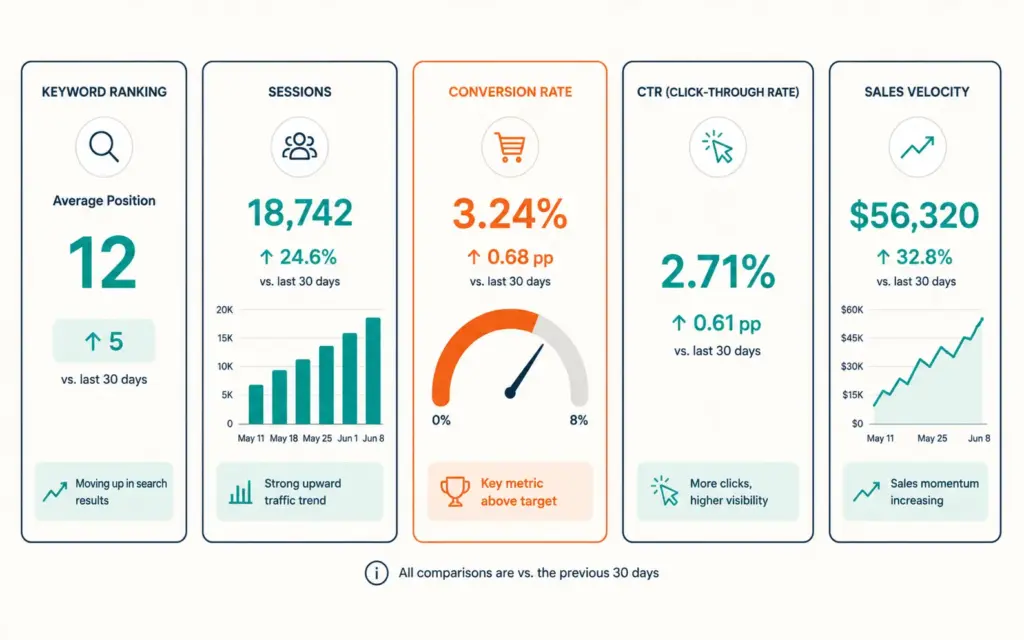
The 5 Amazon listing metrics
- Organic keyword ranking: Track your position for 10 to 15 primary keywords weekly using Helium 10 or Jungle Scout. Movement from page 3 to page 1 typically takes 4 to 8 weeks after optimization.
- Session count: Total product detail page views. Available in Seller Central > Business Reports. Increasing sessions without increased ad spend indicates organic visibility improvement.
- Unit session percentage (conversion rate): Orders divided by sessions. Amazon average is 10 to 15%. Above 20% is strong. Below 8% signals listing quality issues.
- Click-through rate: Impressions to clicks in search results. Primarily driven by main image, title, price, and review count. Available in Brand Analytics for Brand Registered sellers.
- Sales velocity trend: Daily and weekly unit sales. Rising velocity with constant ad spend indicates organic ranking improvement from listing optimization.
Track these metrics before and after each optimization change. Isolate one change at a time (title change, then wait 2 weeks; bullet change, then wait 2 weeks) to attribute results to specific modifications. For broader analytics depth, see our ecommerce KPIs guide.
Common Amazon Listing Mistakes
Keyword stuffing the title
A title that reads “Bamboo Cutting Board Wood Cutting Board Large Cutting Board Kitchen Cutting Board Chopping Board Non Slip Board” is unreadable and triggers Amazon’s title quality warnings. Natural language with strategic keyword placement outranks keyword dumps because Amazon’s algorithm now factors readability and the listing converts better when humans can actually read the title.
Using manufacturer-provided images only
Generic manufacturer images appear on every competitor’s listing selling the same product. Custom lifestyle photography, infographic images with callout text, and size reference photos differentiate your listing and lift conversion 20 to 30%. Invest $300 to $500 in a product photography session for your top 5 products. For product page strategy, see our product page design guide.
Ignoring A+ Content
Free to create for Brand Registered sellers. Lifts conversion 3 to 10%. Yet over 60% of Brand Registered sellers don’t use it. The most common reason: “We’ll get to it later.” Later costs you 3 to 10% of every sale in the meantime.
Not optimizing for mobile
Over 70% of Amazon shoppers browse on mobile. On mobile, only the first 80 characters of the title show, only the first 2 bullet points are visible without expanding, and only the first 3 images display without scrolling. Front-load your most important content into the first 80 title characters, first 2 bullets, and first 3 images.
Frequently Asked Questions
Amazon listing optimization is the process of improving every element of a product listing (title, bullet points, images, A+ Content, backend keywords, and pricing) to increase organic search visibility and conversion rate on Amazon. Optimized listings rank higher in search results, get more clicks, and convert 15 to 40% better than unoptimized competitors. The process combines keyword research, conversion-focused copywriting, and strategic image selection.
Start with Amazon search autocomplete: type your product category and note the suggestions (these are real high-volume searches). Cross-reference with Helium 10 Cerebro (reverse ASIN lookup on top competitors) or Jungle Scout Keyword Scout for exact search volumes. Prioritize keywords with 1,000+ monthly Amazon searches. Use Brand Analytics if available for actual search frequency data. Include primary keywords in the title, secondary keywords in bullets, and remaining terms in backend search terms.
Use all 7 available image slots minimum. Listings with 6+ high-quality images convert 20 to 30% better than those with 3 or fewer. Include: main image (white background), lifestyle/in-use image, feature callout infographic, size reference, comparison chart, what’s-in-the-box, and social proof (reviews/certifications). All images should be minimum 2,000px on the longest side for zoom functionality.
A+ Content is a rich media section below the standard product description available to Brand Registered sellers. It includes formatted text, comparison charts, brand story modules, and high-resolution images. Amazon reports A+ Content lifts conversion 3 to 10% and reduces return rates. It’s free to create and one of the highest-ROI listing optimizations available. Over 60% of eligible sellers don’t use it, creating a competitive advantage for those who do.
Keyword ranking changes typically appear within 1 to 2 weeks, with full impact visible at 4 to 8 weeks. Conversion rate improvements from better images and bullets show within 7 to 14 days with sufficient traffic. A+ Content impact appears within 2 to 4 weeks. Track changes one at a time with 2-week gaps between modifications to isolate which specific optimization drove the result.
Average Amazon conversion rate (unit session percentage) is 10 to 15% across all categories. Above 20% is strong. Below 8% signals listing quality issues that need immediate attention. Conversion varies by category: consumables and low-price items convert higher (15 to 25%); electronics and high-consideration items convert lower (5 to 12%). Compare your conversion to category-specific benchmarks, not overall Amazon averages.
Related Reads
- Amazon FBA Guide
- Walmart Marketplace Guide
- Best Selling Products Research
- Product Descriptions Guide
- Ad Creative Tips
- Ecommerce KPIs Guide
Enjoying this? Get more like it every week.
One email per week with ecommerce strategies, tool picks, and seller insights. No spam.