

- Google Shopping ads show your product image, price, and store name directly in search results when someone searches for products you sell. The intent is the highest of any ad channel: the shopper typed a product query and is actively comparing options. Shopping ads capture demand that already exists rather than creating it, which is why they typically produce the highest ROAS in an ecommerce ad mix.
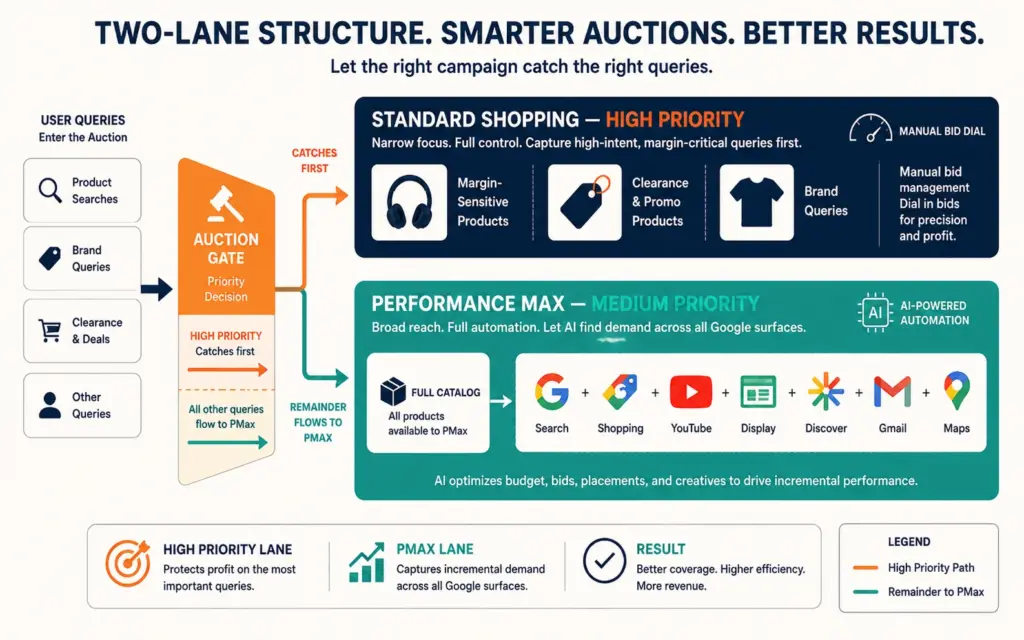
- In 2026, Performance Max runs approximately 67% of all Shopping ad spend, and 74 to 97% of PMax costs flow to feed-based Shopping placements. The "PMax replaced Standard Shopping" narrative is dead. The winning structure is hybrid: PMax for scale across Google's full inventory, Standard Shopping running alongside at High priority for margin-sensitive SKUs, brand-term protection, and clearance inventory where you need bid control.
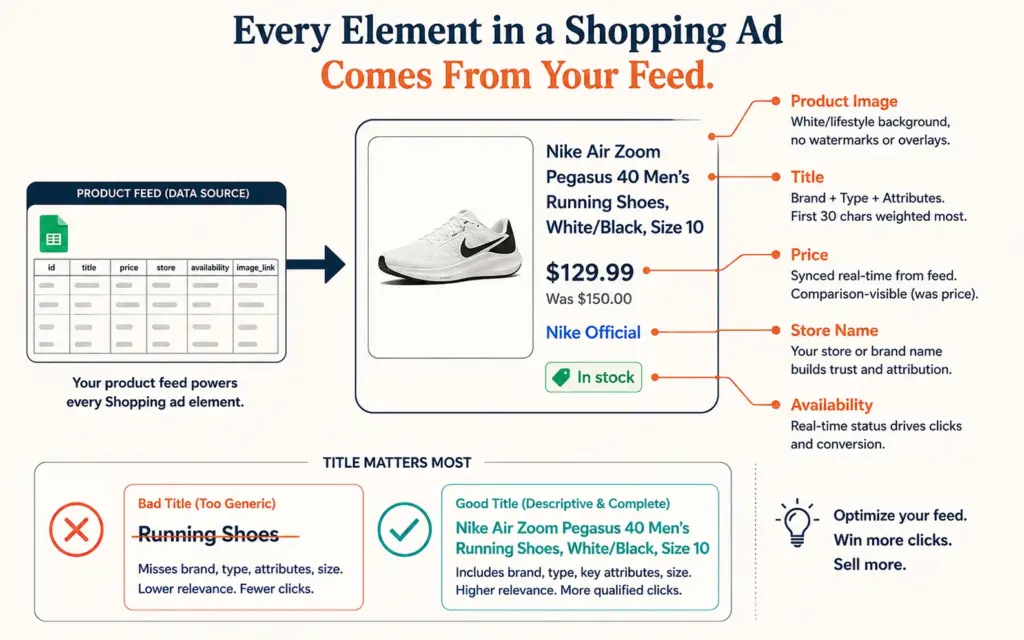
- Your product feed is your targeting. Google matches Shopping ads to search queries using your product titles, descriptions, GTINs, and attributes, not keywords you choose. A title like "Running Shoes" loses to "Nike Air Zoom Pegasus 41 Men's Running Shoes Size 10 Black." Feed optimization is the highest-impact work in Google Shopping and the most neglected.
- Well-architected PMax setups (segmented asset groups, feed hygiene, brand exclusions) deliver 35 to 55% higher ROAS than single-campaign default configurations. The gap between a structured account and a set-and-forget account has never been wider because Google's AI amplifies the quality of its inputs.
Google Shopping ads are the product listings with images and prices that appear at the top of Google search results when someone searches for something you sell. Unlike text ads, Shopping ads show the buyer exactly what they’ll get and what it costs before they click. That transparency filters the traffic: people who click a Shopping ad have already seen your price and product photo and decided to look closer. The intent is as close to bottom-of-funnel as paid advertising gets.
The Shopping ecosystem changed structurally over the past two years. According to Apex Digital’s analysis of Tinuiti’s Q1 2026 benchmark data, Performance Max now accounts for 67% of Shopping spend and 68% of Shopping-attributed sales among advertisers running both campaign types. But Standard Shopping didn’t die. The advertisers getting the best results run both in a deliberate hybrid structure. This guide covers the feed foundation, the campaign architecture, and the optimization rhythm that makes Google Shopping the workhorse channel of an ecommerce ad mix. The Facebook ads for ecommerce guide covers the demand-generation side; Shopping is the demand-capture side.
Google Merchant Center: The Foundation Everything Else Sits On
Google Merchant Center is where your product data lives. Shopping ads pull everything (titles, prices, images, availability) from your Merchant Center feed. Setup steps:
- Create your Merchant Center account at merchants.google.com and verify your website domain.
- Connect your product feed. Shopify’s Google & YouTube channel app syncs your catalog automatically. WooCommerce uses the Google for WooCommerce plugin. Both push product data and inventory updates in near real time.
- Add required business information: shipping rates, return policy, and contact details. Google suspends Merchant Center accounts with missing or mismatched shipping and return information more than any other reason. Your stated policies must match what your website displays exactly.
- Include GTINs (barcodes) wherever they exist. Products with valid GTINs get matched to Google’s product catalog, which improves impression volume and enables comparison placement. Handmade and private-label products without GTINs use brand + MPN instead.
- Link Merchant Center to Google Ads so campaigns can access the feed.
The tracking setup must be complete before spending: conversion tracking with values, Enhanced Conversions enabled, and GA4 linked to Google Ads. Shopping campaigns optimize toward conversion value. Feeding them incomplete data produces confidently wrong optimization.
Product Feed Optimization: Your Titles Are Your Keywords
Google Shopping has no keyword targeting. Google decides which searches trigger your products based on your feed content. That makes your product titles the single most important optimization surface in the entire channel.
Title structure that wins impressions: Brand + Product Type + Key Attributes (size, color, material, model). “Nike Air Zoom Pegasus 41 Men’s Running Shoes Size 10 Black” matches dozens of specific high-intent queries. “Comfortable Running Shoes” matches almost nothing valuable. Front-load the most important terms: Google truncates titles around 70 characters in most placements, and the first 25 to 30 characters carry the most matching weight.
Beyond titles: complete every relevant attribute field (color, size, gender, age group, material), use high-resolution images on white or lifestyle backgrounds without watermarks or promotional text, keep prices synced in real time (price mismatches between feed and site trigger disapprovals), and maintain accurate availability so you never pay for clicks to out-of-stock pages. The product photography standards for marketplace listings apply directly: your Shopping thumbnail competes side-by-side with every competitor’s.
The ecommerce technical SEO work you’ve done on product pages compounds here: structured data (schema.org Product markup) on your site feeds Google additional trust signals that support both free listings and paid Shopping placement.
Performance Max vs Standard Shopping: Run Both, Deliberately
What Performance Max Does Well and Where It Frustrates
PMax serves ads across Google’s entire inventory (Search, Shopping, YouTube, Display, Gmail, Discover, Maps) from one campaign, using AI to allocate budget toward predicted conversions. For most ecommerce accounts, 74 to 97% of PMax spend flows to feed-based Shopping placements anyway, which means PMax is functionally your Shopping engine with extra reach attached.
Its strengths: scale, cross-channel reach, and automated optimization that improves with good inputs. Its historical weakness (black-box opacity) has been partially addressed: campaign-level negative keywords, channel-level performance reporting, and search themes expanded to 50 per asset group give you steering controls that didn’t exist at launch.
Structure PMax deliberately: segment asset groups by product category or margin tier (not one asset group for the whole catalog), exclude brand terms so branded searches don’t inflate reported ROAS (brand traffic converts anyway), and feed each asset group tailored images, copy, and search themes. According to Growth Engines’ PMax architecture research, accounts with sophisticated segmented structures deliver 35 to 55% higher ROAS than single-campaign default setups, and the gap keeps widening as Google’s AI becomes more responsive to well-structured inputs.
Where Standard Shopping Still Earns Its Place
Standard Shopping gives you product-level bid control that PMax doesn’t. Use it for: margin-sensitive SKUs where you need to bid a specific number, seasonal clearance you want to liquidate at any positive margin without dragging down your PMax ROAS target, and high-value brand-plus-product queries being diluted inside PMax averages.
The hybrid mechanics: set the Standard Shopping campaign to High priority. PMax inherits Medium priority. When both campaigns are eligible for the same query, your Standard campaign wins the auction first, giving you surgical control over the products routed to it while PMax handles everything else at scale. Without this priority structure, PMax holds higher auction priority and cannibalizes the traffic you wanted to control.
ROAS Targets Built From Your Margins, Not From Benchmarks
Your break-even ROAS = 1 divided by your contribution margin. At 40% margin, break-even ROAS is 2.5:1. At 25% margin, it’s 4:1. Set your PMax target ROAS above break-even by your desired profit cushion: a 40%-margin store targeting meaningful profit might set tROAS at 3.5:1 to 4:1.
Well-run Google Shopping typically lands between 4:1 and 8:1 blended ROAS for established stores, higher than social channels because the intent is demand-capture rather than demand-creation. The ROAS benchmarks guide breaks down expectations by channel and category. Two cautions: exclude brand terms from your ROAS evaluation (branded clicks convert regardless of ads), and validate Google-reported conversions against GA4 and your store admin monthly. The attribution modeling approach should treat Google Shopping as a last-click-heavy channel whose reported numbers are more reliable than social but still worth cross-referencing.
Budget guidance: start at $20 to $50/day. Shopping campaigns need roughly 30 conversions per month per campaign for the bidding algorithms to optimize effectively. Below that volume, consolidate campaigns rather than fragmenting budget. Use the ad spend ROI calculator to convert ROAS into actual profit dollars at your margin structure.
The Weekly and Monthly Optimization Rhythm
Weekly (20 to 30 minutes): Review the search terms report (now available for PMax at the campaign level) and add irrelevant queries as negative keywords. Check for feed disapprovals in Merchant Center and fix them immediately (disapproved products silently stop serving). Scan channel-level PMax reporting: if Display or YouTube placements consume budget without converting, tighten asset group targeting.
Monthly (1 to 2 hours): Identify “zombie products” (items receiving impressions but no clicks, or clicks but no conversions over 30+ days) and either fix their titles/images/prices or exclude them so budget concentrates on products that convert. Compare product-level performance and shift your Standard Shopping roster: promote PMax underperformers that deserve manual bid control, return stabilized products to PMax. Review price competitiveness in Merchant Center’s price insights: Shopping is a comparison format, and products priced 15%+ above the competitive range rarely convert regardless of ad quality. The ecommerce KPIs dashboard should track Shopping ROAS, wasted-spend share, and feed health as standing metrics.
Common Google Shopping Mistakes That Burn Budget
Launching with an unoptimized feed. Generic titles, missing attributes, and low-quality images cap your impression volume before bidding even matters. Feed work precedes budget scaling, always.
One PMax campaign for the entire catalog. A single asset group mixing $12 accessories with $300 hero products forces one ROAS target across wildly different margin profiles. Segment by category or margin tier.
Ignoring price competitiveness. Shopping displays your price next to competitors’. If you’re consistently the most expensive result, clicks go elsewhere. Either sharpen pricing on ad-targeted SKUs or route those products out of Shopping and into channels where price isn’t displayed pre-click. The dynamic pricing approach can automate competitive repricing on your ad-active catalog.
Judging PMax in week one. PMax needs 4 to 6 weeks of conversion data to stabilize. Restarting or restructuring campaigns every few days resets learning and guarantees mediocre results.
Frequently Asked Questions
Average CPCs run $0.30 to $1.50 depending on category competitiveness. Recommended starting budget: $20 to $50/day per campaign, scaling once the campaign generates 30+ conversions/month (the volume bidding algorithms need to optimize). Established stores typically achieve 4:1 to 8:1 blended ROAS from Shopping, making it the most efficient paid channel in most ecommerce mixes because it captures existing search demand rather than creating it.
Both, in a hybrid structure. PMax delivers scale across Google’s full inventory and now runs about 67% of all Shopping spend. Standard Shopping provides product-level bid control PMax lacks. Set Standard Shopping to High priority for margin-sensitive SKUs, brand-term protection, and clearance items; let PMax (Medium priority) handle the rest of the catalog at scale. Running PMax alone forfeits control; running Standard alone forfeits reach.
You don’t choose keywords. Google matches your products to searches using your feed content: titles, descriptions, attributes, and GTINs. Your product titles function as your keywords, which is why title optimization (Brand + Product Type + Attributes, most important terms first) is the highest-impact work in the channel. You control the negative side: add irrelevant search terms as negative keywords weekly to stop paying for mismatched queries.
The most common causes: price or availability mismatches between your feed and your website, missing or inaccurate shipping and return information, promotional text or watermarks on product images, missing GTINs on products that have them, and policy-restricted product categories. Check Merchant Center’s Diagnostics tab for the specific reason per product. Fix mismatches at the source (your store data) rather than editing the feed manually, so the fix persists through the next sync.
Calculate from your margin: break-even ROAS = 1 ÷ contribution margin. At 40% margin, break-even is 2.5:1, so target 3.5:1 to 4:1 for meaningful profit. At 25% margin, break-even is 4:1, so target 5:1+. Exclude brand-term traffic from the evaluation since branded searches convert with or without ads. Setting tROAS too high too early throttles delivery; start near break-even and raise the target gradually as conversion volume builds.
Impressions begin within 24 to 48 hours of feed approval. Meaningful performance data accumulates over 2 to 4 weeks. PMax campaigns need 4 to 6 weeks and roughly 30+ conversions/month to exit learning and stabilize. Judge the channel after the first full optimization cycle (6 weeks minimum), not the first week. Frequent restructuring resets algorithm learning and is the most common self-inflicted cause of poor Shopping performance.
Related Reads
- Facebook Ads for Ecommerce
- TikTok Ads Guide
- ROAS Benchmarks
- Tracking Setup
- Ad Spend ROI Calculator
- Dynamic Pricing
Enjoying this? Get more like it every week.
One email per week with ecommerce strategies, tool picks, and seller insights. No spam.