
- Squarespace ecommerce produces the most visually polished online stores of any platform. If brand aesthetics and design quality are your primary differentiators, Squarespace delivers a premium look that Shopify and WooCommerce require paid themes and customization to match.
- Squarespace commerce plans start at $33/month (Business) with a 3% transaction fee, or $36/month (Basic Commerce) with zero transaction fees. The Advanced Commerce plan at $65/month adds subscriptions, abandoned cart recovery, and advanced shipping.
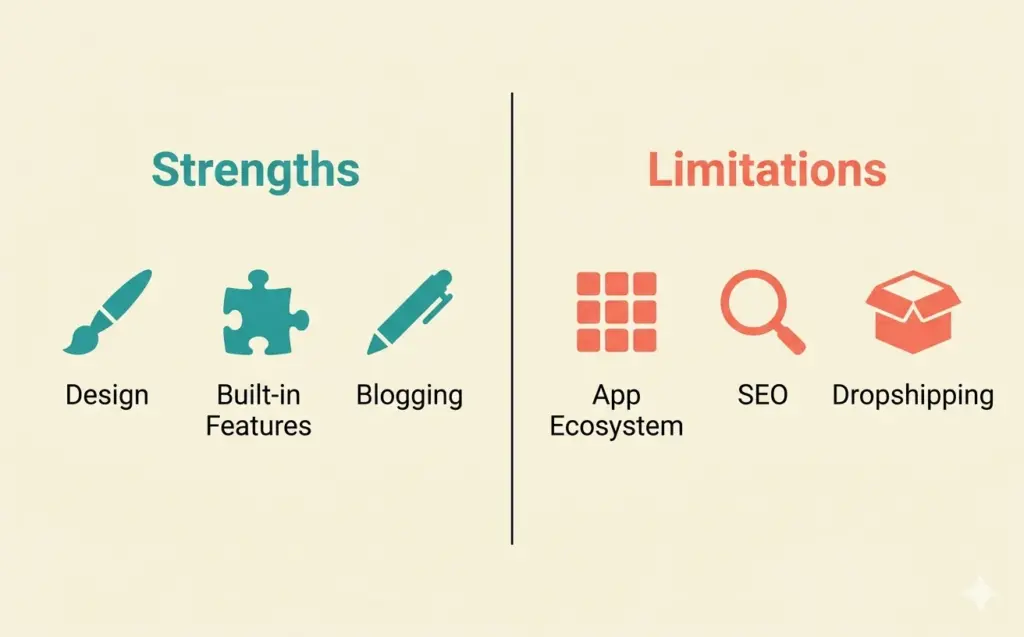
- The trade-off: Squarespace has a much smaller app ecosystem than Shopify, limited third-party integrations, weaker SEO tools, and fewer dropshipping supplier connections. It's built for brand-first sellers with curated catalogs, not high-volume operations.
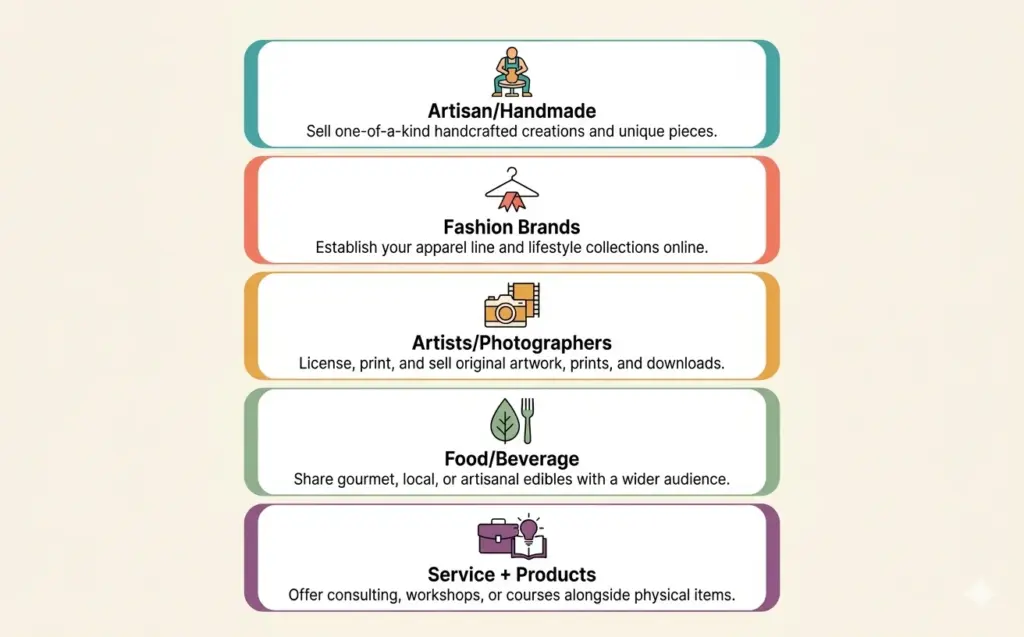
- Best for: fashion brands, artisan food sellers, artists, photographers selling prints, home decor brands, and any seller where visual storytelling drives purchasing decisions. Not ideal for dropshipping, large catalogs (500+ products), or stores needing extensive third-party integrations.
Squarespace ecommerce is the online selling functionality built into the Squarespace website platform, turning its award-winning design templates into fully functional online stores with product listings, checkout processing, inventory management, and shipping tools included on Commerce plans starting at $33/month. Among all website builders, Squarespace consistently produces the most visually striking squarespace commerce sites without requiring design skills or custom development.
The question isn’t whether Squarespace makes beautiful stores. It does. The question is whether beautiful is enough for YOUR business. If you sell 20 handcrafted ceramics and your brand story matters as much as the product itself, Squarespace is probably perfect. If you’re dropshipping 500 products and need deep supplier integrations, it’s probably the wrong choice.
This review covers what Squarespace does exceptionally well, where it genuinely falls short, and exactly who should (and shouldn’t) build their squarespace online store here. For the full platform landscape, our ecommerce platform comparison puts Squarespace against Shopify, BigCommerce, WooCommerce, and others.

Squarespace Commerce Plans and Pricing
Squarespace offers four plans, but only three support ecommerce. Here’s the breakdown of squarespace commerce plans:
| Plan | Monthly Price | Transaction Fee | Key Ecommerce Features |
|---|---|---|---|
| Business | $33/mo | 3% on all transactions | Unlimited products, basic analytics, pop-ups, CSS/JS customization |
| Basic Commerce | $36/mo | 0% | Everything above + POS, customer accounts, no Squarespace ads |
| Advanced Commerce | $65/mo | 0% | Everything above + abandoned cart recovery, subscriptions, advanced shipping, commerce APIs |
The pricing gap between Business ($33) and Basic Commerce ($36) is only $3/month, but that $3 eliminates the 3% transaction fee AND removes Squarespace branding from your site. For any store doing more than $100/month in sales, the squarespace commerce basic plan pays for itself immediately. There’s no reason to sell on the Business plan.
The squarespace commerce advanced plan at $65/month adds abandoned cart recovery, which alone recovers 5-15% of lost sales for most stores. If you’re generating $1,000+/month in revenue, the extra $29/month over Basic Commerce is justified by recovered sales alone. Subscription selling is also locked to this tier, which matters if you sell consumable products.
All plans include a 14-day free trial. Annual billing saves 25-30% compared to monthly. See current Squarespace pricing for the latest rates.
What Squarespace Ecommerce Does Best
Design Quality That Builds Trust
This is Squarespace’s core advantage and it’s not a small one. In ecommerce, design = trust = conversion. A Squarespace store looks like a premium brand from day one. The templates use generous whitespace, professional typography, and image-forward layouts that make products look aspirational.
For product categories where visual presentation drives purchasing (fashion, jewelry, art, home decor, food, beauty), design quality directly correlates with willingness to pay premium prices. A handmade candle photographed beautifully on a Squarespace template commands $35. The same candle on a generic template struggles at $20. That perception gap is real and measurable.
Built-In Features Without App Dependency
Unlike Shopify where core functions require apps, Squarespace includes these natively:
- Email marketing (Squarespace Email Campaigns)
- SEO tools (basic meta tags, auto-sitemaps, SSL)
- Social selling integration (Instagram, Facebook)
- Gift cards on all Commerce plans
- Customer accounts and order history
- Built-in blogging with full design integration
- Member areas for gated content or courses
This “everything included” approach means fewer moving parts, fewer monthly subscriptions, and a simpler operational experience. For sellers who want to spend time on products and marketing rather than managing a stack of apps, this simplicity has real value.
Best Blogging and Content Integration
Squarespace’s blog integrates naturally with your store design. Product links embedded in blog posts, recipe pages linking to ingredient products, style guides featuring shoppable looks. The content-to-commerce connection feels native rather than bolted on. For sellers whose content marketing strategy is central to their business, this integration matters.
Where Squarespace Ecommerce Falls Short
Limited App Ecosystem
Squarespace Extensions marketplace has roughly 40 integrations versus Shopify’s 8,000+. For dropshipping, only Printful, Spocket, and a handful of others integrate directly. If your business model requires specific third-party tools, check the Squarespace Extensions marketplace before committing.
Weaker SEO Than Competitors
Squarespace’s SEO is adequate but not competitive with BigCommerce or even Shopify with apps. Specific limitations: no bulk meta tag editing, limited structured data control, no native rich snippet optimization beyond basics, and URL structures that include date prefixes on blog posts by default. For stores relying heavily on organic search traffic, these gaps add up.
No Native Dropshipping Support
If you’re planning to dropship, Squarespace is a poor choice. The platform was built for brand-owned products, not reselling through supplier integrations. Printful works for print on demand, and Spocket connects some US/EU suppliers, but the AliExpress ecosystem that powers most dropshipping businesses doesn’t integrate with Squarespace. Our dropshipping platform guide covers better options.
Product Limits and Catalog Management
While Squarespace technically supports “unlimited” products, the admin interface becomes clunky above 200-300 products. No bulk editing tools, no CSV import for large catalogs, and limited variant options compared to Shopify. Stores with 500+ products will find catalog management frustrating.
Limited Payment Options
Squarespace processes payments through Stripe, PayPal, Square, and Afterpay/Clearpay. That covers the basics but lacks Apple Pay (on custom domains), Amazon Pay, and several regional payment methods that Shopify supports. Fewer payment options means higher checkout abandonment for some customer segments.
Squarespace vs Shopify for Ecommerce
| Factor | Squarespace | Shopify |
|---|---|---|
| Design quality | Best-in-class templates | Good, great with paid themes |
| Ease of setup | Very easy (drag and drop) | Easy (guided setup) |
| App ecosystem | ~40 extensions | 8,000+ apps |
| SEO | Basic | Good (with apps) |
| Dropshipping | Very limited | 500+ supplier integrations |
| Transaction fees | 0% on Commerce plans | 0% with Shopify Payments |
| Blogging | Excellent, fully integrated | Good, somewhat separate |
| Abandoned cart recovery | Advanced plan only ($65/mo) | All plans (included) |
| Best for | Brand-first, small catalog stores | Most ecommerce businesses |
Choose Squarespace when: Your brand’s visual identity is your primary competitive advantage, you have a curated catalog under 200 products, you want built-in blogging and content integration, and you don’t need extensive third-party apps.
Choose Shopify when: You need dropshipping integrations, you have 200+ products, you want the largest app ecosystem, you need advanced SEO tools, or you plan to sell across multiple channels (Amazon, eBay, TikTok Shop).
Who Should Build a Squarespace Shop?
A squarespace shop works best for specific seller profiles:
Artisan and handmade sellers. Ceramics, jewelry, candles, leather goods, custom furniture. Products where craftsmanship and story justify premium pricing. The templates elevate handmade goods beyond what marketplace listings can achieve.
Fashion and clothing brands. Lookbooks, editorial photography, seasonal collections. Squarespace’s image-heavy layouts showcase apparel better than any other platform. Pair with Printful for print-on-demand fashion lines.
Photographers and artists selling prints. Gallery-style layouts with integrated shopping. Member areas for client galleries. The visual presentation matches the product perfectly.
Food and beverage brands. Recipe blogs linking to product pages, subscription options on the Advanced plan, and design that makes artisan food look as premium as it tastes.
Service-based businesses adding products. Consultants, coaches, or creatives who already have a Squarespace website and want to add a squarespace ecommerce website component without rebuilding on a new platform.
For all other business types, especially high-volume sellers, dropshippers, and stores needing deep integrations, the full platform comparison covers better-fitting options. Your startup budget should account for the platform fee plus any extensions needed.
Frequently Asked Questions
Squarespace ecommerce is excellent for brand-focused sellers with small to medium catalogs (under 200 products) where visual design drives purchasing decisions. It produces the most beautiful online stores of any platform without requiring design skills. It’s not ideal for dropshipping, large catalogs, or stores needing extensive third-party app integrations.
Squarespace commerce plans are: Business at $33/month (with 3% transaction fee), Basic Commerce at $36/month (zero transaction fees), and Advanced Commerce at $65/month (adds abandoned cart recovery and subscriptions). The Basic Commerce plan is the best value for most sellers since the $3 upgrade eliminates the 3% fee and removes Squarespace branding.
Squarespace has very limited dropshipping support. Only Printful (print on demand) and Spocket (US/EU suppliers) integrate directly. The AliExpress and CJdropshipping ecosystems that power most dropshipping businesses don’t work on Squarespace. For dropshipping, Shopify or WooCommerce are significantly better platform choices.
The Squarespace commerce basic plan ($36/month) includes zero transaction fees, customer accounts, POS, and no Squarespace branding. The commerce advanced plan ($65/month) adds abandoned cart recovery emails, subscription selling, advanced shipping rules, and commerce APIs. Upgrade to Advanced when your monthly revenue exceeds $1,000 and the recovered abandoned carts justify the extra cost.
Squarespace beats Shopify on design quality and built-in blogging. Shopify beats Squarespace on app ecosystem (8,000+ vs 40), dropshipping support, SEO tools, multi-channel selling, and catalog management for large stores. Choose Squarespace for brand-first businesses under 200 products. Choose Shopify for everything else.
Start with the 14-day free trial, choose a template matching your product type, add your products with professional photos and descriptions, configure Stripe or PayPal for payments, set shipping rates, add legal pages, and upgrade to the Basic Commerce plan to start selling. Most sellers complete setup in 1-2 days using Squarespace’s guided editor.
Related Reads
- Best Ecommerce Platform Comparison
- How to Sell on Shopify
- BigCommerce SEO Review
- Best Platform for Dropshipping
- Ecommerce Tools and Tech Stack
- Ecommerce Web Design Guide
Enjoying this? Get more like it every week.
One email per week with ecommerce strategies, tool picks, and seller insights. No spam.