
- Launching your store is the moment everything you've built goes live, and it's easy to get caught up in the excitement and miss critical steps. Even a polished-looking store can have broken checkout, missing legal pages, or an unoptimized mobile experience that quietly loses your first customers. A pre-launch checklist prevents these costly, avoidable mistakes.
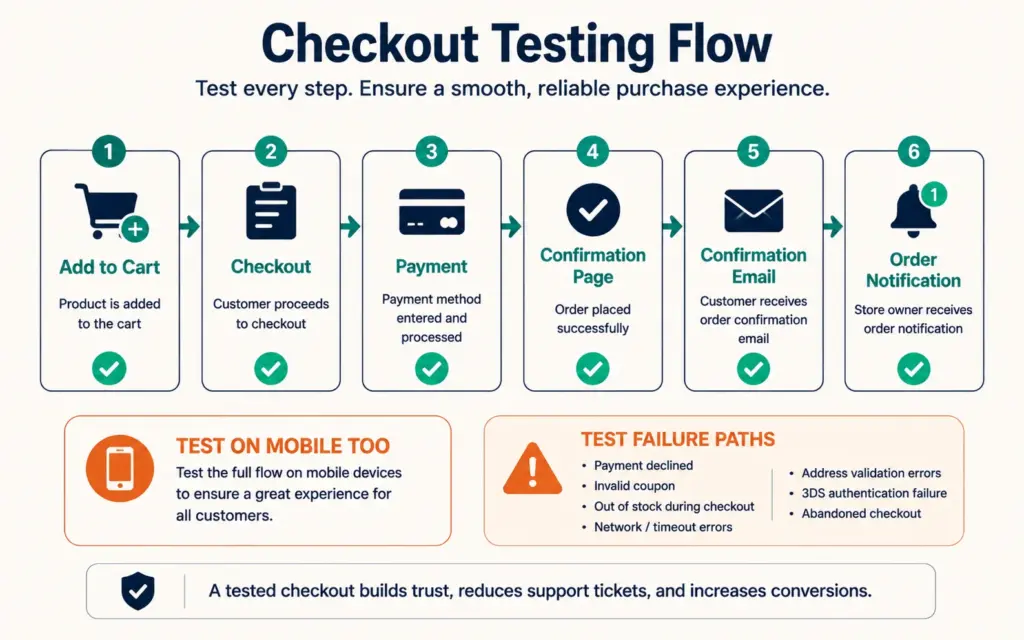
- Test everything before you go live, especially the checkout. Place a real test order start to finish, confirm payment processing works, check that confirmation emails send, and test the entire experience on mobile (where most of your traffic will be). A broken checkout means every visitor you worked to attract can't buy.
- Don't launch silent. The most common launch mistake is assuming customers will automatically find your store. Successful stores begin marketing from day one: announce to your existing audience, run a launch promotion or discount, and drive traffic through social, email, and your other channels. A launch without a marketing push is a store nobody knows exists.
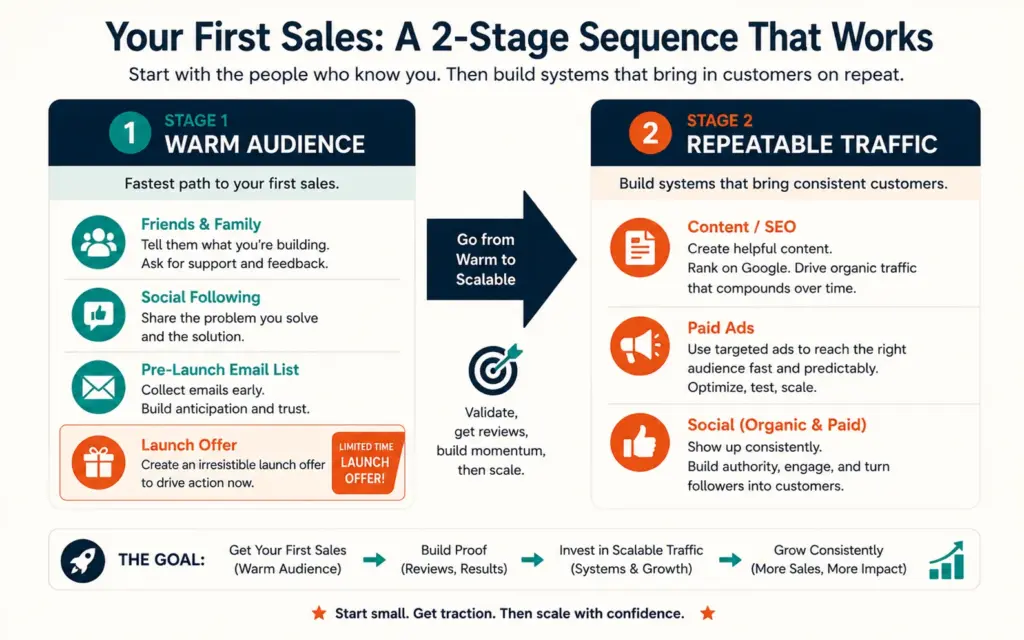
- Your first sales usually come from people who already know you (friends, family, your existing social following, an email list you built pre-launch) plus a launch offer that gives them a reason to buy now. From there, you build repeatable traffic through content, ads, and SEO. The launch is the start of marketing, not the finish line.
Launching your store is the moment everything you’ve built (your products, branding, and website) finally goes live for the world to buy from. It’s exciting, and that excitement is exactly where new sellers get into trouble. It’s easy to get caught up in the thrill of introducing your business to the world and miss critical steps that determine whether those first visitors actually become customers. Even a store that looks polished can hide problems that quietly lose sales: a checkout that breaks on mobile, missing legal pages, confirmation emails that don’t send, or a launch with no marketing behind it so nobody knows the store exists.
The difference between a smooth launch and a frustrating one is preparation. A pre-launch checklist catches the avoidable mistakes before your customers do, and a launch-day plan ensures people actually show up to buy. Skipping either one is how launches fizzle: a flawless store nobody visits sells nothing, and a well-promoted store with a broken checkout turns every hard-won visitor away at the last step. This guide covers the pre-launch checklist, testing everything (especially checkout), the launch marketing push, and how to get your first sales. The first store checklist covers building the store; this covers the final steps to launch it well. The launching your first store guide complements this with the beginner’s full-journey perspective.
The Pre-Launch Checklist That Prevents Mistakes
Before you announce your store to anyone, work through the items that ensure a smooth launch. According to Shopify’s store launch checklist, even when your brand and website look polished, several checklist items ensure a smooth launch that’s easy to skip in the excitement. Work through each of these before you tell a single customer the store is open:
- Product pages complete: Every product has clear photos, accurate descriptions, correct prices, and stock levels set. The product page design should be finished, not half-done.
- Checkout tested: The single most important item, covered in detail below.
- Legal pages published: Privacy policy, terms of service, refund/return policy, and shipping policy. These build trust and are often legally required.
- Shipping configured: Rates, zones, and methods set correctly so customers see accurate shipping at checkout. The shipping strategies guide covers getting this right.
- Site speed optimized: Compress images, use a CDN, and confirm pages load fast, since slow load times lose customers.
- Mobile experience checked: Most traffic is mobile, so test the full experience on a phone, not just desktop.
- Analytics installed: Tracking set up before launch so you capture data from your first visitor. The tracking setup guide covers this.
Test Everything, Especially Checkout
The most important pre-launch step is testing your checkout end to end. A broken checkout means every visitor you worked to attract reaches the point of buying and can’t complete the purchase, wasting all your marketing effort. Place a real test order from start to finish: add a product to cart, go through checkout, enter payment, and complete the order.
Confirm each step works: payment processing goes through (test with a real card if your platform supports test mode, or a small real order you refund), the order confirmation page displays, the confirmation email sends to the customer, and you receive the order notification. Then do it all again on mobile, since the mobile checkout experience is where most of your customers will actually buy and where problems most often hide. According to Hostinger’s store launch guide, a complicated checkout, poor navigation, slow loading, or bad mobile design creates significant barriers to sales, and customers who hit those barriers simply abandon your store for a competitor. Also test the failure paths: what happens with an invalid card, or an out-of-stock item? A checkout that works perfectly on desktop but breaks on mobile loses the majority of your sales, which is why mobile testing isn’t optional. The checkout optimization guide covers making checkout not just functional but smooth, once you’ve confirmed it works at all.
Don’t Launch Silent: The Marketing Push
The most common launch mistake is assuming customers will automatically find your store. They won’t. Many store owners fail to start marketing immediately after launch, assuming the products will sell themselves, and then wonder why nobody’s buying. Successful stores begin marketing efforts right from day one to build awareness and drive traffic. A launch without a marketing push is a store nobody knows exists.
Your launch-day marketing plan should include: announcing to your existing audience (email list, social following, personal network), running a launch promotion or discount that gives first visitors a reason to buy today, posting across your social channels, and if budget allows, running some paid ads to drive initial traffic. The launch offer matters, since a limited-time launch discount or bonus creates urgency and rewards the people who show up first. Without a reason to act now, even interested visitors tend to bookmark your store and never return, so the offer converts curiosity into an actual first sale. The discount strategy guide covers structuring a launch offer that drives sales without eroding your margins permanently. The social media marketing and email marketing strategy guides cover the channels that carry your launch message to the people most likely to buy first.
Getting Your First Sales After Going Live
Your first sales almost always come from people who already know you, not strangers discovering your store cold. This is normal and it’s how nearly every store starts. The realistic first-sales sequence:
Your warm audience first. Friends, family, your existing social following, and any email list you built before launch. These are the people most willing to buy from a brand-new store, since they trust you already and want to support you, and a launch offer gives them the final nudge to buy today rather than meaning to later. If you built an email list during your pre-launch (a smart move), launch day is when it pays off, since you can email that ready audience with your launch offer and generate immediate sales rather than launching into silence and waiting for strangers to find you.
Then repeatable traffic. Once you’ve made those first sales, the work shifts to building traffic sources that bring strangers reliably: content marketing and SEO for long-term organic traffic, paid ads for immediate traffic you can scale, and social media for ongoing awareness. The first 100 customers guide covers this next phase in depth.
The key mindset: the launch is the start of your marketing, not the finish line. Going live is one milestone; the ongoing work of driving traffic and converting it is what builds the business. Don’t treat launch day as the goal and then go quiet, which is one of the most common reasons promising new stores stall out in their first month. Treat it as day one of a continuous effort to bring customers to a store you’ve confirmed is ready to sell to them. The stores that succeed are the ones that keep showing up with marketing week after week, long after the launch-day excitement fades. The budgeting for launch plan should include marketing budget for the weeks after launch, not just the costs of building the store, since the post-launch marketing is what actually generates revenue.
Frequently Asked Questions
Work through a pre-launch checklist: product pages complete (photos, descriptions, prices, stock), checkout tested end to end, legal pages published (privacy, terms, refund, shipping policies), shipping rates and zones configured correctly, site speed optimized, mobile experience checked (most traffic is mobile), and analytics installed so you capture data from your first visitor. Even a polished-looking store can hide broken checkout, missing legal pages, or mobile problems that quietly lose sales. The checklist catches these avoidable mistakes before your customers do.
Place a real test order from start to finish: add a product to cart, go through checkout, enter payment, and complete the order. Confirm payment processing works, the confirmation page displays, the confirmation email sends, and you receive the order notification. Then repeat the entire test on mobile, since that’s where most customers buy and where problems hide. Also test failure paths like invalid cards or out-of-stock items. A broken checkout means every visitor you attract can’t buy, wasting your marketing effort, so checkout testing is the most important pre-launch step.
Your first sales usually come from your warm audience: friends, family, your existing social following, and any email list you built before launch. These people are most willing to buy from a brand-new store, especially with a launch offer that gives them a reason to buy now. If you built an email list pre-launch, launch day is when it pays off. After those first sales, shift to building repeatable traffic through content and SEO (long-term organic), paid ads (immediate, scalable), and social media (ongoing awareness). The launch is the start of marketing, not the finish.
Assuming customers will automatically find your store. Many owners fail to start marketing immediately after launch, expecting products to sell themselves, then wonder why nobody’s buying. A launch without a marketing push is a store nobody knows exists. Successful stores begin marketing from day one: announcing to their existing audience, running a launch promotion, posting on social, and driving traffic through every available channel. The second biggest mistake is launching without testing checkout, which means the visitors you do attract can’t complete a purchase. Both are avoidable with preparation.
Yes, a launch promotion or discount is one of the most effective ways to drive your first sales. A limited-time launch offer gives first visitors a reason to buy today rather than later, creates urgency, and rewards the people who show up early. It’s especially effective for converting your warm audience (email list, social followers) who are already inclined to support your launch. Structure it to drive sales without permanently eroding your margins: a time-limited launch discount or a bonus with purchase works better than a permanent price cut that trains customers to expect low prices.
Yes, building an email list before launch is one of the smartest pre-launch moves. A pre-launch list (built through a coming-soon page, social teasers, or a waitlist with an incentive) gives you an audience ready to buy the moment you go live. When launch day arrives, you email that list with your launch offer and generate immediate sales rather than launching to silence. Your warm audience delivers your first sales, and an email list is the most direct way to reach them at launch. Start collecting emails as early as possible in your pre-launch phase.
Related Reads
- First Store Checklist
- First 100 Customers
- Budgeting for Launch
- Checkout Optimization
- Discount Strategy
- Email Marketing Strategy
Enjoying this? Get more like it every week.
One email per week with ecommerce strategies, tool picks, and seller insights. No spam.