

- One-click checkout lets returning customers complete a purchase with a single tap by storing their payment and shipping information securely. Instead of filling out forms at checkout, the buyer's saved details auto-populate and the order completes instantly. This collapses the highest-friction moment in ecommerce (the checkout form) into a single action.
- Checkout friction is a leading cause of cart abandonment, which averages around 70% across ecommerce. A significant share of that abandonment happens at checkout specifically: too many fields, forced account creation, and slow multi-step forms. Every field you remove and every step you eliminate recovers some of those abandoning buyers.
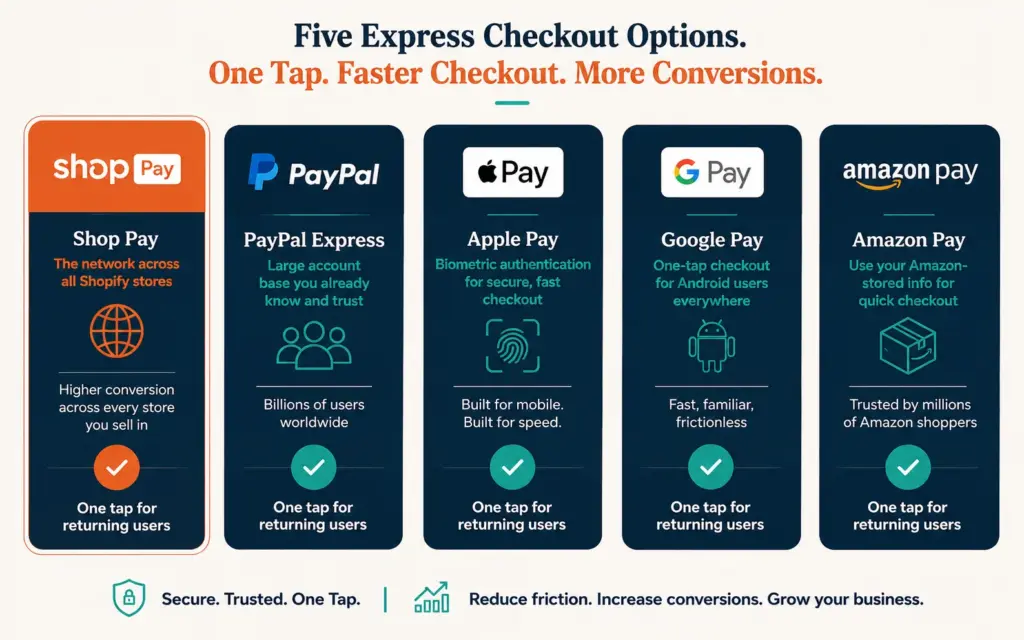
- Accelerated checkout options (Shop Pay, PayPal Express, Apple Pay, Google Pay, Amazon Pay) bring one-click or near-one-click checkout to any store. Shop Pay in particular reports meaningfully higher conversion than standard checkout because returning Shop Pay users skip form-filling entirely. Enabling these express options is the fastest one-click win for most stores.
- One-click checkout works best for returning customers (whose info is stored) and mobile shoppers (where form-filling is most painful). The tradeoff to manage: reducing friction can also reduce the deliberation that catches errors or upsell opportunities, so balance speed with the confirmation and order-review steps that prevent mistakes and support AOV.
One-click checkout lets a returning customer buy with a single tap by securely storing their payment and shipping details so they never re-enter them. The moment a shopper decides to buy is the moment you most want to protect from friction, and the traditional checkout form (name, address, card number, confirm, review) is where that friction concentrates. One-click checkout removes it entirely for returning buyers: their saved information auto-fills, and the order completes in one action. For the customer, the gap between wanting the product and owning it shrinks to almost nothing, which is exactly what you want at the moment of purchase intent. According to Baymard Institute’s cart abandonment research, the average documented cart abandonment rate across ecommerce sits around 70%, with checkout complexity among the leading causes.
The conversion stakes are high. Cart abandonment averages around 70% across ecommerce, and a large share happens at checkout specifically, driven by long forms, forced account creation, and slow multi-step processes. Every field and step between the buy decision and the completed order costs you some of those buyers. One-click checkout is the most aggressive possible reduction of that friction, collapsing a multi-field, multi-step process into a single deliberate tap. This guide covers how it works, the accelerated checkout options that bring it to any store, the conversion impact, and the tradeoffs to manage. The checkout optimization guide covers the full checkout funnel; this focuses on the one-click acceleration.
How One-Click Checkout Actually Works
One-click checkout relies on stored customer information. The first time a customer buys (or when they create an account), their payment method, shipping address, and billing details are securely saved, typically tokenized so the actual card number isn’t stored on your systems. On subsequent purchases, that saved information auto-populates the entire checkout, and the customer confirms with a single tap.
The security is handled through payment tokenization and PCI-compliant vaulting by the payment provider, not by storing raw card data yourself. This is why one-click checkout is delivered through established payment services (Shop Pay, PayPal, Apple Pay) rather than built from scratch: they handle the secure storage and compliance so you don’t take on the liability and technical burden of vaulting card data yourself, which for most stores would be prohibitively complex and risky. Your job is enabling these options and ensuring your checkout optimization supports them prominently. The payment processing setup determines which express options are available to your store.
Accelerated Checkout Options That Deliver One-Click
You don’t need to build one-click checkout yourself. Accelerated checkout services bring it to any store:
- Shop Pay: Shopify’s accelerated checkout. Returning Shop Pay users (a large and growing network across all Shopify stores) check out in one tap. Shop Pay reports meaningfully higher conversion than standard checkout, and because the user network spans all Shopify stores, a customer who used Shop Pay on any store can one-click on yours. According to Shopify’s Shop Pay information, the accelerated checkout is designed to be faster than standard checkout for returning users across the network.
- PayPal Express: One-click for the large base of PayPal account holders. Widely trusted and recognized.
- Apple Pay: One-tap checkout on Apple devices using stored payment and biometric confirmation. Excellent mobile conversion.
- Google Pay: The Android equivalent, one-tap using stored Google payment info.
- Amazon Pay: Lets customers use their Amazon-stored payment and shipping info on your store.
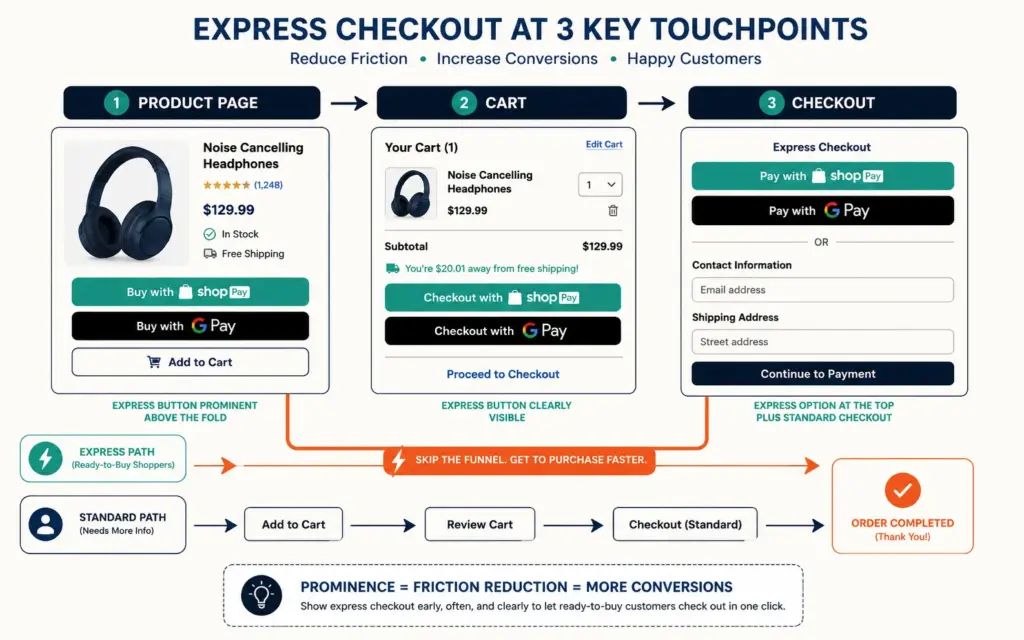
Enabling these express checkout buttons (typically shown on the product page and cart in addition to checkout) is the fastest one-click win available. Most shoppers already have at least one of these set up, so you’re removing friction for a large share of your traffic immediately. The setup cost is minimal and the payoff is instant: unlike most conversion optimizations that require testing and iteration, enabling express checkout options delivers a friction reduction that applies to every returning and express-enabled shopper the moment you turn it on. The mobile CRO impact is especially strong: on mobile, where typing a full checkout form is genuinely painful, one-tap options like Apple Pay and Shop Pay dramatically lift completion rates.
The Conversion Impact of Removing Checkout Friction
Checkout friction directly drives abandonment. According to widely cited Baymard Institute research on why shoppers abandon carts, the leading non-cost reasons include a checkout process that’s too long or complicated and being forced to create an account. One-click checkout addresses both: it eliminates the long form and lets customers buy without a friction-heavy account creation step.
The mechanism is straightforward. Each field in a checkout form is a point where some percentage of buyers hesitate, get distracted, or abandon. A checkout with 15 fields loses more buyers than one with 5. One-click checkout takes that to the extreme: zero fields for returning buyers. The result is recovered sales that would otherwise have abandoned at the form. The effect compounds on mobile: a shopper who would never type a 16-digit card number and full billing address on a phone keyboard will happily complete a purchase with a thumbprint or face scan, which is precisely what Apple Pay and Shop Pay enable. The reduce cart abandonment guide covers the full set of abandonment causes, but checkout friction is among the most fixable, and one-click is the most complete fix. Measure the impact through your ecommerce KPIs: checkout completion rate and cart abandonment rate before and after enabling express options.
Implementation on Shopify and WooCommerce
Shopify: Shop Pay is built in. Enable it and the other accelerated checkout options (Apple Pay, Google Pay, PayPal) in your payment settings. Show the express checkout buttons on product pages and cart, not just at final checkout, so shoppers can skip straight to one-click purchase. Shopify’s native checkout is already optimized, and enabling Shop Pay is often a single toggle.
WooCommerce: One-click and express checkout come through plugins and payment gateways. WooCommerce supports Apple Pay and Google Pay through Stripe, PayPal Express through the PayPal extension, and Amazon Pay through its plugin. The best WooCommerce plugins guide covers the checkout and payment plugins that add express options. WooCommerce gives you more control but requires more setup than Shopify’s built-in approach.
For both platforms, the key implementation principle is prominence: express checkout options only reduce friction if shoppers see them early. Placing express buttons on the product page and cart (not hidden until the final checkout step) lets ready-to-buy shoppers skip the entire funnel. The product page design should feature express checkout buttons prominently for exactly this reason.
The Tradeoffs of One-Click Checkout
Faster isn’t universally better, and one-click checkout has tradeoffs to manage:
Reduced deliberation can mean more errors. When checkout is instant, customers have less opportunity to catch a wrong shipping address, an unintended quantity, or a forgotten discount code. Provide a clear order confirmation and easy post-purchase editing window to catch these.
Fewer upsell opportunities. A multi-step checkout offers moments to present order bumps and upsells. One-click skips these. Balance this by placing upsells earlier (on the product page or cart) and using post-purchase upsell offers that don’t slow the initial checkout. The AOV optimization tactics need to shift earlier in the funnel when checkout is one-click.
First-time buyers still need a full checkout. One-click benefits returning customers with stored info. New customers complete a standard (ideally optimized) checkout the first time. Don’t neglect first-purchase checkout optimization just because returning buyers get one-click.
The net is strongly positive for most stores: the conversion gain from removing friction outweighs the tradeoffs, especially for mobile and returning customers. Manage the tradeoffs with good order confirmation, earlier-funnel upsells, and continued attention to first-time checkout, and one-click checkout becomes one of the highest-impact conversion improvements available. The conversion rate optimization discipline of testing applies: measure the conversion lift against any change in AOV or error rate to confirm the net benefit.
Frequently Asked Questions
One-click checkout lets returning customers complete a purchase with a single tap by securely storing their payment and shipping information. On the first purchase, the customer’s details are saved (tokenized, so raw card data isn’t stored on your systems). On later purchases, that information auto-fills the entire checkout and the order completes in one action. It’s delivered through payment services like Shop Pay, PayPal, and Apple Pay that handle the secure storage and PCI compliance, not built from scratch.
Yes, typically significantly. Checkout friction (long forms, forced account creation, multi-step processes) is a leading cause of cart abandonment, which averages around 70% across ecommerce. One-click checkout eliminates the form entirely for returning buyers, recovering sales that would otherwise abandon. Shop Pay in particular reports meaningfully higher conversion than standard checkout. The impact is strongest on mobile, where form-filling is most painful, and for returning customers whose information is already stored.
Shop Pay is built into Shopify. Enable it along with other accelerated checkout options (Apple Pay, Google Pay, PayPal) in your payment settings, often a single toggle. Then show the express checkout buttons on your product pages and cart, not just at final checkout, so ready-to-buy shoppers can skip straight to one-click purchase. Because Shop Pay’s user network spans all Shopify stores, any customer who used Shop Pay elsewhere can one-click on your store immediately.
Yes, through plugins and payment gateways. WooCommerce supports Apple Pay and Google Pay via Stripe, PayPal Express through the PayPal extension, and Amazon Pay through its plugin. These bring express, near-one-click checkout to your store. WooCommerce gives you more control than Shopify but requires more setup. Place the express checkout buttons prominently on product pages and cart so shoppers see them early and can skip the full checkout funnel.
Yes, when delivered through established payment services. One-click checkout uses payment tokenization and PCI-compliant vaulting handled by the payment provider (Shop Pay, PayPal, Apple Pay), not by storing raw card numbers on your systems. The customer’s actual card data is secured by the provider, and your store never handles it directly. This is why one-click is delivered through these trusted services rather than built in-house: they carry the security and compliance responsibility that protects both you and your customers.
Three tradeoffs to manage: reduced deliberation can mean customers catch fewer errors (wrong address, quantity, forgotten discount), so provide clear order confirmation and an editing window; fewer in-checkout upsell opportunities, so move upsells earlier to the product page and cart or use post-purchase offers; and it only benefits returning customers with stored info, so first-time buyers still need an optimized standard checkout. For most stores the conversion gain outweighs these, especially on mobile and for returning buyers.
Related Reads
- Checkout Optimization
- Reduce Cart Abandonment
- Mobile CRO
- AOV Optimization
- Payment Processing
- Conversion Rate Optimization
Enjoying this? Get more like it every week.
One email per week with ecommerce strategies, tool picks, and seller insights. No spam.