
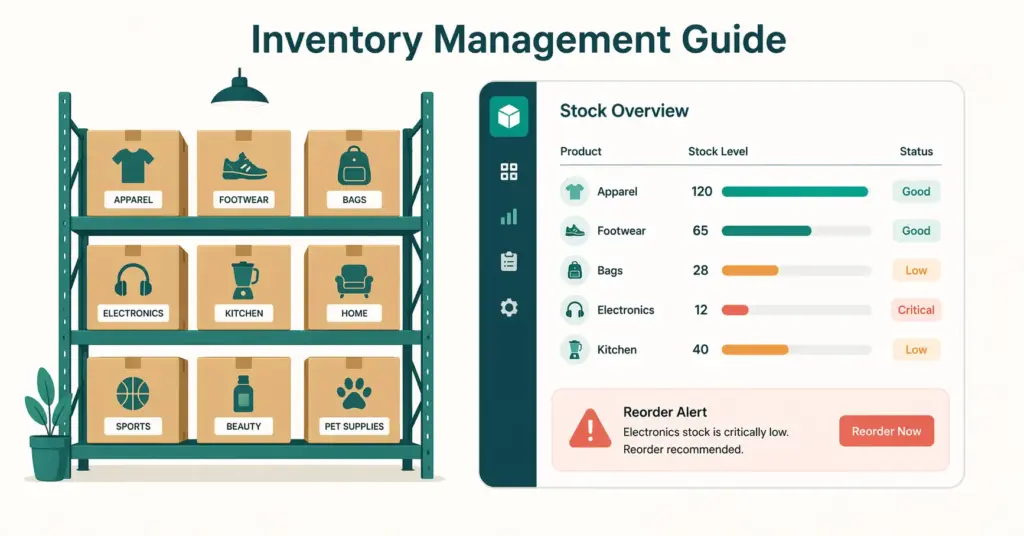
- Poor inventory management is the silent profit killer in ecommerce. Stockouts cost you sales and search rankings (Amazon penalizes out-of-stock listings). Overstock ties up cash in products sitting in warehouses costing you storage fees. Getting it right means having the right amount of the right products at the right time.
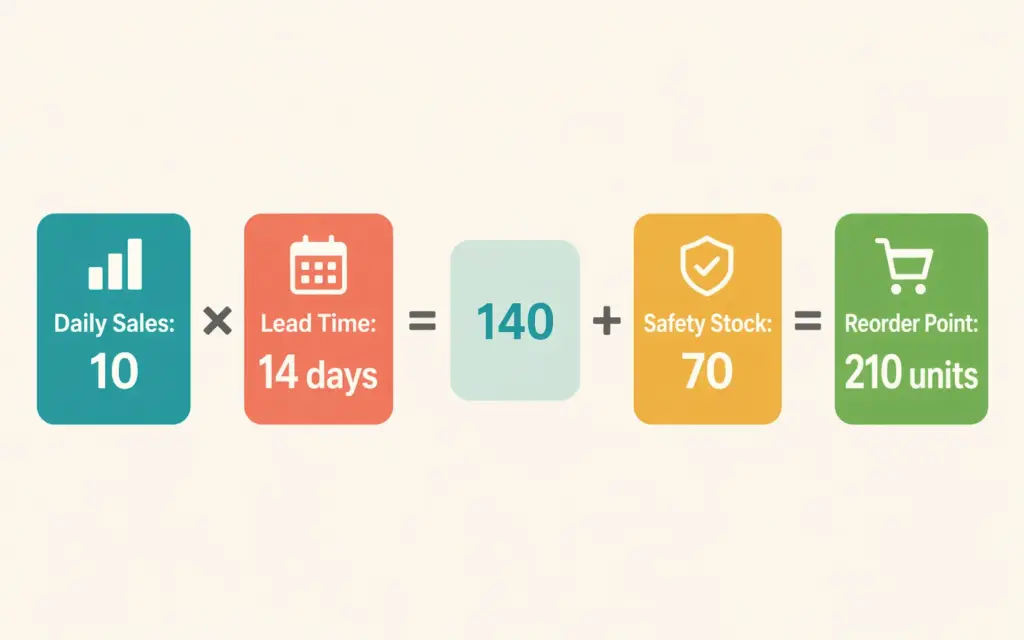
- The reorder point formula every seller needs: Reorder Point = (Average Daily Sales x Lead Time in Days) + Safety Stock. This single calculation prevents most stockouts when applied consistently across your catalog.
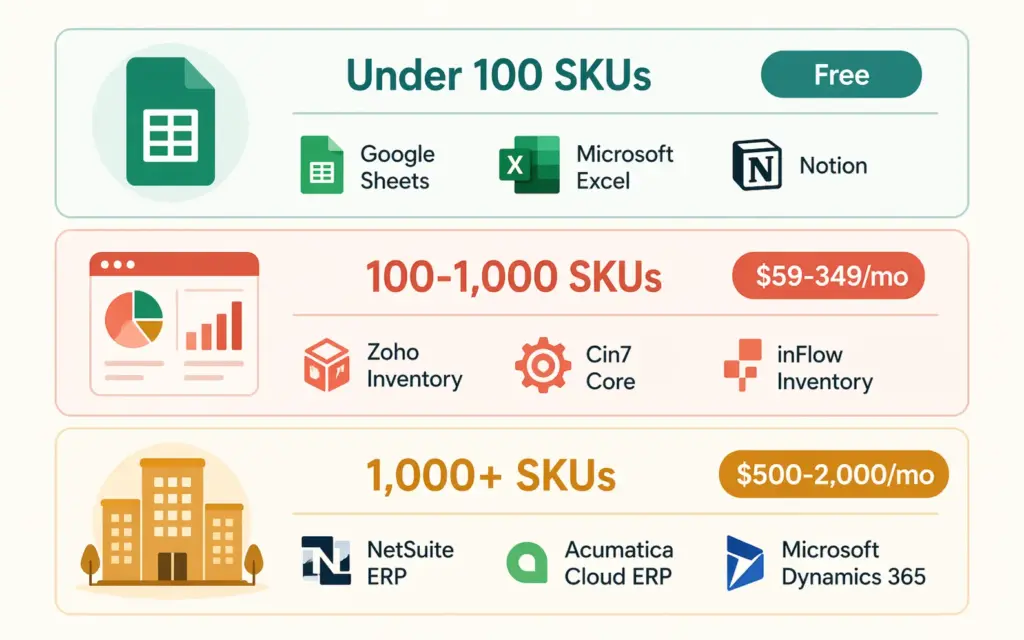
- Stores under 100 SKUs can manage inventory with spreadsheets. Beyond that, dedicated inventory management software (Cin7, ShipBob, Skubana/Extensiv) pays for itself by preventing the stockouts and overselling that manual tracking inevitably causes.
- Multi-channel sellers (own store + Amazon + eBay) need real-time inventory syncing. Selling the same unit on three platforms without sync means triple-selling items you only have one of, resulting in canceled orders and angry customers.
Ecommerce inventory management is the system of tracking, organizing, and controlling your product stock across all storage locations and sales channels so you always have enough inventory to fulfill orders without tying up excessive cash in unsold products. It covers everything from knowing how many units you have right now, to predicting how many you’ll need next month, to automating reorders before you run out.
Here’s why this matters more than most sellers realize: a stockout on your best-selling product doesn’t just lose today’s sales. On Amazon, going out of stock drops your search ranking, and regaining that position can take weeks of advertising spend. On your own store, a “Sold Out” label on your hero product sends shoppers to competitors who DO have it in stock. On the other side, 500 units of a product that sells 10 per month means 50 months of storage costs eating your margins.
This guide covers inventory management methods, the formulas that prevent stockouts, software options by store size, and multi-channel inventory sync. If you’re just starting out, our store launch checklist covers initial inventory setup, and our startup costs guide helps you budget for your first inventory purchase.
The Real Cost of Bad Inventory Management
Inventory problems hit your business in three ways simultaneously:
Stockouts (too little inventory). Lost sales are the obvious cost. The hidden cost is worse: customers who encounter a stockout are 70% likely to buy from a competitor instead. On Amazon, your BSR drops during out-of-stock periods, and you lose the organic ranking you built. Rebuilding takes 2-4 weeks of aggressive PPC spend after restocking.
Overstock (too much inventory). Cash locked in slow-moving products can’t be invested in products that actually sell. Amazon charges $0.87-2.40 per cubic foot per month for storage, with an aged inventory surcharge for items stored over 181 days. A pallet of dead stock can cost $500+ per year just in storage fees. Self-storage isn’t free either: warehouse space, insurance, and labor all add up.
Overselling (selling what you don’t have). When you sell on multiple channels without inventory sync, you can sell the same unit twice. The result: canceled orders, refund processing, negative reviews, and potential account penalties on marketplaces. This is the fastest way to damage your seller reputation.
Inventory Management Methods
Just-in-Time (JIT)
Order inventory as close to when you’ll sell it as possible. JIT minimizes storage costs and cash tied up in stock. The risk: any supply chain disruption (shipping delays, manufacturer backlog) causes immediate stockouts. JIT works best for products with reliable suppliers, short lead times, and predictable demand.
Safety Stock Method
Maintain a buffer of extra inventory beyond what you expect to sell during your reorder lead time. This is the most common method for ecommerce and the one I recommend for most sellers. The buffer absorbs demand spikes and supplier delays without the cash burden of massive overstock.
ABC Analysis
Categorize products into three tiers based on revenue contribution:
- A items (top 20% of products, ~80% of revenue): Tight inventory control, frequent reorder checks, never out of stock
- B items (next 30%, ~15% of revenue): Regular monitoring, moderate safety stock
- C items (bottom 50%, ~5% of revenue): Minimal monitoring, order in bulk less frequently
ABC analysis prevents you from giving equal attention to all SKUs. Your top 20 products deserve daily inventory monitoring. Your bottom 100 can be checked monthly. Our product research guide covers identifying which products belong in each tier.
Dropshipping (Zero Inventory)
Dropshipping eliminates inventory management entirely by having suppliers ship directly to customers. No stockouts because you don’t hold stock. No overstock because you never buy in advance. The trade-off: lower margins, less quality control, and dependency on supplier reliability.
The Reorder Point Formula
This single formula prevents most stockouts when applied consistently:
Reorder Point = (Average Daily Sales x Lead Time in Days) + Safety Stock
Example: You sell 10 units per day. Your supplier takes 14 days to deliver a reorder. You want 7 days of safety stock.
Reorder Point = (10 x 14) + (10 x 7) = 140 + 70 = 210 units
When your inventory hits 210 units, place your reorder. You’ll sell approximately 140 units during the 14-day lead time, and the 70-unit safety stock covers demand spikes or minor shipping delays.
Economic Order Quantity (EOQ) determines HOW MUCH to order each time:
EOQ = √(2 x Annual Demand x Order Cost / Holding Cost per Unit)
EOQ balances ordering costs (shipping, processing) against holding costs (storage, insurance, capital). Ordering too frequently means high shipping costs. Ordering too infrequently means high storage costs. EOQ finds the middle ground. Most inventory management software ecommerce tools calculate this automatically based on your data.
Inventory Management Software Compared
Your inventory management system for online business should match your current scale. Here’s what works at each stage:
Under 100 SKUs: Spreadsheets + Platform Tools
A Google Sheet tracking product name, current stock, reorder point, supplier lead time, and last order date handles small catalogs. Shopify, WooCommerce, and BigCommerce all include basic inventory tracking (stock quantities, low-stock alerts) that works for single-channel sellers.
Cost: Free. Limitation: Manual updates, no multi-channel sync, human error on data entry.
100-1,000 SKUs: Dedicated Inventory Software
| Software | Monthly Cost | Best For | Key Features |
|---|---|---|---|
| Cin7 Core | $349/mo | Multi-channel sellers | Real-time sync, PO automation, warehouse management |
| ShipBob | Usage-based | DTC brands using 3PL | Fulfillment + inventory in one, analytics dashboard |
| Extensiv (Skubana) | $1,000+/mo | High-volume sellers | Multi-warehouse, demand forecasting, automation |
| Ordoro | $59/mo | Small multi-channel | Inventory + shipping, dropship automation |
| inFlow | $110/mo | Growing stores | Barcode scanning, reporting, B2B features |
The right choice depends on your channels, warehouse setup, and growth trajectory. For most mid-size stores, Cin7 Core or Ordoro offer the best balance of features and price. Our tools guide covers the broader tech stack these integrate with.
1,000+ SKUs: Enterprise Systems
At this scale, you need an ERP (Enterprise Resource Planning) system that connects inventory with purchasing, accounting, and fulfillment. NetSuite, Brightpearl, and SAP Business One handle enterprise ecommerce inventory with automated purchasing, demand forecasting, and multi-warehouse management. These cost $500-2,000+/month but prevent the operational chaos that manual systems create at high volume.
Multi-Channel Inventory Sync
Selling on your own store, Amazon, and eBay simultaneously means three platforms showing your available stock. Without real-time sync, you will oversell. It’s not a question of if but when.
How sync works: A central inventory system acts as the source of truth. When a sale happens on any channel, the central system reduces available stock and pushes the update to all other channels within seconds. When you receive new inventory, you update the central system and all channels reflect the new quantity.
Tools that handle multi-channel sync:
- Cin7: Syncs across Shopify, Amazon, eBay, WooCommerce, BigCommerce, and 300+ integrations
- Sellbrite: Affordable option ($29/mo) for sellers on 2-3 channels with under 100 listings
- ChannelAdvisor: Enterprise-level multi-marketplace management
- Linnworks: Popular for UK/EU sellers managing multiple marketplaces
Even a 5-minute sync delay during a flash sale can cause overselling. Choose tools with near-real-time sync (under 2 minutes) for your highest-velocity products. For Amazon specifically, overselling triggers account health warnings that can lead to listing suspension.
Inventory Best Practices for Ecommerce
Conduct regular stock counts. Digital inventory counts drift from reality through receiving errors, shipping mistakes, returns processing, and theft. Count your top-selling products weekly and your full catalog monthly. Variance above 2% signals a process problem that needs investigation.
Set up low-stock alerts. Every ecommerce inventory tracking system supports alerts when products hit a threshold. Set alerts at your reorder point so you have lead-time days to place the reorder before stockout. Don’t rely on checking manually.
Track inventory velocity by product. Days of inventory = Current Stock / Average Daily Sales. A product with 500 units selling 5 per day has 100 days of inventory. If your next shipment takes 30 days, that’s comfortable. If that same product sells 50 per day, you have 10 days before stockout and need to reorder immediately.
Plan for seasonality. If December does 3x your average monthly sales, your October inventory purchase needs to account for that spike. Use last year’s monthly sales data (or industry seasonality benchmarks if you’re in year one) to project demand and order accordingly. Our pricing strategy guide covers how seasonal demand affects pricing decisions.
Separate fast and slow movers in your warehouse. Products that ship 20+ times per day should be closest to your packing station. Products that ship twice a month can sit in the back. This reduces picking time per order, which compounds into hours saved per week as order volume grows.
Frequently Asked Questions
For stores with 100-1,000 SKUs, Cin7 Core ($349/mo) offers the best balance of multi-channel sync, warehouse management, and automation. For smaller stores under 100 SKUs, Ordoro ($59/mo) handles inventory and shipping in one tool. For enterprise stores with 1,000+ SKUs, Extensiv or NetSuite provide the depth needed for complex operations.
Use the reorder point formula: (Average Daily Sales x Lead Time in Days) + Safety Stock. If you sell 10 units daily, your supplier takes 14 days to deliver, and you want 7 days of safety stock: (10 x 14) + (10 x 7) = 210 units. When stock reaches 210, place your reorder. This prevents stockouts while avoiding excessive overstock.
Use a centralized inventory management system that syncs stock levels in real-time across all channels (own store, Amazon, eBay). Tools like Cin7, Sellbrite, and Linnworks push inventory updates within seconds of each sale to prevent overselling. Without real-time sync, selling the same unit on multiple platforms simultaneously causes canceled orders and account penalties.
The biggest mistake is treating all products equally. ABC analysis shows your top 20% of products generate 80% of revenue. Those A-items need daily monitoring, tight safety stock, and priority reordering. Your bottom 50% of products (C-items) can be checked monthly. Giving equal attention to all SKUs wastes time on low-impact products while risking stockouts on your best sellers.
Upgrade when you hit any of these triggers: catalog exceeds 100 SKUs, you sell on 2+ channels simultaneously, you’ve experienced overselling or stockouts due to tracking errors, or manual inventory updates consume more than 5 hours per week. The software cost ($59-349/mo) pays for itself by preventing a single stockout on a popular product.
Amazon tracks FBA inventory within Seller Central, but you’re responsible for monitoring stock levels and sending replenishment shipments before running out. Amazon charges storage fees monthly and aged inventory surcharges after 181 days. Connect your inventory management software to Amazon’s API to see FBA stock alongside your other channels in one dashboard and automate reorder alerts.
Related Reads
- Amazon FBA Guide
- Ecommerce Tools and Tech Stack
- Finding Wholesale Suppliers
- Alibaba Sourcing Guide
- Ecommerce Startup Costs
- Dropshipping vs Private Label vs Wholesale
Enjoying this? Get more like it every week.
One email per week with ecommerce strategies, tool picks, and seller insights. No spam.