
- Your ecommerce website template affects speed, conversion rate, and SEO more than most sellers realize. A slow, bloated theme costs you sales even if it looks beautiful. Prioritize performance (under 50KB frontend footprint), mobile responsiveness, and WooCommerce/Shopify compatibility over visual bells and whistles.
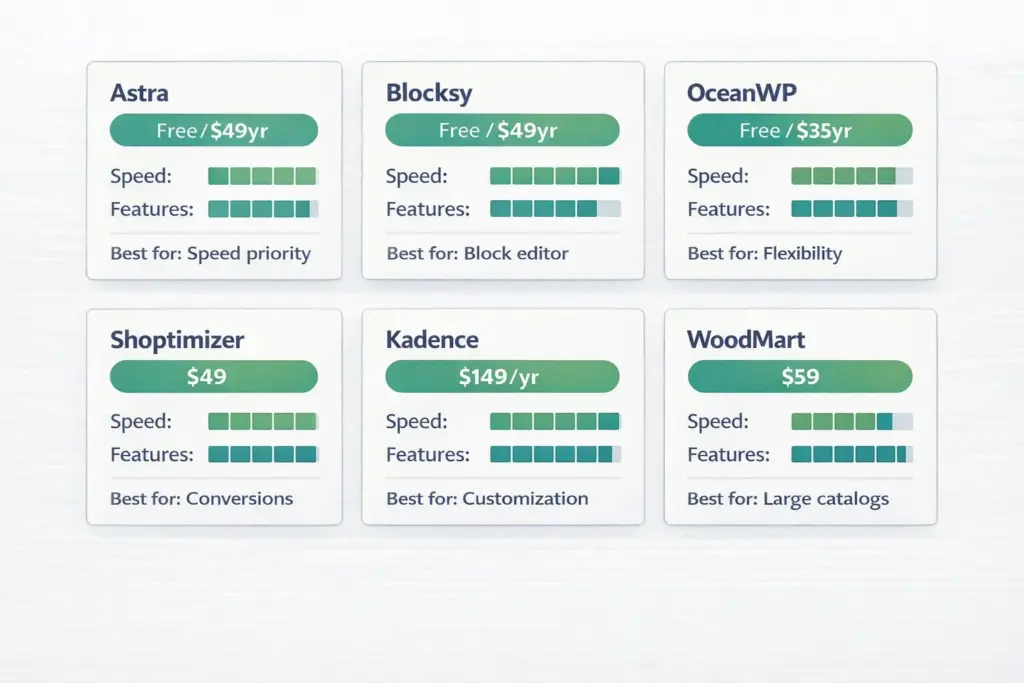
- Best free WordPress ecommerce themes: Astra (fastest, under 50KB), Blocksy (modern block-based), OceanWP (most flexible), and Storefront (official WooCommerce theme). Best premium: Shoptimizer ($49, conversion-optimized), Kadence ($149/year, most customizable), WoodMart ($59, best for large catalogs).
- Best free Shopify themes: Dawn (default, excellent performance), Craft (artisan products), and Refresh (modern, clean). All free Shopify themes are built by Shopify's own team and fully optimized. Premium Shopify themes cost $150-$400 one-time.
- Don't spend more than 2-3 hours choosing a theme. The best ecommerce website template is the one that loads fast, works on mobile, and lets you start selling. You can always switch later.
A seller asked me to review her store last month. Beautiful custom theme. Parallax scrolling. Animated product reveals. Full-width video on the homepage. It took 6.8 seconds to load on mobile. Her bounce rate was 73%. All that design work was actively hurting her sales.
WordPress ecommerce themes are pre-designed website templates that provide the visual layout, styling, and structural framework for an online store built on WordPress with WooCommerce. The right ecommerce website template handles product display, checkout flow, mobile responsiveness, and page speed without requiring you to code anything from scratch. Your theme choice directly affects three things that determine whether visitors buy: how fast your store loads (47% of consumers expect a page to load in 2 seconds or less), how it looks and functions on mobile (over 60% of ecommerce traffic is mobile), and how easily customers can navigate from product discovery to checkout.
This guide covers the best ecommerce templates across WordPress/WooCommerce, Shopify, and standalone builders, organized by what actually matters for sales rather than just screenshots. If you’re still deciding which platform to build on, see our ecommerce platform comparison first.
What to Look For in an Ecommerce Template (Before Design)
Most people choose themes by how they look. That’s like buying a car based on paint color. These five factors matter more than aesthetics:
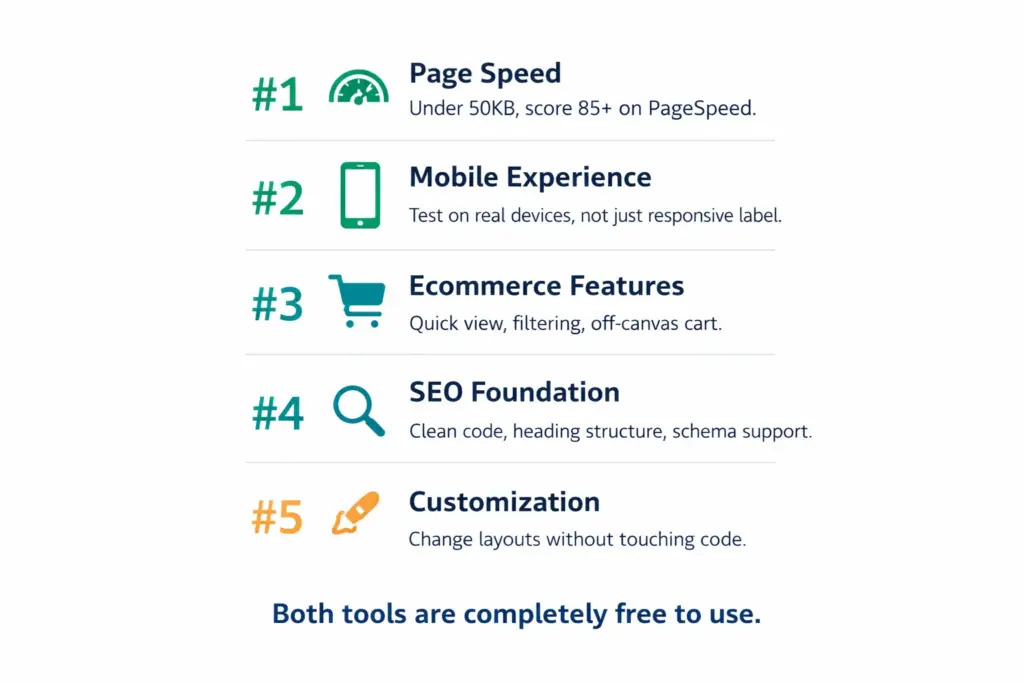
1. Page speed. Run any theme’s demo through Google PageSpeed Insights before installing it. Look for a performance score above 85 on mobile. Themes with heavy animations, sliders, and multiple external scripts load slowly. Lightweight themes like Astra (under 50KB) and Blocksy outperform bloated “feature-rich” themes every time.
2. Mobile responsiveness. Open the theme demo on your phone. Can you browse products, read descriptions, and complete a checkout without pinching or zooming? Test the product grid, filters, cart, and checkout on a real device. “Mobile responsive” on the features list doesn’t always mean “great on mobile” in practice.
3. Ecommerce features. Does the theme support product quick view, off-canvas cart, wishlist, product filtering, and zoom-on-hover? These features directly affect conversion rate. A theme without product filtering forces customers to scroll through your entire catalog instead of finding what they want.
4. SEO foundation. Clean code, proper heading structure (H1-H6), schema markup support, and fast load times are the SEO basics a theme should provide. Themes with clean, semantic HTML give search engines and AI answer engines an easier time extracting your content. Our ecommerce web design guide covers the full technical checklist.
5. Customization without code. Can you change colors, fonts, layouts, and header/footer without editing PHP files? Modern themes use the WordPress Customizer, page builders (Elementor, Gutenberg blocks), or Shopify’s theme editor. If you need a developer to make basic changes, the theme will slow down your business every time you want to update something.
Best WordPress Ecommerce Themes (WooCommerce)
WordPress powers over 40% of the web, and WooCommerce is the most used ecommerce plugin. Your WordPress ecommerce theme determines how your WooCommerce store looks, performs, and converts.
Best Free WordPress Ecommerce Themes
Astra. The most popular WordPress ecommerce theme for good reason. Under 50KB frontend footprint makes it one of the fastest themes available. Deep WooCommerce integration with product grids, off-canvas cart, and checkout customization in the Pro version ($49/year). Over 300 starter templates across industries. Compatible with Elementor, Beaver Builder, and Gutenberg. If speed is your priority and you want one theme recommendation, it’s Astra.
Blocksy. A modern, block-based WordPress ecommerce theme built for the Gutenberg editor. Excellent performance with a lightweight codebase. Strong WooCommerce support including product quick view, wishlist, and AJAX filtering. The free version is remarkably capable. Pro upgrade adds conditional layouts, advanced headers, and deeper ecommerce features. Best for sellers who want to use WordPress’s native block editor rather than a third-party page builder.
OceanWP. The most flexible free ecommerce template on this list. WooCommerce support includes quick view, floating add-to-cart bar, and product layout options. The Pro upgrade is the cheapest at $35/year. The trade-off: because it tries to do everything, it’s not as tightly optimized for ecommerce as purpose-built themes. Good for stores that also need non-ecommerce pages (blog, services, portfolio).
Storefront. The official WooCommerce theme, built by the WooCommerce team. Guaranteed compatibility with every WooCommerce extension. Clean, minimal design that prioritizes function over flash. Limited customization without paid child themes. Best for sellers who want zero compatibility headaches and plan to extend with WooCommerce plugins rather than theme features.
Best Premium WordPress Ecommerce Themes
Shoptimizer ($49 one-time). Built specifically to maximize conversions. Features include distraction-free checkout, trust badges, countdown timers, and sticky add-to-cart. Performance-optimized with fast load times. Best for sellers who prioritize conversion rate over design flexibility.
Kadence ($149/year). Advanced header and footer builder, conditional layouts, and deep WooCommerce controls. Extremely customizable without touching code. Starter templates for multiple store types. Scalable from a small shop to a large catalog. Best for sellers who want maximum control over every layout detail.
WoodMart ($59 one-time, ThemeForest). The highest-rated WooCommerce theme on ThemeForest. AJAX product filters, quick view, wishlist, compare functionality, and mega menu built in. 70+ pre-built demo layouts. Handles large product catalogs (500+ products) well. The trade-off: feature-heavy means a steeper learning curve. Best for stores with large, varied catalogs.
Best Shopify Ecommerce Templates
Shopify themes work differently from WordPress. All Shopify themes are hosted and optimized by Shopify’s infrastructure, so performance is generally more consistent. Shopify’s free themes are built by Shopify’s own design team and are legitimately excellent.
Dawn (free). Shopify’s default theme and honestly one of the best. Minimal, fast, and designed around Shopify’s Online Store 2.0 architecture. Flexible sections on every page. Works for most store types. If you’re starting on Shopify, start with Dawn and only switch if you hit a specific limitation.
Craft (free). Designed for artisan and handmade product stores. Visual storytelling focus with large imagery and editorial-style layouts. Perfect for brands where the product story matters as much as the product itself.
Refresh (free). Clean, modern design with a focus on health, beauty, and wellness products. Smooth animations and a contemporary feel. Good for brands targeting younger demographics who expect polished digital experiences.
Premium Shopify themes ($150-$400 one-time): Themes like Prestige (luxury/fashion), Impulse (high-volume stores), and Empire (large catalogs with advanced filtering) add features beyond what free themes offer. But Shopify’s free themes genuinely handle most store needs. Only upgrade when you’ve identified a specific feature gap.
Free vs Premium: When to Upgrade Your Ecommerce Template
Start free if: You’re making under $5K/month in revenue. You’re still validating your product-market fit. You’re not sure what features you actually need yet. Your store has under 100 products.
Upgrade to premium if: You need specific conversion features (countdown timers, sticky cart, mega menu). Your catalog exceeds 200+ products and needs advanced filtering. You want unique layouts that free templates can’t achieve. You’ve confirmed your store converts and want to optimize further.
The return on investment math: if a $49-$150 premium theme increases your conversion rate by even 0.5% on 10,000 monthly visitors, that’s 50 extra sales per month. At $30 average order value, that’s $1,500/month from a one-time $49-$150 investment. Premium themes pay for themselves quickly once you have traffic.
Common Ecommerce Template Mistakes
Choosing based on the demo, not your products. Every theme demo looks amazing because it uses professional photography and perfect copy. Your store will look different. Install the theme, add YOUR products and YOUR photos, then evaluate.
Installing too many plugins to compensate for a bad theme. If your theme doesn’t support basic ecommerce features, you’ll add 5-10 plugins to fill the gaps. Each plugin adds load time, potential conflicts, and maintenance overhead. A good ecommerce template has core features built in.
Ignoring update frequency. WordPress ecommerce themes that haven’t been updated in 12+ months are security risks. Check the theme’s changelog before purchasing. Active themes get updated every 1-3 months. On Shopify, this is less of a concern since themes automatically stay compatible.
Spending weeks choosing before making a single sale. The ecommerce website template you launch with is not the one you’ll have in 12 months. Pick a fast, mobile-friendly theme, launch, and iterate. Perfection is the enemy of revenue.
Frequently Asked Questions
What is the best WordPress ecommerce theme?
Astra is the best overall for most sellers because of its speed (under 50KB), WooCommerce integration, and 300+ starter templates. For conversion optimization specifically, Shoptimizer is purpose-built to maximize sales. For large catalogs with 500+ products, WoodMart handles advanced filtering best.
Are free ecommerce website templates good enough?
Yes, for most new and growing stores. Free themes like Astra and Blocksy (WordPress) and Dawn (Shopify) offer excellent performance, mobile responsiveness, and full ecommerce compatibility. Upgrade to premium when you need specific conversion features or deep customization.
What should I look for in an ecommerce template?
Prioritize page speed (PageSpeed score above 85 on mobile), mobile responsiveness on real devices, built-in ecommerce features (filtering, quick view, cart), SEO-friendly code structure, and customization without needing a developer. Design aesthetics should come after these five factors.
How much do ecommerce website templates cost?
Free to $400. Quality free options exist on both WordPress and Shopify. Premium WordPress ecommerce themes cost $49-$150. Shopify premium themes cost $150-$400 one-time. ThemeForest WordPress themes average $59. Custom theme development starts at $2,000-$5,000+.
Should I use a WordPress or Shopify theme for my store?
Use WordPress/WooCommerce if you want maximum flexibility, own your code, and are comfortable with self-hosted software. Use Shopify if you want simplicity, automatic updates, and built-in hosting. Your platform choice should drive the theme decision, not the other way around.
Can I change my ecommerce template later?
Yes, but it requires work. On WordPress, switching themes may affect layouts, menus, and widget areas. On Shopify, theme switching is smoother but you’ll need to reconfigure sections and settings. Plan for 4-8 hours of work to properly migrate. Start with a good theme to minimize switching later.
Related reads: Best Ecommerce Platform | Ecommerce Web Design | Ecommerce Startup Costs | How to Start an Ecommerce Business | How to Sell Things Online | Ecommerce Trends
Enjoying this? Get more like it every week.
One email per week with ecommerce strategies, tool picks, and seller insights. No spam.