

- Your Shopify theme is the foundation of your store's customer experience, determining page speed, mobile usability, visual presentation, and conversion potential. A poorly chosen theme can cost 20 to 40% of potential revenue through slow load times and awkward UX, while a well-chosen one paired with the right apps creates a conversion-optimized store.
- Free themes have improved dramatically. Dawn (Shopify's default) remains the gold standard foundation, scoring around 92 to 95 on PageSpeed with minimal JavaScript. Horizon, Shopify's newest default, adds AI-powered section generation and modular flexibility. For most new stores, starting with a fast free theme plus conversion apps is the most cost-effective approach.
- Paid themes ($100 to $425 one-time) add built-in conversion features (quick buy, sticky cart, countdown timers, mega menus) that would otherwise require multiple app subscriptions. A premium theme can replace 3+ app subscriptions. Top picks include Impulse (fashion, best-selling), Impact (multi-industry), Prestige (luxury), and Satoshi (best value at ~$100).
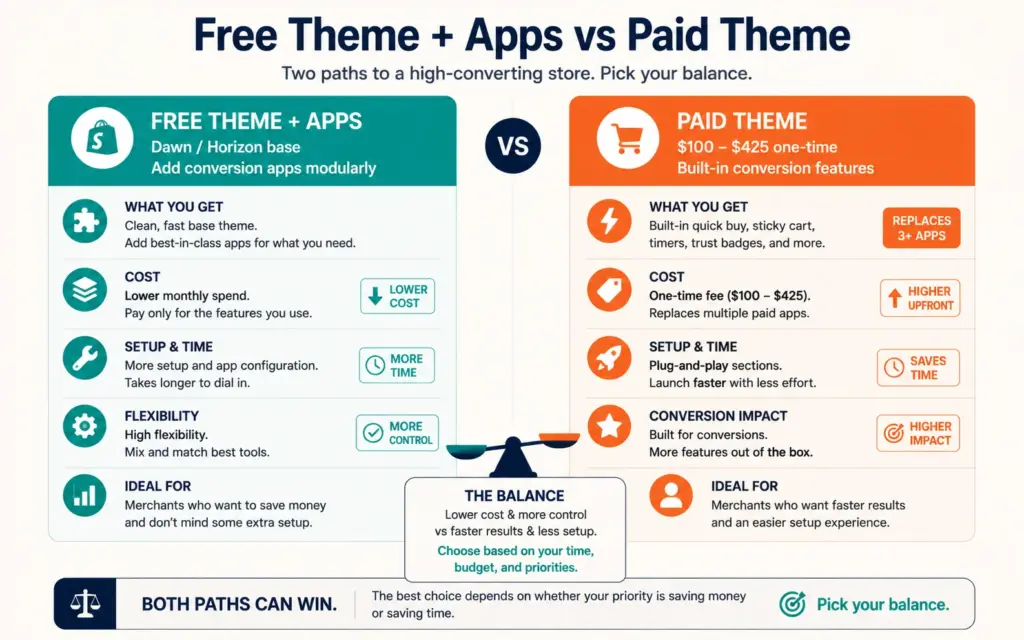
- The core decision is built-in features (paid theme) versus modular app-based features (free theme plus apps). Choose by budget, catalog size, and brand type. No matter which you pick, conversion apps fill the gap between what themes provide and what high-converting stores need. Stick to the top themes in the official Shopify Theme Store, since every one is reviewed for speed, security, and usability.
This Shopify themes guide tackles a decision that matters far more than most new merchants realize: your theme is the foundation of your entire customer experience. It determines how fast your pages load, how your store works on mobile, how your products are presented, and ultimately how well you convert visitors into buyers. According to EasyApps’ theme testing, a poorly chosen theme can cost you 20 to 40% of potential revenue through slow load times and awkward user experiences. That’s not a design preference, it’s a revenue decision. The visitors who leave because a page loaded slowly or looked broken on their phone rarely come back, and you never see them in your sales numbers, only in the gap between the traffic you paid for and the orders you actually got.
The good news is that choosing well isn’t complicated once you understand the tradeoffs. The core question is whether you want built-in features (a paid theme) or modular, app-based features (a free theme plus apps), and the answer depends on your budget, catalog size, and brand type. This guide covers free versus paid themes, the top picks for speed and conversion, how to choose by store type, and the customization basics. The Shopify setup guide covers store creation; this focuses specifically on selecting the theme that shapes your store’s performance.
Why Your Theme Choice Directly Affects Revenue
A theme isn’t just how your store looks. It controls the factors that determine whether visitors buy: page speed (slow themes lose sales, since conversion drops sharply as load time climbs past 1 to 2 seconds), mobile experience (most ecommerce traffic is mobile, so a theme that works poorly on phones loses the majority of your visitors), and built-in conversion features (or the lack of them).
According to StarApps’ theme performance data, stores with faster, conversion-optimized themes see up to 2.5x higher conversions when pages load in 1 second versus 5 seconds. Speed is a conversion multiplier, and your theme is the largest single factor in your store’s baseline speed. The product page SEO benefit compounds this: Core Web Vitals are ranking factors, so a fast theme helps both conversion and search visibility. Every theme decision should weigh speed and mobile experience first, aesthetics second. The product page design your theme enables directly shapes how well your product pages convert.
Free Shopify Themes: Better Than Ever
Free Shopify themes have improved dramatically and now deliver enterprise-grade speed and mobile optimization without licensing costs. The standout options:
- Dawn: Shopify’s long-standing default and the gold-standard foundation. Scores around 92 to 95 on Lighthouse, uses minimal JavaScript, and provides the cleanest base for apps and customization. The safest starting choice for most new stores.
- Horizon: Shopify’s newest default theme, offering full modular flexibility, AI-powered section generation, and fast load speeds. Considered by many the best free theme for new stores in the current lineup.
- Sense: Performance-first, well-suited to health, beauty, and wellness brands.
- Craft: Storytelling-focused for brands that lead with narrative and editorial design.
For most new stores, starting with a fast free theme plus a few conversion apps is the most cost-effective approach. You get a proven, fast foundation and add only the specific conversion features you need, which keeps your monthly costs down and your store fast, since every app you add carries both a subscription cost and a small performance cost. The tradeoff: free themes include fewer built-in features than premium ones, so you’ll rely on apps for advanced functionality, and starting free can lead to higher long-term costs if you later need extensive custom development. The budgeting for launch logic of starting lean applies: a free theme is a smart launch choice you can upgrade from as revenue justifies it.
Paid Shopify Themes: Built-In Conversion Features
Paid themes (typically $100 to $425 one-time, not recurring) bundle conversion features that would otherwise require multiple app subscriptions: quick buy, quick view, sticky add-to-cart, countdown timers, sale badges, mega menus, and recommended products. A premium theme can replace 3+ app subscriptions, offsetting part of its cost. The leading picks:
- Impulse (~$380): The best-selling paid theme on the official store, with 1,100+ reviews and a 95% positive rating. Passes Core Web Vitals at 90%+ on live stores. Best for fashion, lifestyle, and 50 to 200 product stores.
- Impact (~$400): A top multi-industry conversion theme, strong on speed and flexibility.
- Prestige: The go-to for luxury and premium brands.
- Satoshi (~$100): The best value pick, a minimalist, conversion-focused design with an app-like browsing feel. Great for clothing and luxury products.
- Turbo (~$425): A premium speed-and-conversion theme for established stores.
Paid themes make sense when you want polished built-in functionality without assembling and paying for multiple apps, or when your brand needs a specific premium aesthetic. Be skeptical of bold “guaranteed higher conversion” claims from random third-party sellers, since most of that is marketing rather than measured fact, and a flashy theme with unproven claims is riskier than a well-reviewed one from the official store. Stick to the top themes in the official Shopify Theme Store, where every theme is reviewed for speed, security, and usability. The best Shopify apps guide covers the conversion apps that complement whichever theme you choose.
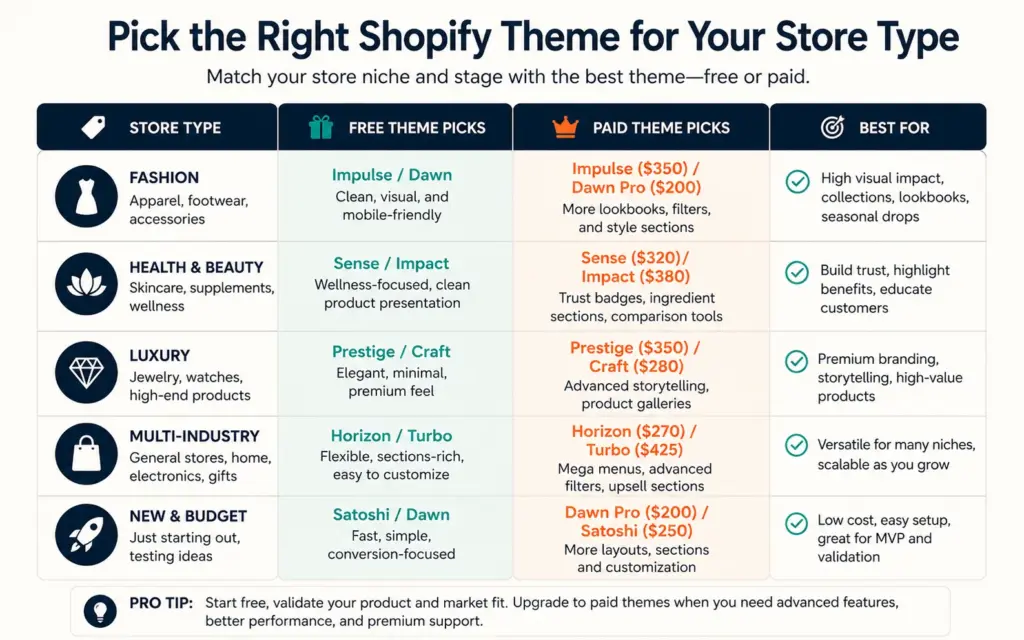
Choosing a Theme by Store Type
| Store Type | Free Pick | Paid Pick |
|---|---|---|
| New store, tight budget | Dawn or Horizon | Satoshi (~$100) |
| Fashion / lifestyle | Dawn | Impulse (~$380) |
| Health / beauty | Sense | Impact |
| Luxury / premium | Craft | Prestige |
| Multi-industry / scaling | Horizon | Impact or Turbo |
The selection principle: pick a theme that’s already close to what you want to build, or whose design you like, then customize from there. Don’t overcomplicate it, since almost anything can be customized later. Match the theme to your catalog structure, media depth, and how customers browse your products, not aesthetics alone. A theme built for large image-heavy fashion catalogs fits a clothing brand with hundreds of visual products; a clean minimal theme fits a focused line of a few hero products where each one deserves the spotlight. Choosing a theme whose structure matches how you actually sell saves far more customization work than picking one purely on looks. The domain and branding direction you’ve set should guide which theme’s aesthetic aligns with your brand identity.
Customizing Your Theme and Filling Feature Gaps
Once you choose a theme, customize it through Shopify’s theme editor (no code required for most changes) or with a developer for deeper customization. The editor handles colors, fonts, section arrangement, and content. For anything beyond the built-in options, a developer can modify the theme code. Most stores never need custom code, though: the modern theme editor covers the overwhelming majority of what a growing store wants to change, and reaching for a developer too early is a common way to spend money on customization that visitors will never notice.
No matter which theme you choose, conversion apps fill the gap between what themes provide and what high-converting stores need. Common additions: email capture pop-ups and spin wheels (gamified list-building), sticky add-to-cart on mobile, free-shipping progress bars (which lift AOV), upsell and cross-sell recommendations, and countdown timers for sales. The AOV optimization tactics like free-shipping bars and upsells are often theme-agnostic apps you add on top. The conversion rate optimization discipline of testing applies to themes too: monitor your conversion rate and page speed after any theme change, and confirm the change actually helped. The ecommerce KPIs to watch include page load time, mobile conversion rate, and bounce rate, all directly affected by your theme.
Frequently Asked Questions
For most new stores, a fast free theme (Dawn or Horizon) plus a few conversion apps is the most cost-effective approach: you get a proven, fast foundation and add only the features you need. Choose a paid theme ($100 to $425 one-time) when you want polished built-in conversion features without assembling multiple apps, or when your brand needs a specific premium aesthetic. A premium theme can replace 3+ app subscriptions. The core decision is built-in features (paid) versus modular app-based features (free plus apps).
Dawn remains the gold-standard free theme and the strongest foundation, scoring around 92 to 95 on PageSpeed with minimal JavaScript and providing the cleanest base for apps and customization. Horizon, Shopify’s newest default, is widely considered the best free theme for new stores, adding AI-powered section generation and modular flexibility. Sense suits health and beauty brands, and Craft fits storytelling-focused brands. All are fast, mobile-optimized, and free, making them excellent starting points for most new stores.
Paid Shopify themes are typically a one-time cost of $100 to $425, not a recurring subscription. Satoshi is the best value at around $100, Impulse (the best-selling theme) is around $380, Impact around $400, and Turbo around $425. The one-time price often offsets partly because a premium theme’s built-in features (quick buy, sticky cart, countdown timers, mega menus) can replace 3+ recurring app subscriptions, saving ongoing monthly costs. Buy from the official Shopify Theme Store, where themes are reviewed for speed and security.
A poorly chosen theme can cost 20 to 40% of potential revenue through slow load times and awkward user experiences. Speed is a conversion multiplier: stores with faster, conversion-optimized themes see up to 2.5x higher conversions when pages load in 1 second versus 5 seconds. Since your theme is the largest single factor in your store’s baseline speed, and Core Web Vitals are also SEO ranking factors, choosing a fast theme directly affects both your conversion rate and your search visibility. Prioritize speed and mobile experience over aesthetics.
Match the theme to your catalog structure, media depth, and how customers browse, not aesthetics alone. Fashion and lifestyle stores suit Impulse (paid) or Dawn (free); health and beauty suit Sense or Impact; luxury suits Prestige or Craft; multi-industry scaling suits Impact, Turbo, or Horizon; and tight-budget new stores suit Satoshi (~$100) or free Dawn/Horizon. Pick a theme already close to what you want to build, then customize from there. Don’t overcomplicate it, since almost anything can be customized later.
Yes. You can switch themes at any time, and your products, collections, and content remain in your store (they’re not tied to the theme). You’ll need to reconfigure the new theme’s settings and re-add any customizations, so it’s some work but entirely doable. This is why you shouldn’t overcomplicate the initial choice: pick a solid theme now, and upgrade later if your needs change or revenue justifies a premium option. Just monitor your conversion rate and page speed after switching to confirm the new theme performs well.
Related Reads
- Shopify Setup Guide
- Best Shopify Apps
- Product Page Design
- Product Page SEO
- AOV Optimization
- Domain and Branding
Enjoying this? Get more like it every week.
One email per week with ecommerce strategies, tool picks, and seller insights. No spam.