
- Shopify is the best all-around ecommerce platform for most sellers in 2026. It's the easiest to launch, has the largest app ecosystem (8,000+ apps), and handles everything from first sale to $10M+ in revenue without migrating.
- WooCommerce is the best option if you already have a WordPress site or want full code control. It's free to install but requires hosting, security, and more hands-on management.
- BigCommerce (now Commerce.com) is the best for sellers who need advanced B2B features, multi-storefront capability, or want to avoid per-transaction fees on top of payment processing.
- Don't start with your own store if you have zero audience. Start on a marketplace (Etsy, Amazon, eBay), validate demand, then launch your own store once you know what sells.
I’ve helped people set up stores on Shopify, WooCommerce, Wix, BigCommerce, and Squarespace. The pattern I see over and over: people spend weeks comparing feature lists and pricing tables, pick a platform, then realize six months later it doesn’t match how they actually run their business. The features barely mattered. The fit did.
An ecommerce platform is the software that powers your online store. It handles your product catalog, shopping cart, checkout, payment processing, and order management. Some platforms also include marketing tools, inventory tracking, shipping integrations, and analytics. The “best” one isn’t the one with the most features. It’s the one that fits your business model, budget, and technical comfort level right now while being able to grow with you.
If you’re still in the “should I even build a store yet?” phase, read our guide to selling things online first. For many new sellers, starting on a marketplace makes more sense than paying for a platform subscription before you’ve made your first sale.
Choose by Business Stage, Not Feature Count
This is the framework most comparison articles miss. The right platform depends on WHERE you are, not just WHAT you sell.
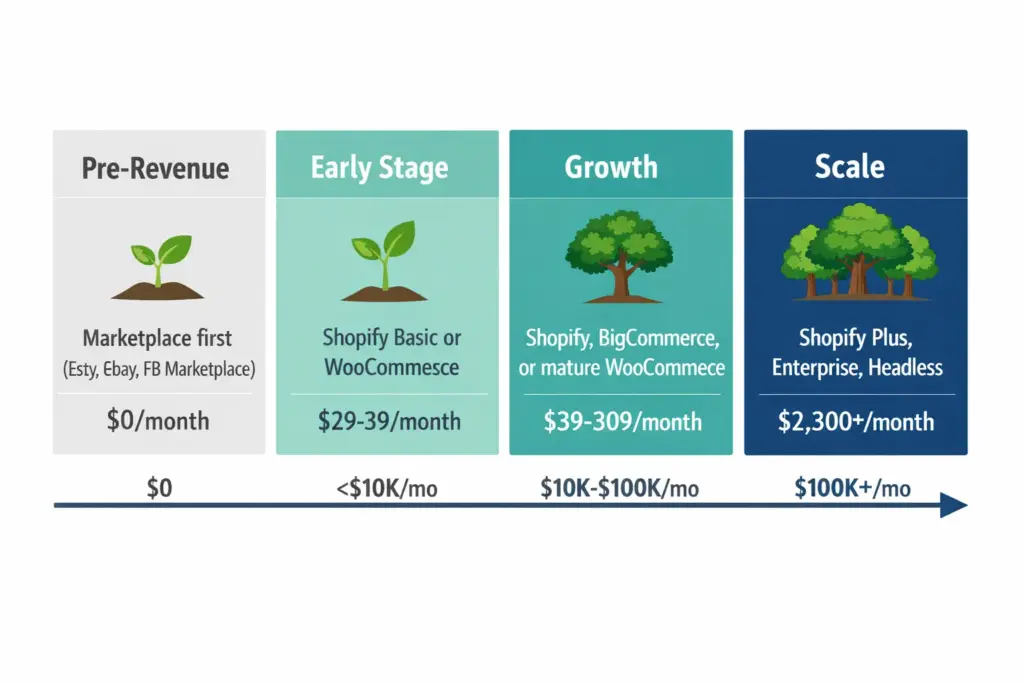
Pre-revenue (0 sales, testing an idea): Don’t pay for a platform yet. List on Etsy ($0.20/listing), eBay (free tier), or Facebook Marketplace (free). Validate that people want what you’re selling before committing to monthly fees. If you insist on your own store, Shopify’s starter plan or a free Ecwid tier lets you test for almost nothing.
Early stage (1-100 sales/month, under $10K/month revenue): Shopify Basic ($39/month) or WooCommerce (free plugin + $5-30/month hosting) covers everything you need. At this stage, simplicity matters more than advanced features. You need a store that works, not one that does everything.
Growth stage (100-1,000+ sales/month, $10K-$100K/month): Shopify, BigCommerce (Commerce.com), or a mature WooCommerce setup. Now features matter: multi-channel selling, abandoned cart recovery, advanced analytics, staff accounts, and integrations with your fulfillment and accounting tools.
Scale stage ($100K+/month): Shopify Plus ($2,300/month), BigCommerce Enterprise, or headless commerce setups. At this level you’re optimizing checkout conversion fractions, need custom automation, and have a development team. If you’re here, you probably don’t need this article.
The Major Platforms Compared Honestly
Every “best ecommerce platform” article is written by a platform (biased) or an affiliate reviewer (incentivized). I’m going to be direct about what each platform does well and where it falls short.
Shopify
Best for: Most sellers. Seriously. If you don’t know which platform to pick, pick Shopify. It handles the widest range of business models (physical products, digital products, dropshipping, print on demand, subscriptions) with the least friction.
Pricing: Basic at $39/month (billed annually $29/month), Shopify at $105/month, Advanced at $399/month. All plans include hosting, SSL, and Shopify Payments (2.9% + $0.30 per transaction on Basic). Using a third-party payment gateway adds an additional 2% fee on Basic.
Why people choose it: The app ecosystem is unmatched. Over 8,000 apps cover every conceivable need: email marketing, reviews, upsells, subscriptions, loyalty programs, print on demand fulfillment. Shopify’s checkout (Shop Pay) converts higher than most competitors. Theme customization is genuinely intuitive. You can launch a professional-looking store in a weekend.
Where it falls short: Monthly costs add up fast once you start adding paid apps. A typical Shopify store running email marketing, reviews, and a few other apps might spend $100-$200/month on top of the base plan. Content blogging is functional but basic compared to WordPress. Advanced customization requires Liquid (Shopify’s templating language) which has a learning curve.
WooCommerce
Best for: WordPress users, developers, and sellers who want complete control over their store. If you already have a WordPress site with traffic and SEO authority, adding WooCommerce to it makes perfect sense.
Pricing: The WooCommerce plugin is free. But you need hosting ($5-$50/month for shared, $30-$100+/month for managed WordPress hosting), a domain ($10-$15/year), an SSL certificate (often free with hosting), and likely some paid extensions ($0-$300+ depending on needs). Realistic all-in cost for a functional store: $20-$100/month.
Why people choose it: Total flexibility. You own the code, the data, and the hosting. No per-transaction fees beyond your payment processor (Stripe charges 2.9% + $0.30). The WordPress ecosystem gives you best-in-class SEO capabilities (Rank Math, Yoast) and content marketing tools. For content-heavy businesses where blog traffic drives sales, WooCommerce on WordPress is hard to beat.
Where it falls short: You’re responsible for everything: hosting performance, security updates, plugin compatibility, backups. A plugin conflict can break your checkout at 2 AM and nobody’s fixing it but you (or your developer). The initial setup is more complex than Shopify. Not ideal for non-technical sellers who just want to list products and sell.
BigCommerce (Commerce.com)
Best for: Mid-market and B2B sellers who need advanced built-in features without relying on third-party apps. BigCommerce rebranded to Commerce.com in 2025 with a focus on AI-integrated commerce and multi-channel selling.
Pricing: Standard at $39/month, Plus at $105/month, Pro at $399/month, Enterprise (custom pricing). No additional transaction fees on any plan, which is a meaningful advantage over Shopify for high-volume sellers using non-native payment gateways.
Why people choose it: More built-in features at lower price points than Shopify. Native multi-storefront capability, B2B pricing and quote management, and support for 140+ currencies without apps. No transaction fee surcharge for using third-party payment processors. Strong API-first architecture for headless commerce setups.
Where it falls short: Smaller app and theme ecosystem than Shopify. Automatic plan upgrades based on revenue thresholds (exceed your plan’s revenue cap and you’re forced to upgrade). The admin interface feels less intuitive than Shopify’s. Smaller community means fewer tutorials and troubleshooting resources.
Wix
Best for: Small businesses that need a combined website and store. Service businesses, restaurants, salons, consultants, or small product sellers who want a beautiful website with ecommerce built in, not the other way around.
Pricing: Business Basic at $29/month (cheapest plan with ecommerce). Business Unlimited at $36/month adds subscription products and more storage.
Why people choose it: The drag-and-drop builder is genuinely the easiest to use. Wix’s AI website builder can generate a full site from a text prompt. Beautiful templates. Integrated booking, scheduling, and service selling make it versatile for hybrid businesses.
Where it falls short: Limited scalability for serious ecommerce. Weaker inventory management. Can’t switch templates without rebuilding your site. Fewer ecommerce-specific integrations than Shopify or BigCommerce. Not the platform for a 500+ product catalog or complex product variations.
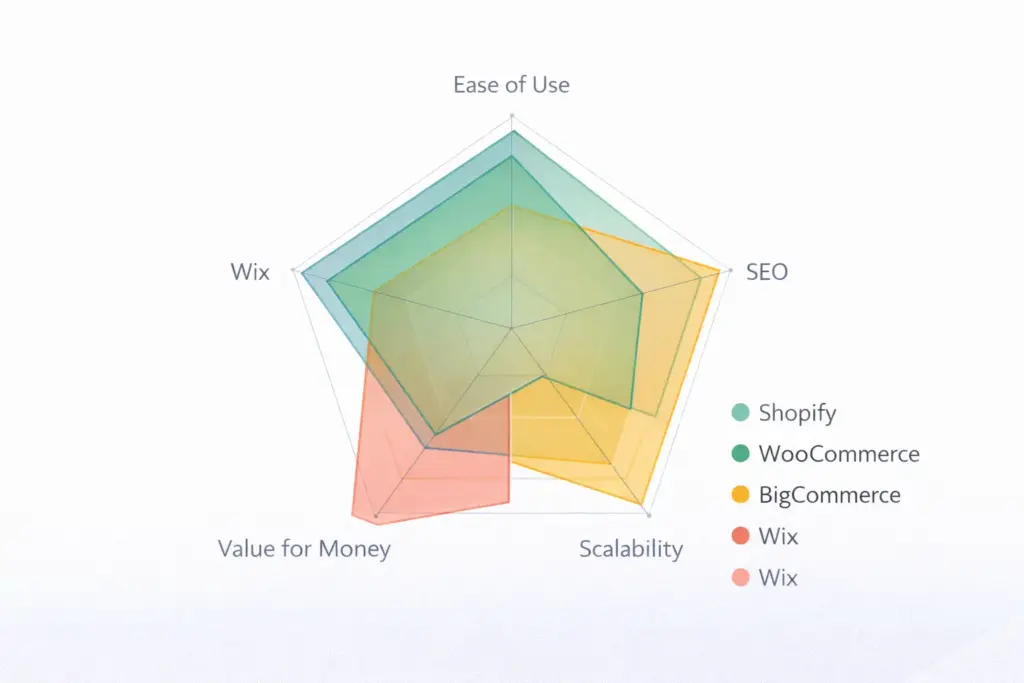
Quick Comparison Table
| Factor | Shopify | WooCommerce | BigCommerce | Wix |
|---|---|---|---|---|
| Starting price | $29/month | ~$20/month (hosting) | $39/month | $29/month |
| Ease of use | Very easy | Moderate | Moderate | Easiest |
| SEO capabilities | Good | Excellent | Good | Decent |
| App ecosystem | 8,000+ apps | 59,000+ plugins | 1,000+ apps | 500+ apps |
| Transaction fees | 0-2% (on top of payment processing) | None | None | None |
| Scalability | Excellent | Excellent (with investment) | Excellent | Limited |
| Best for | Most sellers | WordPress users, content-driven stores | B2B, multi-storefront, high-volume | Small business, service + product hybrid |
What About Marketplaces vs Your Own Store?
Amazon, Etsy, and eBay aren’t “ecommerce platforms” in the traditional sense, but they’re where many sellers make the bulk of their revenue. The smart approach for most new sellers: start on a marketplace, then add your own store.
Marketplaces: Built-in traffic, existing buyer trust, faster first sales. Trade-off: higher fees (Amazon takes 30-40% all-in), limited branding, you don’t own the customer relationship, and you’re subject to their rules.
Your own store: Full brand control, own the customer data, lower per-sale costs. Trade-off: you drive ALL the traffic yourself (costs money or time), zero built-in audience, slower to first sale.
The hybrid model: Most successful ecommerce businesses use both. Marketplaces for volume and discovery. Their own store for brand-building, better margins, and email list growth. One founder I know does 60% of revenue on Amazon and 40% on Shopify. Amazon is his acquisition channel. Shopify is where repeat customers buy directly at better margins.
Our how to sell things online guide covers the marketplace decision in more detail if you’re still weighing the options.
Best Ecommerce Platform for SEO
This deserves its own section because it’s one of the most searched sub-topics and the answer is more nuanced than “WooCommerce wins.”
WooCommerce + WordPress is technically the most SEO-capable setup. Full control over URL structures, schema markup, site speed optimization, and access to the best SEO plugins (Rank Math, Yoast). If organic search is your primary traffic strategy, WooCommerce gives you the most tools. But those tools only help if you know how to use them.
Shopify has improved its SEO significantly. You can edit title tags, meta descriptions, URL handles, alt text, and add structured data. The limitations: URL structures include forced prefixes (/products/, /collections/), you can’t customize robots.txt as freely, and site speed depends heavily on your theme and app load. For most sellers, Shopify’s SEO is more than sufficient.
BigCommerce has strong native SEO features including full URL control, automatic 301 redirects, and built-in microdata. It gives you more SEO flexibility than Shopify out of the box without requiring apps.
The honest take: platform SEO differences account for maybe 10-15% of your organic search success. The other 85-90% is content quality, keyword targeting, backlinks, and site experience. A Shopify store with excellent content will outrank a WooCommerce store with poor content every time. Don’t choose your platform based on SEO alone unless organic search is your only channel and you have the technical expertise to leverage WooCommerce’s full SEO toolkit. For more on building a store that ranks, see our ecommerce web design guide.
Frequently Asked Questions
What is the best ecommerce platform for small business?
Shopify for most small businesses. It’s the easiest to set up, has the largest ecosystem of apps and themes, and scales from first sale to millions in revenue. WooCommerce is the better choice if you already use WordPress and are comfortable with self-hosted software.
What is the cheapest ecommerce platform?
WooCommerce is technically the cheapest since the plugin is free and hosting starts around $5/month. For hosted platforms, Ecwid’s starter plan at $5/month is the lowest. Among major platforms, Shopify and Wix both start at $29/month for ecommerce-capable plans.
Can I switch ecommerce platforms later?
Yes, but it’s not painless. Product data, customer info, and order history can be migrated. What you lose: your URL structure (which impacts SEO), any platform-specific customizations, and usually your theme/design. Plan for 2-4 weeks of work for a basic migration. The best approach is choosing the right platform from the start.
Do I need an ecommerce platform or can I just sell on Amazon?
You can absolutely just sell on Amazon or Etsy without your own platform. Many successful sellers do exactly this. Your own store makes sense when you want to build a brand, own your customer relationships, reduce platform dependency, and improve margins. Most sellers eventually do both.
Which ecommerce platform is best for dropshipping?
Shopify, because of its integrations with DSers, Spocket, and other dropshipping apps. WooCommerce with AliDropship is the alternative. The platform matters less than your supplier reliability and marketing. See our dropshipping guide for the full breakdown.
Is WordPress WooCommerce better than Shopify?
WooCommerce is better for SEO-focused, content-driven stores run by technical users. Shopify is better for everything else: ease of use, speed of launch, checkout optimization, and app ecosystem. Neither is objectively “better.” They serve different seller profiles.
Related reads: Complete Guide to Starting an Ecommerce Business | How to Sell Things Online | Ecommerce Web Design | Ecommerce Business Models | How to Start Dropshipping
Enjoying this? Get more like it every week.
One email per week with ecommerce strategies, tool picks, and seller insights. No spam.