

- WooCommerce hosting is the server infrastructure your WooCommerce store runs on. Unlike Shopify (hosting included), WooCommerce is self-hosted, meaning you choose and pay for hosting separately. This is WooCommerce's biggest tradeoff: full control at the cost of managing your own performance, security, and scalability, all of which depend heavily on your hosting choice.
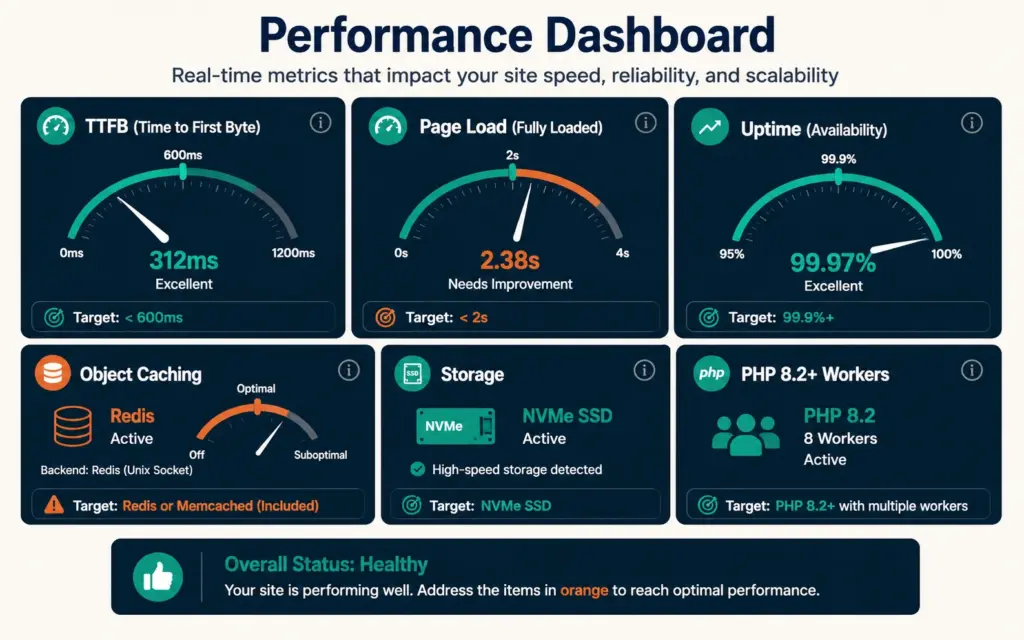
- WooCommerce has demands generic WordPress hosting can't meet: dynamic product pages, shopping carts, and checkout that can't be page-cached, plus concurrent database transactions during traffic spikes. The performance metrics that matter are TTFB under 600ms, page load under 2 seconds, 99.9%+ uptime, and object caching (Redis or Memcached) for the dynamic content WooCommerce generates.
- Speed directly affects revenue: over half of shoppers abandon a site that takes longer than 3 seconds to load. Hosting is the foundation of store speed, so cheap shared hosting that saves $20/month can cost far more in lost sales from slow pages and downtime during your busiest moments.
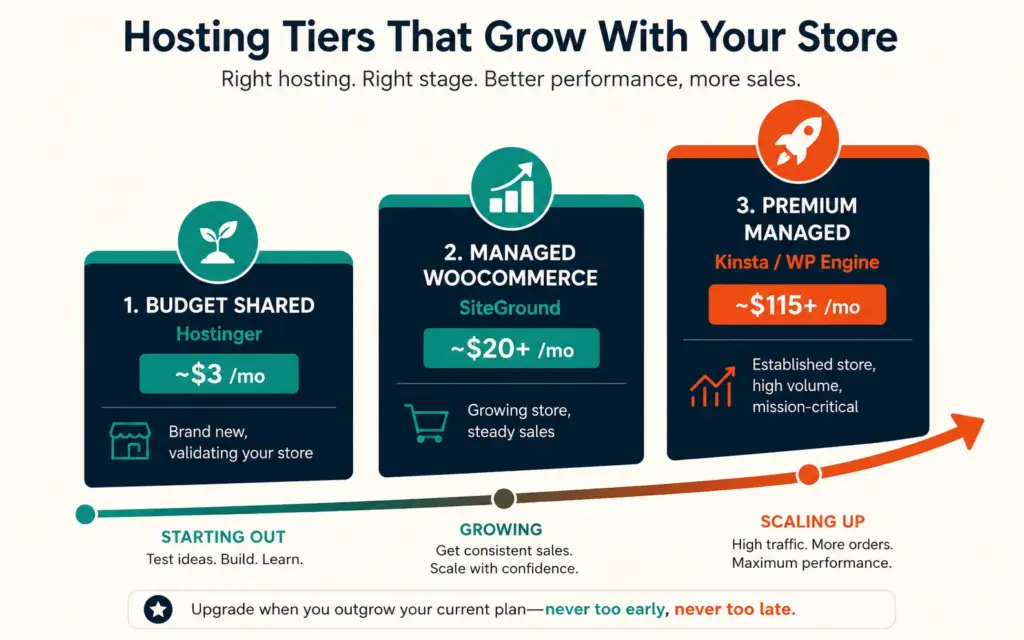
- Hosting tiers by store size: budget shared hosting (Hostinger, ~$3/month) for brand-new stores validating product-market fit, managed WooCommerce hosting (SiteGround, ~$20+/month) for growing stores wanting a hands-off managed experience, and premium managed hosting (Kinsta, WP Engine, ~$115+/month) for established stores with serious checkout volume needing multiple PHP workers.
WooCommerce hosting is the server infrastructure that runs your WooCommerce store, and choosing it well is one of the most consequential technical decisions a WooCommerce merchant makes. Unlike Shopify, where hosting is bundled into the platform fee, WooCommerce is self-hosted software: you install it on hosting you choose and pay for separately. That’s WooCommerce’s defining tradeoff, full control and flexibility in exchange for owning your store’s performance, security, and scalability, all of which rest heavily on your hosting choice.
The stakes are higher than they appear. A WooCommerce store on cheap, underpowered hosting loads slowly, struggles during traffic spikes, and risks downtime at exactly the moments (flash sales, seasonal peaks) when you can least afford it. According to Elementor’s WooCommerce hosting analysis, over 53% of online shoppers will abandon a site that takes longer than 3 seconds to load, which makes hosting a direct revenue factor, not just a technical detail. This guide covers what makes hosting WooCommerce-ready, the metrics that matter, and how to choose by store size. The WooCommerce setup guide covers installation; this covers the hosting foundation it runs on.
Why WooCommerce Needs More Than Generic WordPress Hosting
You can technically run WooCommerce on standard WordPress hosting, but WooCommerce has specific demands that generic hosting handles poorly. Regular WordPress pages can be cached and served fast to everyone. WooCommerce’s dynamic elements (product pages with live inventory, shopping carts, checkout, customer accounts) can’t be simply page-cached because they’re unique to each visitor and constantly changing.
This creates two demands generic hosting struggles with: database performance (WooCommerce runs many concurrent database queries, especially during checkout) and object caching (caching the dynamic query results that page caching can’t handle). During a traffic spike, a store on hosting without proper database tuning and object caching slows to a crawl or times out at checkout, losing sales precisely when volume is highest. WooCommerce-optimized hosting is engineered for these demands with pre-configured server settings, database optimization, and object caching built in. The difference shows up most sharply under concurrent load: a generic host might serve a single visitor fine, then buckle when fifty shoppers browse and check out simultaneously during a promotion, exactly the moment when every timeout is a lost sale. The WooCommerce speed guide covers the optimization layer that sits on top of good hosting.
The Performance Metrics That Actually Matter
When evaluating WooCommerce hosting, these are the metrics that directly affect your store:
- Time to First Byte (TTFB) under 600ms: How fast the server starts responding. High TTFB means slow everything.
- Page load under 2 seconds: The practical target for ecommerce. Above 3 seconds, abandonment climbs sharply.
- 99.9%+ uptime: Downtime is lost revenue. Look for real-world uptime track records, not just SLA promises.
- Object caching (Redis or Memcached): Essential for WooCommerce’s dynamic content. Confirm it’s included, not a paid add-on.
- NVMe SSD storage: Fast storage IOPS directly affect database read/write speed, which affects every page load and checkout.
- PHP 8.2+ with OPcache: Modern PHP execution speed under load.
- Enough PHP workers: PHP workers handle concurrent requests. Too few means checkout timeouts during busy periods.
According to MassiveGRID’s WooCommerce hosting comparison, testing providers against a standardized store (500 products, multiple payment gateways, 50 concurrent users) reveals the real differences in PHP execution, database query performance, and checkout response times that marketing claims obscure. Test any host with GTmetrix or Google PageSpeed Insights during a trial before committing. Marketing claims about speed are nearly universal and nearly meaningless; the only reliable evidence is a real test of your actual store, or at least a comparable one, under realistic conditions rather than an empty demo site loading a single cached page. The product page SEO benefit is direct: Core Web Vitals are ranking factors, and hosting speed is foundational to them.
Hosting Types: Shared vs Managed vs Cloud
Shared Hosting for Brand-New Stores on Tight Budgets
Shared hosting puts many sites on one server, keeping costs low (Hostinger’s WooCommerce-optimized shared hosting starts around $2.69/month with WordPress and WooCommerce pre-installed). It’s suitable for brand-new stores validating product-market fit on a minimal budget, where the priority is getting live cheaply rather than handling heavy traffic. The tradeoffs: shared resources mean slower performance under load, and introductory pricing is dramatically lower than renewal pricing. Stores with serious revenue ambitions typically outgrow shared hosting within 12 to 18 months and need to migrate. The budgeting for launch approach of starting lean applies: shared hosting is a reasonable launch choice you upgrade from as you grow. The mistake to avoid is treating the introductory price as the permanent price, since the renewal rate after the first term is often two or three times higher, which can turn a bargain launch decision into an unpleasant surprise a year later.
Managed WooCommerce Hosting for Growing Stores
Managed hosting handles the technical work for you: automatic WordPress and PHP updates, managed caching, CDN, backups, and security. SiteGround (around $20+/month) is frequently recommended as the best managed WooCommerce experience, with pre-installed WooCommerce, the Storefront theme, Google Cloud infrastructure, free CDN, and smart caching. Managed hosting is the sweet spot for growing stores that want strong performance without managing servers themselves, since it removes the need to become a part-time systems administrator just to keep your store fast and secure. The ecommerce automation philosophy of removing manual technical work applies: managed hosting automates the server maintenance so you focus on the business.
Premium Managed and Cloud Hosting for Established Stores
Premium managed hosts (Kinsta, WP Engine, around $115+/month) run on enterprise infrastructure (Google Cloud, AWS) with isolated containers, enterprise CDN, and the multiple PHP workers that high checkout volume requires. Kinsta recommends its Business tier ($115/month) as the minimum for WooCommerce stores specifically because it’s the first tier with enough PHP workers to handle concurrent checkout sessions without timeouts. Managed cloud hosting (Cloudways) offers a middle path: cloud infrastructure performance with managed convenience. These tiers suit established stores where downtime or slow checkout directly costs significant revenue. At meaningful sales volume, a single hour of downtime during peak traffic can cost more than a year of the hosting upgrade that would have prevented it, which reframes premium hosting from an expense into insurance against lost revenue. The best WooCommerce plugins you run also affect resource needs, so match hosting capacity to your plugin load and traffic.
Choosing WooCommerce Hosting by Store Stage
| Store Stage | Hosting Type | Example | Rough Cost |
|---|---|---|---|
| Brand new, validating | Budget shared | Hostinger | ~$3/month |
| Growing, steady sales | Managed WooCommerce | SiteGround | ~$20+/month |
| Established, high volume | Premium managed | Kinsta, WP Engine | ~$115+/month |
| Scaling, wants control | Managed cloud | Cloudways | Variable |
The principle: match hosting to your current stage and upgrade as you grow. Overpaying for premium hosting before you have the traffic to need it wastes money; underpaying for cheap shared hosting once you have real volume costs sales. Watch your performance metrics and traffic, and upgrade when you see slowdowns during peaks or approach your plan’s limits. The ecommerce KPIs to monitor include page load time and uptime, since both directly affect conversion. When your store consistently hits performance ceilings on your current tier, that’s the signal to upgrade. The financial planning and scaling budget should treat hosting as a cost that scales with your store, increasing as traffic and revenue grow.
WooCommerce Hosting Essentials to Verify Before Buying
Beyond performance, confirm any WooCommerce host includes: free SSL certificate (required for secure checkout and PCI compliance), staging environment (test changes safely before pushing live), automated daily backups (recover from mistakes or attacks), malware protection and security hardening (WooCommerce handles sensitive customer data), one-click WooCommerce installation, and responsive WordPress-knowledgeable support. Server location also matters: host near your primary customer base, since traffic crossing an ocean adds 0.5 to 1 second of latency. The ecommerce security requirements of handling payment and customer data make the security features non-negotiable, not optional extras.
Frequently Asked Questions
You can run WooCommerce on standard WordPress hosting, but WooCommerce-optimized hosting performs significantly better. WooCommerce has demands generic hosting handles poorly: dynamic product pages, carts, and checkout that can’t be page-cached, plus concurrent database transactions during traffic spikes. WooCommerce-optimized hosting includes database tuning, object caching (Redis/Memcached), and enough PHP workers to handle checkout under load. For anything beyond a hobby store, WooCommerce-specific hosting is worth it because slow pages and checkout timeouts directly cost sales.
WooCommerce hosting ranges from about $2.69/month (Hostinger budget shared) to $115+/month (Kinsta Business, premium managed). Managed WooCommerce hosting like SiteGround sits around $20+/month and suits most growing stores. The right cost depends on your stage: budget shared for brand-new stores validating product-market fit, managed hosting for growing stores wanting hands-off performance, and premium managed for established stores with serious checkout volume. Watch for introductory pricing that jumps significantly at renewal.
It depends on your stage. SiteGround is frequently recommended as the best managed WooCommerce experience for growing stores (pre-installed WooCommerce, Google Cloud infrastructure, free CDN, smart caching). For premium managed hosting on established high-volume stores, Kinsta and WP Engine lead on performance and scalability. For budget launches, Hostinger’s WooCommerce-optimized shared hosting is a low-cost entry. Cloudways offers managed cloud hosting for those wanting more control. Test any host with GTmetrix or PageSpeed Insights during a trial.
Hosting is the foundation of store speed. It determines Time to First Byte (target under 600ms), how fast pages load (target under 2 seconds), whether object caching handles WooCommerce’s dynamic content, storage speed (NVMe SSD affects database performance), and whether you have enough PHP workers to avoid checkout timeouts during traffic spikes. Since over half of shoppers abandon sites slower than 3 seconds, and Core Web Vitals are SEO ranking factors, hosting speed directly affects both conversion and search rankings.
Upgrade when you see performance problems: slow page loads during traffic peaks, checkout timeouts, downtime during busy periods, or when you approach your plan’s resource limits. Stores on budget shared hosting typically outgrow it within 12 to 18 months as revenue grows. Monitor page load time and uptime in your analytics, and upgrade when your store consistently hits performance ceilings on your current tier. Match hosting to your current stage and scale up as traffic and revenue increase.
Essentials to verify: free SSL certificate (secure checkout and PCI compliance), object caching with Redis or Memcached (WooCommerce’s dynamic content), staging environment (test changes safely), automated daily backups, malware protection and security hardening (sensitive customer data), one-click WooCommerce installation, NVMe SSD storage, PHP 8.2+ support, and responsive WordPress-knowledgeable support. Also consider server location, hosting near your primary customer base reduces latency by 0.5 to 1 second compared to traffic crossing an ocean.
Related Reads
- WooCommerce Setup
- WooCommerce Speed
- Best WooCommerce Plugins
- Product Page SEO
- Ecommerce Security
- Budgeting for Launch
Enjoying this? Get more like it every week.
One email per week with ecommerce strategies, tool picks, and seller insights. No spam.