
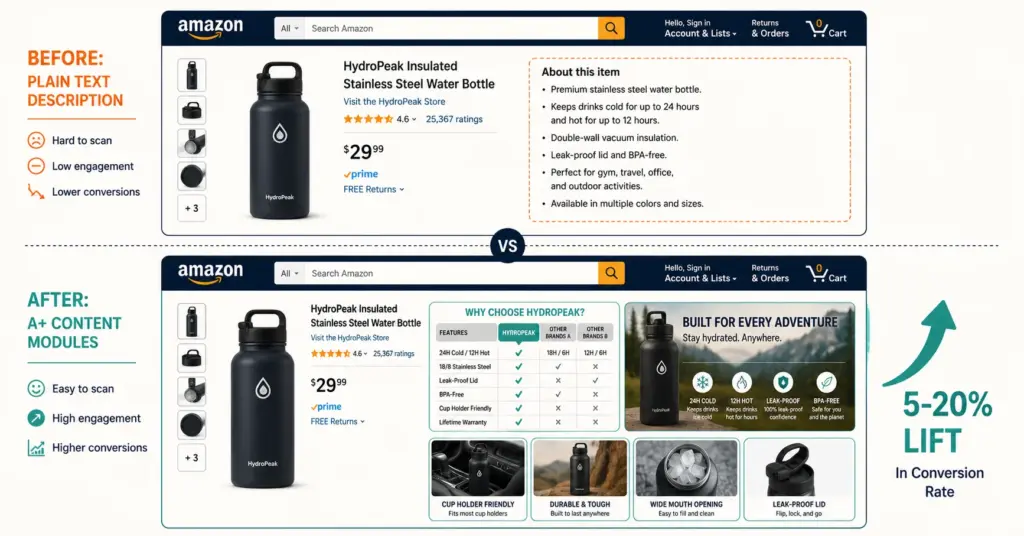
- Amazon A+ Content (formerly Enhanced Brand Content) replaces your plain text product description with visual modules: image banners, comparison charts, feature callouts, and brand story sections. It's free for Brand Registry members and lifts conversion 5 to 20% depending on category and execution quality.
- Basic A+ Content gives you up to 5 modules. Premium A+ Content (unlocked for eligible brands) adds video, interactive hotspots, and full-width modules. Most sellers should master Basic first. Premium is available when you've published Brand Stories on all ASINs and meet Amazon's eligibility criteria.
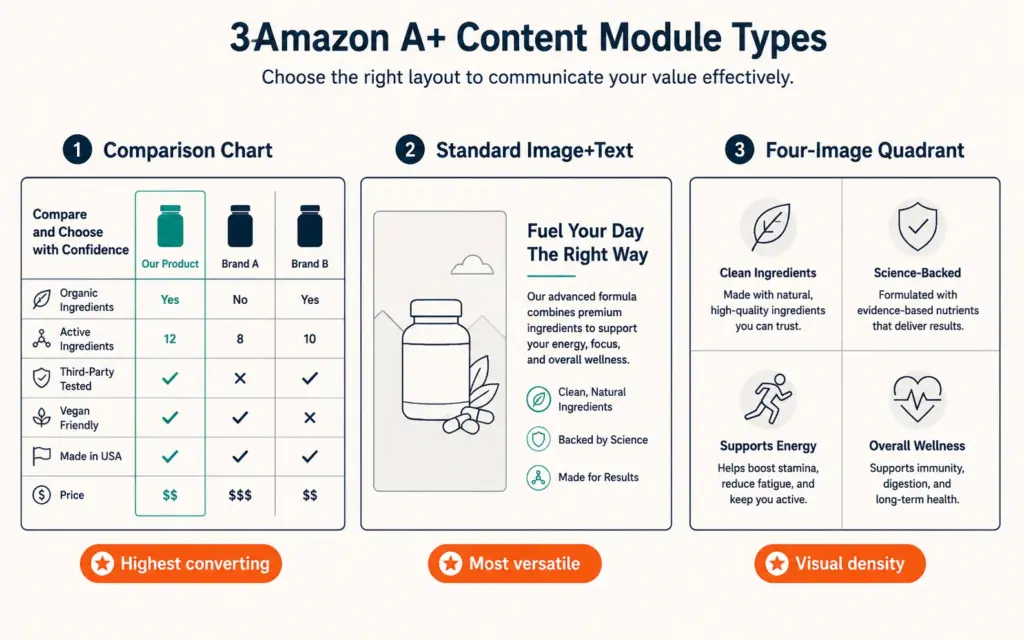
- The modules that convert best: comparison chart (letting buyers see your product vs competitors or vs your own product line), standard image and text (benefit-focused, not feature-focused), and the standard four-image quadrant (showing use cases). The modules that underperform: walls of text with tiny images, and brand history modules placed before product information.
- The biggest A+ Content mistake is treating it as a branding exercise instead of a conversion tool. Buyers scrolling past your bullet points to the A+ section have specific questions. Your modules should answer those questions visually. If your A+ Content is a company timeline and mission statement, you've wasted the most valuable real estate on your listing.
A+ Content (also called a plus content or enhanced brand content) on Amazon replaces the default text description block on your product detail page with a visual layout built from modular sections. Instead of a paragraph of plain text that most shoppers skip, you get image banners, comparison charts, feature callouts with photos, and brand story modules that communicate product value in a format people actually look at. Amazon used to call this Enhanced Brand Content (EBC) for third-party sellers. Since 2019, it’s all called A+ Content regardless of whether you sell through Seller Central or Vendor Central.
The conversion impact is documented. Amazon’s own data says Basic A+ Content lifts sales up to 8%. Premium A+ Content can push that to 20%. According to SalesDuo’s A+ Content analysis, the actual lift depends heavily on your category and how well your modules answer the specific questions buyers have about your product. A well-built A+ section on a supplement listing (where buyers need ingredient details and usage instructions) lifts conversion more than A+ on a simple household item where the bullet points already answer everything.
You need Amazon Brand Registry enrollment to access A+ Content. No Brand Registry, no A+ Content. That means you need a trademark. The investment is the trademark ($750 to $1,850). A+ Content creation and publishing is free.
Basic vs Premium A+ Content
Basic A+ Content (all Brand Registry sellers)
Available to every Brand Registry member at no cost. You get up to 5 content modules per ASIN plus a Brand Story module (which appears above the A+ section). Module types include standard image and text, comparison charts, single images, four-image quadrants, and text-only blocks. Image specs: 970 pixels wide for full-width modules, various heights depending on module type. All images must be JPEG or PNG.
Basic A+ replaces the product description. Whatever was in your text description disappears and the A+ modules take its place. The text you put in A+ modules is not indexed for Amazon search (your title, bullet points, and backend keywords handle SEO). But A+ Content IS indexed by Google, which means it can drive external search traffic to your Amazon listing.
Premium A+ Content (eligible brands)
Premium adds video modules, interactive hotspot images (clickable product features), carousel displays, and full-width module layouts. The visual impact is significantly stronger. Amazon periodically changes eligibility criteria, but it generally requires: Brand Story published on all ASINs in your catalog, a minimum A+ Content publishing history, and meeting brand quality standards.
Don’t wait for Premium. Basic A+ Content is where 80% of the conversion lift happens. Perfect your Basic modules first. Premium is the polish, not the foundation.
Which Modules Convert Best
Comparison chart (highest converting module)
Show your product alongside 3 to 4 other products from YOUR catalog. Each column highlights key attributes: size, material, features, best-for use case. This isn’t about trashing competitors (Amazon prohibits competitor brand mentions in A+ Content). It’s about helping the buyer pick the right product from your line. A shopper choosing between your 3 sizes sees a comparison chart and selects confidently instead of bouncing to research elsewhere.
If you only sell one product, compare your product’s variants (sizes, flavors, bundles) or compare your product’s features against generic category expectations (“Standard pillows vs Our Memory Foam Pillow”). The chart format scans quickly on mobile, which matters because over 70% of Amazon shopping happens on phones.
Standard image and text (most versatile)
Left side: product image showing a specific benefit. Right side: 2 to 3 sentences explaining that benefit. Use this module to address the top purchase objections in your category. If buyers frequently ask “Is this machine washable?” or “Will this fit a Queen bed?”, dedicate one image-text module to answering each question with a photo that proves the answer.
The product descriptions principles apply here: lead with the buyer benefit, not the product feature. “Sleep cool all night” beats “Made with phase-change cooling fabric.” Show the benefit in the image, explain it in the text.
Standard four-image quadrant
Four images in a 2×2 grid, each with a caption. Use this for showing 4 use cases, 4 included items, or 4 key features. The visual density of this module earns attention on mobile because it feels like content worth stopping for. Each image should be distinct (don’t use 4 slightly different angles of the same product).
How to Build A+ Content: Step by Step
- Go to Seller Central > Advertising > A+ Content Manager. Click “Start creating A+ Content.” Select “Basic” or “Brand Story.”
- Name your content. Use a descriptive name you’ll recognize later (e.g., “Cooling Pillow – Main A+ – v2”).
- Select your modules. You can use up to 5 modules. Start with: comparison chart, 2 standard image+text modules, and 1 four-image quadrant. This combination covers product comparison, benefit communication, and use case visualization.
- Upload images at spec. Amazon rejects blurry, watermarked, or incorrectly sized images. Module-specific dimensions vary. Standard image+text: 300×300 or 970×600 depending on layout. Always upload at the maximum resolution the module supports. The product photography standards for Amazon A+ require clean, high-resolution images without text overlays that Amazon might reject.
- Write module copy. Keep it short. 2 to 3 sentences per module maximum. No promotional language (“Buy now!”, “Best seller!”, “#1 rated”). Amazon rejects claims without substantiation. No competitor brand mentions. No pricing references (prices change and A+ Content doesn’t auto-update).
- Apply to ASINs. Select which product listings receive this A+ Content. You can apply the same A+ to multiple related ASINs or create unique A+ for each product.
- Submit for review. Amazon reviews A+ Content within 7 business days (usually faster). Common rejection reasons: promotional language, unsubstantiated claims, image quality issues, or competitor references. Fix and resubmit. Most rejections are easily resolved.
Brand Story: The Module Most Sellers Waste
The Brand Story module appears above your A+ Content section. It includes your brand logo, a carousel of brand images, and a brand description. Most sellers fill this with their company origin story and mission statement. Buyers don’t care about your founding year or your values. They care about why your products solve their problem better than alternatives.
Use the Brand Story to communicate what makes your brand different from a buyer’s perspective: “We test every batch for purity” (supplement brand). “Designed by veterinarians” (pet brand). “Made from recycled ocean plastic” (sustainability brand). The Brand Story should be a trust-building proof point, not a biography. If your brand story requires 3 paragraphs to explain, it’s not compelling enough. One sentence that matters beats three paragraphs that don’t.
A+ Content That Converts vs A+ Content That Doesn’t
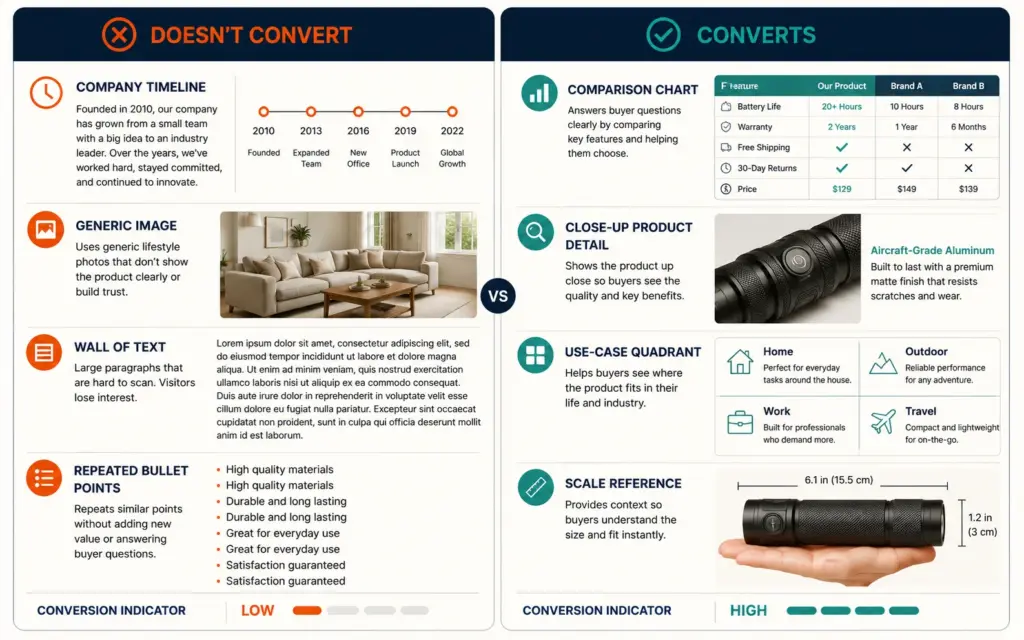
Converts: Modules that answer the specific questions buyers have about THIS product. What’s included in the box? How big is it compared to X? What’s it made of? Is it compatible with Y? How do I use it? These are the questions sitting in your product’s 1-star and 3-star reviews. Build A+ modules that pre-answer them. Check your competitors’ negative reviews too. If every competitor’s 3-star reviews mention “smaller than expected,” make a scale comparison module your first A+ section.
Doesn’t convert: Modules about your company history, generic lifestyle images that don’t show the product clearly, blocks of text without images, and A+ Content that repeats information already in your bullet points. If a buyer scrolled past your bullets and title to reach the A+ section, they’re looking for information your bullets didn’t cover. Give them something new.
The Amazon listing optimization strategy should treat bullet points and A+ Content as complementary, not redundant. Bullets handle feature specs, dimensions, and compatibility. A+ handles visual proof, comparison, and use-case storytelling. According to EcomBrainly’s A+ Content research, the conversion lift from A+ Content is highest when the A+ section provides information that isn’t available in the bullet points, rather than restating the same details in a visual format.
Common A+ Content Mistakes
Text-heavy modules. If a module has 200+ words and a small thumbnail image, shoppers skip it. They came to the A+ section for visual information. Large, clear images with 1 to 2 sentence captions outperform detailed text blocks every time. Show, don’t tell.
Not optimizing for mobile. Over 70% of Amazon shoppers browse on their phone. Full-width images look great on desktop but may render tiny on mobile. Standard image+text modules where the image and text stack vertically on mobile work better than side-by-side layouts that shrink both elements. Preview every module on a phone before publishing.
Skipping the comparison chart. The comparison module is the highest-converting A+ module type because it helps buyers make a decision instead of just absorbing information. Every A+ layout should include one. If you only sell one product, compare its variants or compare product tiers.
Ignoring A+ Content for low-performing ASINs. Sellers tend to create A+ Content for their best sellers first, which makes sense operationally. But the biggest conversion lift happens on underperforming ASINs that have decent traffic but low conversion. Those are the listings where better product communication moves the needle most. Check your ecommerce KPIs to identify ASINs with high impressions but below-average conversion. Those are your highest-priority A+ Content targets.
Setting and forgetting. A+ Content isn’t permanent. Revisit your modules quarterly. Update seasonal messaging. Refresh images. Test different module orders. Amazon’s A/B testing tool (Manage Your Experiments) lets you test two A+ versions against each other and measure which converts better. The A/B testing ecommerce methodology applies to A+ Content experiments: run each test for 4 to 6 weeks minimum to reach statistical significance.
Frequently Asked Questions
A+ Content (formerly Enhanced Brand Content) replaces the plain text product description on your Amazon listing with visual modules: image banners, comparison charts, feature callouts, and brand story sections. It’s free for Brand Registry members. Basic A+ allows 5 modules per ASIN. Premium A+ adds video and interactive elements for eligible brands. The main purpose is improving conversion by communicating product value visually instead of through text that most shoppers skip.
Amazon reports Basic A+ Content lifts sales up to 8% and Premium A+ up to 20%. The actual lift depends on your category, your baseline conversion rate, and how well your modules address buyer questions. Products with complex features, multiple use cases, or common buyer confusion see the highest lifts. Simple products where bullet points already answer everything see smaller gains. Measure your own before/after using Amazon’s A/B testing tool for accurate numbers.
A+ Content text is NOT indexed for Amazon’s internal search algorithm. Your title, bullet points, and backend search terms handle Amazon SEO. However, A+ Content IS indexed by Google, which means it can drive external search traffic to your Amazon listing. Don’t rely on A+ for Amazon keyword ranking. Use it for conversion optimization and Google visibility.
Image requirements vary by module type. Standard image+text: 300×300 or 970×600 pixels depending on layout selection. Full-width banner: 970×300 pixels. Comparison chart product images: 150×150 pixels. All images must be JPEG or PNG, high resolution, no watermarks, no promotional text (“Sale!”, “Best Value!”), and no competitor brand logos. Upload at the maximum resolution each module supports for the sharpest rendering on all devices.
Premium A+ Content requires: Brand Story published on all ASINs in your catalog, a publishing history with Basic A+ Content, and meeting Amazon’s brand quality standards. Amazon periodically changes the specific eligibility thresholds. Check A+ Content Manager in Seller Central for your current eligibility status. Don’t wait for Premium. Basic A+ delivers 80% of the conversion benefit. Master Basic first, then pursue Premium eligibility.
Common rejection reasons: promotional language (“Buy now!”, “#1 rated”, “Best seller”), unsubstantiated health or safety claims, competitor brand names or logos in images or text, pricing references (prices change and A+ doesn’t update), blurry or improperly sized images, and contact information (phone numbers, website URLs, email addresses). Remove the violating content and resubmit. Amazon usually specifies the rejection reason. Most rejections are resolved in one revision.
Related Reads
- Amazon Brand Registry
- Amazon Listing Optimization
- Product Photography
- Product Descriptions
- A/B Testing Ecommerce
- Ecommerce KPIs
Enjoying this? Get more like it every week.
One email per week with ecommerce strategies, tool picks, and seller insights. No spam.