
- Category pages are the most underoptimized pages on most ecommerce sites, yet they target the broadest, highest-volume keywords ("wireless headphones," "women's running shoes") and serve as the gateway between search engines and your product catalog.
- Effective ecommerce category page design balances two competing goals: giving Google enough text content to understand and rank the page, while keeping the shopping experience clean and conversion-focused for human visitors.
- The essential elements: unique category description (200-400 words), proper H1 tag with target keyword, optimized meta title and description, breadcrumb navigation, filter handling that prevents duplicate content, and internal links to subcategories and top products.
- Category pages often outrank product pages for commercial keywords because they match broader search intent. Someone searching "men's dress shoes" expects to browse options, not land on a single product.
Ecommerce category page design is the process of structuring and optimizing the pages that organize your products into browsable groups, combining visual layout, filtering functionality, SEO elements, and conversion-focused design so these pages rank well in search engines while making it easy for shoppers to find and buy the right product. Category pages sit between your homepage and individual product pages in the site hierarchy, and they’re often the most important pages on your entire store for organic traffic.
Most store owners obsess over product pages and ignore categories. That’s backwards. Category pages target broader, higher-volume keywords that match how most people actually search. A shopper types “wireless headphones” before they type “Sony WH-1000XM5.” Your category page captures that early-stage traffic and funnels it toward specific products.
This guide covers every element of ecommerce category seo and design, from the content Google needs to the layout elements shoppers need. It builds on our technical SEO guide (which covers the crawlability and indexation foundations) and our complete ecommerce SEO strategy.
Why Category Pages Matter More Than You Think
Category pages serve three critical functions that product pages can’t:
They match broad commercial intent. When someone searches “men’s running shoes,” they want to browse options. A category page showing 30 running shoes with filters for size, brand, and price perfectly matches that intent. A single product page doesn’t.
They distribute authority. Backlinks and internal links pointing to your category page pass authority down to every product listed on it. One strong category page lifts rankings for dozens of products underneath it.
They drive the most organic revenue. In many stores, category pages generate 40-60% of total organic traffic because they rank for the broad keywords with the highest search volume. Product pages capture the long-tail remainder.
Essential Elements of Ecommerce Category Page Design
1. Optimized H1 Tag and Header Hierarchy
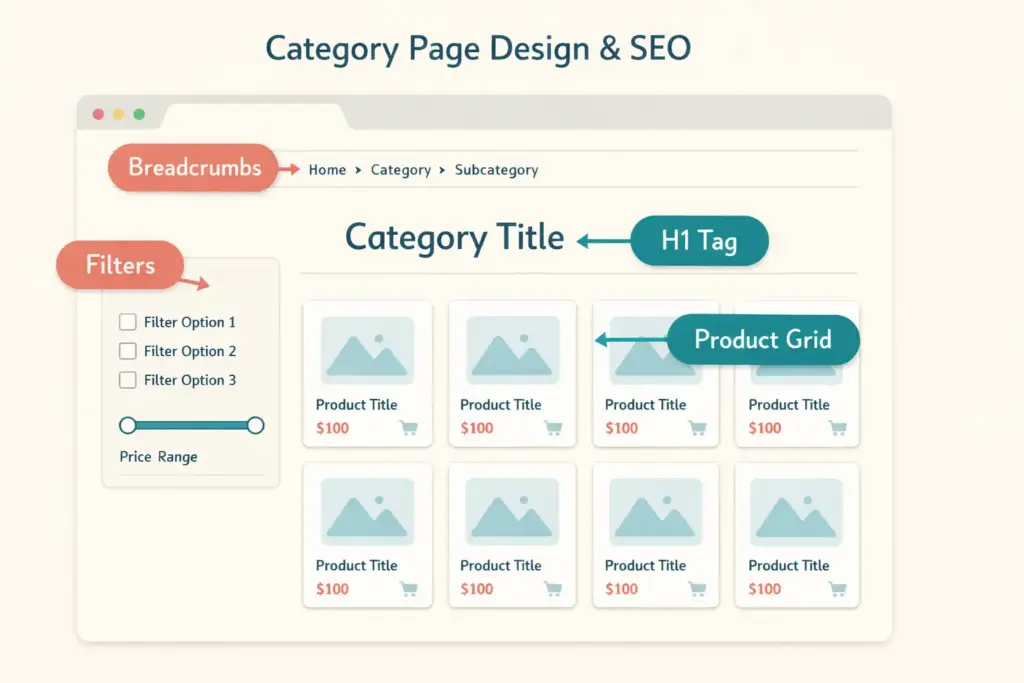
Your category page needs exactly one H1 tag containing the primary keyword. “Women’s Running Shoes” not “Products” or “Shop All.” Below that, use H2s for subcategory sections or content blocks, and H3s for individual subsections. This hierarchy tells Google what the page is about and how its content is organized.
2. Unique Category Description (The SEO Copy)
This is where most stores fail at ecommerce category seo. A page showing 30 product thumbnails with no text gives Google almost nothing to work with. The fix: add 200-400 words of unique descriptive content to each category page.
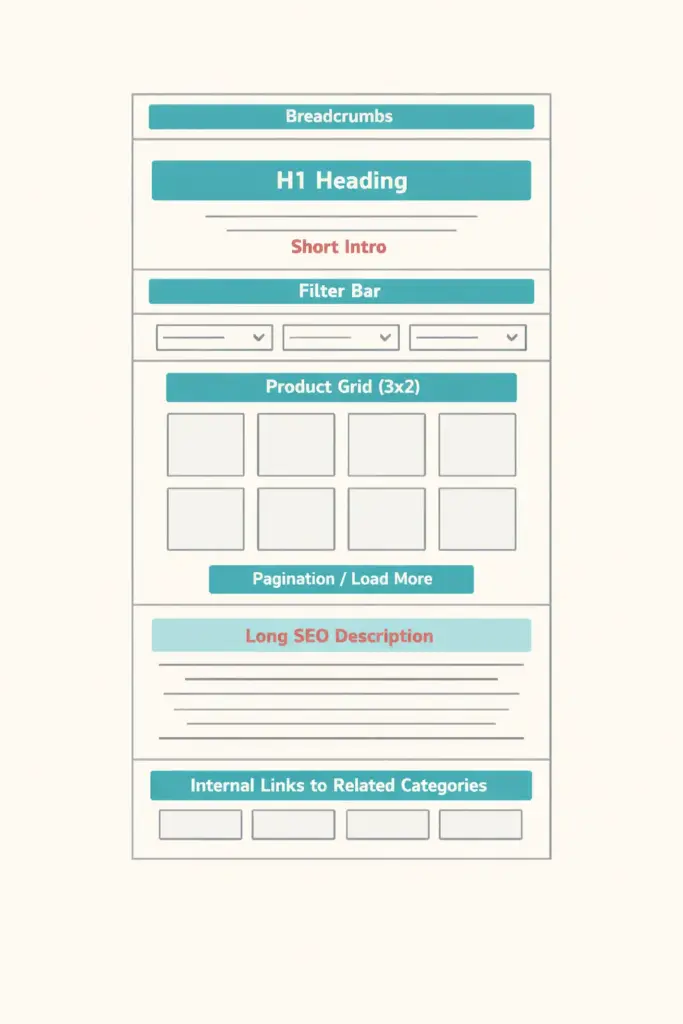
Place a short introduction (2-3 sentences with the primary keyword) above the product grid. Put the longer description below the product grid so it doesn’t push products below the fold and hurt the shopping experience. This “split content” approach satisfies both Google and shoppers.
What to include in category descriptions:
- What products this category contains and who they’re for
- Key buying considerations (material, size, use case)
- Why your selection stands out (curation, quality, price range)
- Internal links to related categories and buying guides
Don’t stuff keywords. Write naturally about what the category offers. If the category is “Organic Skincare,” explain what makes skincare organic, who benefits from it, and what product types you carry. That naturally includes the keywords Google needs.
3. Meta Title and Description
Category meta titles follow this pattern: Primary Keyword | Brand Differentiator | Store Name. Example: “Women’s Running Shoes | Free Shipping Over $75 | StoreName.” Keep under 60 characters.
Meta descriptions should include the category keyword, a benefit (free shipping, price range, number of options), and a reason to click. “Shop 50+ women’s running shoes from Nike, Brooks, and ASICS. Free shipping on orders over $75. Find your perfect fit.” Keep under 155 characters.
4. Breadcrumb Navigation
Breadcrumbs show the path from homepage to the current category: Home > Women’s > Shoes > Running Shoes. They help users navigate up the hierarchy and tell Google how your categories relate to each other. Implement BreadcrumbList schema markup so breadcrumbs appear in search results. Every major ecommerce platform supports breadcrumbs natively or through apps. Google’s ecommerce search documentation confirms that structured data helps them understand store pages better.
5. Product Grid Layout
The product grid is the core visual element. Design decisions here directly impact conversion:
- Grid columns: 3-4 columns on desktop, 2 on mobile. More columns show more products but make each image smaller. Test what works for your product type.
- Product card elements: Image, product name, price, star rating (if available), and a quick-add button. Avoid cluttering cards with too much text.
- Products per page: 24-48 products strikes the right balance between selection and page load speed. Infinite scroll or “Load More” buttons outperform traditional pagination for user engagement.
- Default sort order: “Best Selling” or “Recommended” (based on your margin and popularity data) outperforms alphabetical or newest-first as default sorts.
6. Filtering and Faceted Navigation
Filters let shoppers narrow by size, color, price, brand, and other attributes. Good filters reduce the path to purchase. Bad filter implementation destroys your SEO.
The SEO problem: Every filter combination can generate a unique URL. A category with 5 sizes, 8 colors, and 4 brands creates potentially 160+ URLs showing similar content. Google sees this as massive duplication.
The fix: Use JavaScript-based filtering that updates the page content without changing the URL (AJAX filtering). If your platform creates filter URLs, block them from crawling in robots.txt or add noindex directives. Only your clean category URL should be indexable. For popular filter combinations with real search volume (“red women’s running shoes”), consider creating dedicated subcategory pages instead of relying on filters.
7. Internal Linking Strategy
Category pages should link to:
- Subcategories: “Women’s Shoes” links to “Running Shoes,” “Casual Shoes,” “Boots”
- Related categories: “Running Shoes” links to “Running Socks,” “Running Shorts”
- Buying guides: A “Wireless Headphones” category links to “How to Choose Wireless Headphones” blog post
- Top products: Feature 3-4 “Editor’s Picks” or “Best Sellers” with prominent placement
These links pass authority, help Google discover all your pages, and guide shoppers toward decisions. Product collection page seo improves significantly when every collection is part of a connected web of internal links rather than existing as an isolated page.
Category Page Design Patterns That Convert
Above the Fold: Hook the Shopper
The first screen should show: H1 heading with category name, a 1-2 sentence intro, filter/sort controls, and at least the first row of products. If your category description pushes products below the fold on mobile, you’ve lost the shopper before they saw a single product. Keep above-fold text minimal. Put the longer SEO content at the bottom.
Banner and Visual Hierarchy
A category hero banner (lifestyle image showing products in use) adds visual appeal and brand personality. Keep it narrow (200-300px height max on desktop) so it doesn’t push products down. On mobile, consider removing the banner entirely or making it very compact. Speed and product visibility trump aesthetics on small screens.
Social Proof Elements
Display total review counts, best-seller badges, and “X people bought this today” indicators on category pages. These trust signals reduce decision anxiety and increase click-through to product pages. Even something as simple as star ratings on product cards in the grid boosts engagement.
Mobile-Specific Design
Over 60% of ecommerce traffic is mobile. Your category page mobile design needs: sticky filter/sort bar that stays accessible while scrolling, 2-column product grid (not 1, which wastes screen space), collapsible filter menus that don’t obscure products, and quick-add-to-cart functionality without navigating to the full product page. Your web design choices should prioritize mobile-first category experiences.
Category Page SEO Checklist
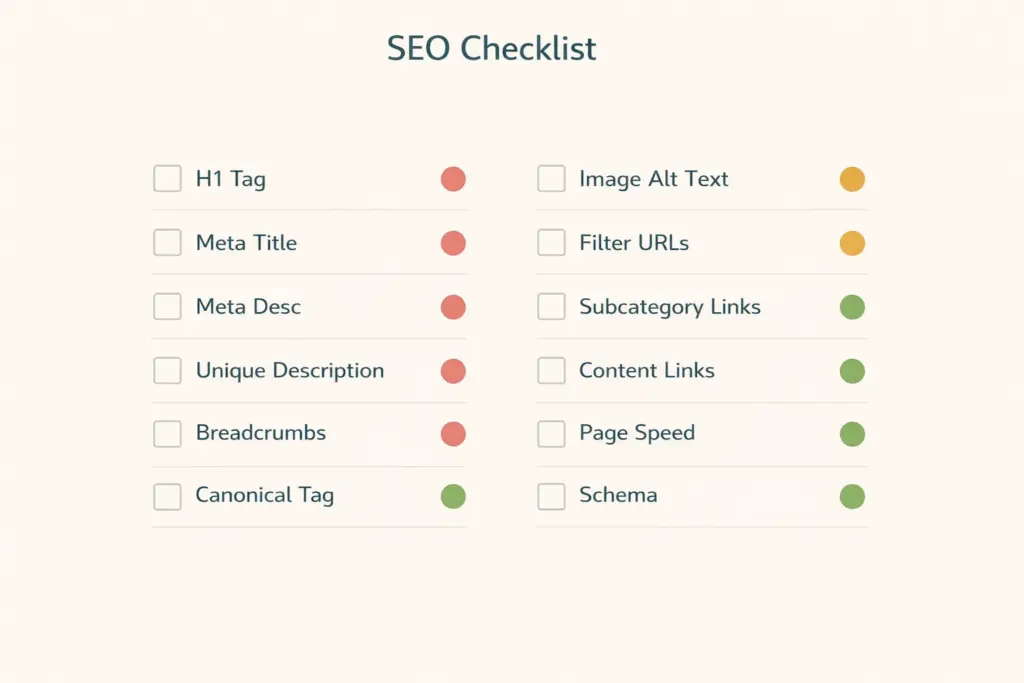
| Element | Requirement | Priority |
|---|---|---|
| H1 tag with target keyword | Exactly one per page | Critical |
| Meta title (under 60 chars) | Keyword + differentiator + brand | Critical |
| Meta description (under 155 chars) | Keyword + benefit + CTA | Critical |
| Unique category description | 200-400 words, split above/below grid | High |
| Breadcrumb navigation + schema | Full path from homepage | High |
| Canonical tag | Self-referencing on clean URL | High |
| Image alt text on product thumbnails | Descriptive, keyword-relevant | Medium |
| Filter URL handling | Noindex or robots block for filter URLs | High |
| Internal links to subcategories | 3-5 links minimum | Medium |
| Internal links to related content | Link to buying guides/blog posts | Medium |
| Page speed (mobile) | 70+ PageSpeed Insights score | High |
| Structured data | BreadcrumbList + CollectionPage schema | Medium |
Run through this checklist for your top 10 category pages first (the ones with the highest traffic potential). Then work through the rest of your catalog. Our ecommerce tools guide covers SEO audit tools that automate parts of this process.
Common Category Page Mistakes
No text content at all. A page with only product images and prices gives Google nothing to rank. Even 150 words of unique description dramatically improves indexation and rankings. This is the most fixable and most common ecommerce category seo failure.
Duplicate descriptions across categories. Copying the same description template and swapping one word (“men’s” vs “women’s”) looks like duplicate content to Google. Write genuinely unique copy for each category that reflects the specific products and audience.
Pushing products below the fold with large banners or text blocks. Shoppers want to see products immediately. If they have to scroll past a 500-word essay and a giant banner image, they’ll bounce. Keep above-fold content minimal and put longer SEO text at the page bottom.
Ignoring pagination and load-more SEO. Products on page 5 of a paginated category get crawled less often. Use self-referencing canonicals on paginated pages as Google recommends (don’t canonical them all to page 1) and ensure the full product catalog is accessible through your site architecture.
No mobile filter optimization. Desktop filter sidebars don’t work on phones. If your filters are unusable on mobile, you’re losing the majority of your traffic. Implement collapsible mobile filter menus with clear apply/reset buttons.
Frequently Asked Questions
What is ecommerce category page design and why does it matter for SEO?
Ecommerce category page design is how you structure, lay out, and optimize the pages that group your products into browsable collections. It matters for SEO because category pages target the broadest, highest-volume keywords in your niche and often generate 40-60% of a store’s total organic traffic. Poor category design means poor rankings for your most valuable keywords.
How do I optimize ecommerce category pages for SEO?
Start with ecommerce category seo fundamentals: add a unique H1 with your target keyword, write 200-400 words of unique description (split above and below the product grid), optimize meta title and description, implement breadcrumbs with schema markup, handle filter URLs to prevent duplicates, and build internal links to subcategories and related content.
How much text should I put on a category page?
200-400 words of unique content is the sweet spot. Place a 2-3 sentence introduction above the product grid and the longer description below it. This satisfies Google’s content requirements without hurting the shopping experience. Pages with zero text content rank significantly worse than those with even brief category descriptions.
How do I handle filters without creating duplicate content?
Use AJAX-based filtering that updates products without changing the URL. If your platform creates filter URLs, block them from indexing via robots.txt or noindex tags. For filter combinations with genuine search volume (like “red running shoes”), create dedicated subcategory pages instead of relying on filter parameters.
What’s the difference between product collection page seo and product page seo?
Product collection page seo targets broader keywords matching browse intent (“running shoes”), while product page SEO targets specific keywords matching buy intent (“Nike Air Zoom Pegasus 41”). Category pages show multiple options for comparison. Product pages close the sale on a single item. Both need optimization, but category pages typically drive more total organic traffic.
How many products should I show per category page?
24-48 products per page balances selection with load speed. Use “Load More” buttons or infinite scroll rather than traditional pagination for better user engagement. Ensure all products are accessible to Google’s crawler regardless of the load method, either through the HTML source or XML sitemap.
Related Reads
- Ecommerce SEO Complete Guide
- Ecommerce Technical SEO Audit
- Ecommerce Web Design Guide
- Best Ecommerce Platform Comparison
- Ecommerce Website Templates
- Ecommerce Customer Retention Strategies
Enjoying this? Get more like it every week.
One email per week with ecommerce strategies, tool picks, and seller insights. No spam.